Circle.so Review – Good Community Platform but One Problem

Circle.so is one of the most polished platforms for running a branded online community. Spaces, courses, live streams and payments sit under your own domain, with apps for every device. But the $89 headline price hides most of what Circle really costs.
I have compared community platforms for years, including Skool, Nas.io and especially Circle. Many people who I talked to asked me about Circle.so specifically.
I must say I hate biased undisclosed reviews. So here is quick disclaimer: I have added affiliate links to Circle and other platforms I have used and researched. I will appreciate if you use them while getting a free trial. But you don’t have to. This doesn’t cost you anything extra but I might earn a small commission if you use these links.
You can start your free 14-day Circle trial by using this link whenever you are ready.
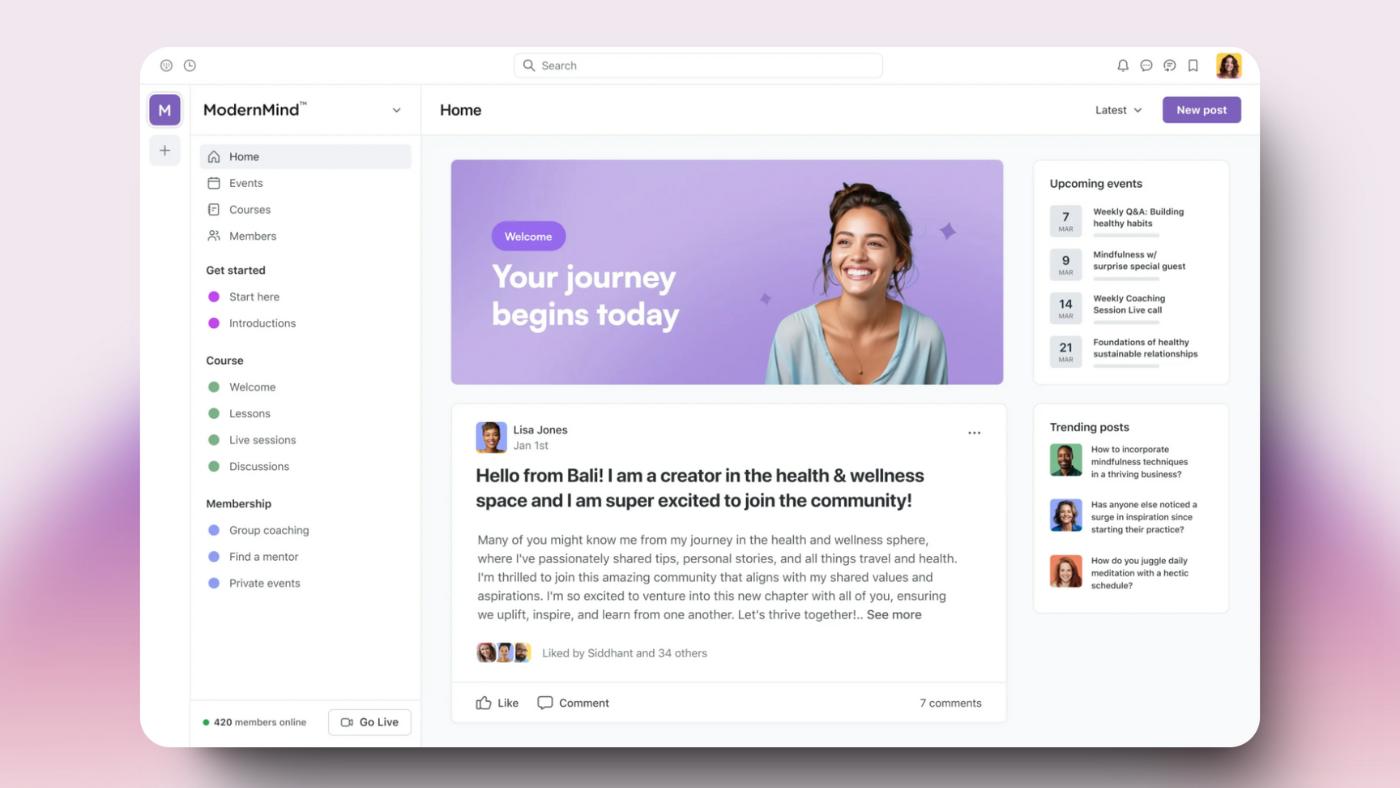
Regardless of what people say online, I do not think Circle is the right platform for everyone.
Personally, I love the clean interface and absolutely amazing features this platform offers. But for many, these features might not even be useful. So before you pay for an yearly subscription I want you to look at the review below so you can save your hard earned money.
Affiliate disclosure: Some links on this page are affiliate links. If you buy through them, I may earn a commission at no extra cost to you. If you do not want, feel free to not click on them. But I will appreciate if you use them.
What is Circle.so?
Circle.so is a cloud-based community building platform that’s gaining a lot of buzz lately in the online space. It helps creators, brands, and businesses build and grow engaged communities on their own terms.
In other words, It is different from chat platforms like Whatsapp group where you don’t really have much features to truly utilize your tribe. And it is specifically for “online-first” community.
Unlike Facebook Groups, Circle runs on your own domain on every plan, and the Business plan removes Circle’s branding entirely. You truly own your audience and can customize the experience to fit your brand.
The platform aims to be your one-stop-shop for community building, offering tools for discussions, online courses, events, live streaming, and monetization.
Circle Pricing Review
Before I get to reviewing features I wanna jump into the pricing because I know it might be a deal breaker or deal maker for you.
As of my last research, Circle’s basic plan now costs $89/mo which is not the cheapest option… especially knowing it doesn’t come with workflows and API support.
However, it is more than enough to manage a community of less than 1000 people.
These are Circle’s plans, with yearly billing:
Professional: $89/month ($99 billed monthly)
- Ideal for small communities or those just starting out
- Unlimited members, 20 spaces, 3 admins and 10 moderators
- Comes with all necessary features like course hosting, events, live streams, paid memberships and gamification
- 2% transaction fee
Business: $199/month ($219 billed monthly)
- Best for already established communities and businesses.
- 30 spaces, 5 admins and 15 moderators, white-labeling, workflows, the AI content writer, automated transcriptions and activity scores
- 1% transaction fee
Scale: $419/month
- For large communities with complex needs.
- Adds AI agents, the knowledge engine, AI moderation and the AI inbox, with higher limits on every feature
- 1% transaction fee
Circle Plus: custom pricing
- For brands that want their own branded iOS and Android apps
- 0.5% transaction fee
On top of these packages, Circle also offers Email Hub, a $99/month add-on for up to 10,000 contacts with the first 30 days free. It is essentially a marketing suite for communicating with your audience and capturing new potential leads.
Note that Professional, Business and Scale come with a 14-day free trial with no credit card required, and Circle offers a 30-day money-back guarantee. Stripe’s card processing fee is charged on top of Circle’s transaction fee.
Here’s my take on the Circle.so pricing
Circle is not the cheapest option available for community building, and it costs more than Skool at every revenue level. It is designed to build a successful business through an online community. If this is not your goal, this is just another expense.
However, It can be very potent if you want a distraction free place to create a community driven online venture.
The Professional plan, while affordable, feels a bit restrictive with its 20-space and 3-admin limits and no workflows. It’s fine for testing the waters, but you’ll likely outgrow it quickly if your community takes off.
The Business plan offers the best value once you need workflows, white-labeling or more than 20 spaces, and it’s a solid choice for serious community builders.
The Scale and Circle Plus plans, while pricier, offer advanced features that are worth it for larger communities or those with specific technical needs.
The transaction fees are a bit of a bummer, especially on the lower-tier plans.
Overall, while it isn’t the cheapest option out there, the pricing is competitive given the feature set. Just be sure to factor in those transaction fees when budgeting!
What Circle really costs at $2K, $5K and $10K a month
The monthly price is only part of the bill. These figures assume $50 payments from US cards, Circle’s yearly prices, Circle’s own fee and Stripe’s 2.9% + 30¢ per payment:
- Professional: about $199 a month at $2,000 in sales, $364 at $5,000 and $639 at $10,000
- Business: about $289 at $2,000, $424 at $5,000 and $649 at $10,000
Business overtakes Professional at about $11,000 a month in sales, where its lower 1% fee covers the $110 difference in price. Below that, Professional stays cheaper unless you need Business features such as workflows or white-labeling.
For comparison, Skool Pro (at its $99 monthly price, processing included) costs about $169, $274 and $449 at the same three levels. Whop, with no monthly fee, is the cheapest of the Skool alternatives at about $165 on $5,000 in sales.
Circle.so Features: What You Need to Know
Choosing a community platform is about control, engagement, and growth. Circle.so claims to be the best, but does it truly deliver?
Community Spaces: Engagement backbone
What’s Good: Circle’s “Spaces” give you structured community sections with forums, courses, events, and group chats. You can customize them for different member levels, making it ideal for tiered memberships or exclusive content drops.
What’s Lacking: Unlike platforms like Discord or Slack, real-time engagement still feels limited. Segmenting discussions automatically by activity or interest needs workflows, which start on the Business plan.
Built-in Courses: A Game-Changer or Just a Nice Add-on?
What’s Good: Circle has an integrated course platform, meaning you don’t need Kajabi or Teachable. Community members can move from discussions to lessons in one click.
What’s Lacking: The course builder is functional but has no native certificates, so you need a third-party certificate tool connected through Zapier. If education is your focus, dedicated LMS platforms like Thrive apprentice might serve you better.
Course quizzes
Circle quizzes sit inside course sections, between lessons or at the end of a section, and a course can hold as many as you like. Each question takes a single correct answer or several.
A passing grade makes Circle grade submissions automatically, and you can require that grade before a student marks the quiz complete. Students who fail can retake it. Without a passing grade, admins and course moderators grade each submission by hand from the Quiz results tab.
You can also hide the correct answers on the results page and attach up to 15 files to a quiz. Quizzes are part of the course builder, which comes with every plan. Students take them in the browser, in Circle’s iOS and Android apps and in Circle Plus branded apps.
Live Streams & Events: Where Real Engagement Happens
What’s Good: Native live-streaming means you don’t need Zoom or third-party integrations. The event calendar also keeps everything in one place. Gamification is included on every plan, which helps members keep coming back.
What’s Lacking: Live streams are capped by plan (100 attendees and 10 hours a month on Professional), and there is no advanced audience segmentation or deep analytics on engagement.
Monetization: Memberships, Payments & Control
What’s Good: Circle lets you set up paid memberships, one-time offers, or subscription models, all within the platform. Stripe integration makes payments smooth, and you can add coupons, bundles, free trials and payment plans.
What’s Lacking: There’s no A/B price testing or sales funnel automation. If you’re serious about scaling revenue, you’ll still need additional tools.
Customization & Branding: How Much Control Do You Really Have?
What’s Good: Circle allows custom domains and CSS customization on every plan, and full white-labeling from Business, meaning you can make it feel like YOUR platform.
What’s Lacking: It’s still limited compared to self-hosted solutions. If deep customization matters (like full control over user data and analytics), you may feel restricted.
Integrations & API: Plays Well with Others?
What’s Good: Circle integrates with Zapier on every plan. From the Business plan you also get Integrately, Circle’s admin API and Circle MCP, which allow custom workflows.
What’s Lacking: Compared to Webflow or WordPress, integration depth is still limited. Want full automation across your entire ecosystem? You’ll need workarounds.
Circle AI Review
I recently got an invitation for the “Eclipse” update in 2026. And this is genuinely the biggest change to the platform since I first started using it. If you’re comparing Circle today versus a year ago, this is definitely a big shift.

Circle’s AI features basically have 4 pillars:
- An AI content writer that helps you brainstorm, write, and repurpose discussions, event recaps, and course lessons (basically a writing companion baked right into the editor)
- AI Agents that can answer member questions autonomously using a “Knowledge Engine” you feed with your own discussions, lessons, and documents
- Activity Scores that track how your members engage over time so you can actually measure what’s working
- AI Workflows for automating the repetitive admin stuff. There’s also automated video transcriptions, which quietly makes all your recordings and course videos searchable and accessible.
To be honest, the setup automation and the content writer are the features most people will actually use day-to-day, and they do save real time.
Circle AI can propose a full community structure (spaces, access groups, paywalls) in seconds, which used to take me weeks of fiddling. The AI Agents… they’re the kind of thing you’ll only get value from if you already have a decent library of content to train them on.
Circle AI is available on every plan, with 2,500 credits a month on Professional and Business. The AI content writer, transcriptions and Activity Scores need Business ($199/mo). AI Agents, AI Workflows and the knowledge engine are reserved for Scale ($419/mo) and Circle Plus. It’s a great addition if you’re already paying for Business or above; however, it’s not a reason on its own to upgrade from the entry tier. I suggest looking at other features in combination if you decide to upgrade your subscription.
Eclipse also brought Discover 2.0, Circle’s marketplace that routes people to communities, courses and events, with creators applying to be listed. Discovery used to be one of the clearest reasons to pick Skool over Circle.
Circle MCP: running your community from an AI chat
Circle MCP connects your community to AI tools that support the Model Context Protocol, such as Claude, ChatGPT, Cursor and VS Code. An admin can ask “What are my most engaged spaces?” or invite members, post, send DMs and build course lessons without opening Circle.
It runs on Circle’s Admin API, so anything the API can do, the MCP can do. That also lets you chain tools, for example inviting contacts from your CRM straight into Circle.
Each admin connects with their own account and picks read-only or full access. Read-only hides every write tool, so I suggest starting there and switching only when you need changes made.
Circle MCP is admin-only and starts on the Business plan. Every action the AI takes counts as one request against your monthly API allowance: 5,000 on Business and 30,000 on Scale.
Is Circle.so the Right Choice?
Circle.so is a powerful all-in-one community platform, but it’s not without limitations. If you want a clean, beginner-friendly solution with courses, memberships, and engagement tools under one roof, it’s excellent.
But if you’re looking for complete customization, deeper analytics, or advanced monetization, you may feel boxed in. The Circle Plus plan might suit you if you already have an established community. Or you might want to build one on an LMS platform with deeper customization.
In short, Circle.so is best for coaches, creators, and businesses who want a community-focused membership model. But it might not be the right platform for enterprise brands expecting full control over their platform.
Cancelling Circle and exporting your data
You cancel from Settings > Plans > Manage Billing, with “End your subscription” at the bottom of the page. A paid plan stays live until the end of the billing cycle, and support can deactivate the community sooner.
Cancelling your Circle plan does not cancel your members’ paywall subscriptions. Those run through your own Standard Stripe account, so you cancel them and issue any refunds yourself. Your customer and payment records stay in that Stripe account after you leave.
Circle removes community data about 90 days after cancellation, so export before then:
- Members: Audience > More > Export CSV gives names, emails, join dates, tags, profile fields and activity counts. Spaces, events and live streams have their own member CSVs.
- Subscriptions and transactions: each Payments page has an Export CSV button, and your Stripe dashboard exports customers, subscriptions and payments.
- Posts and comments: Circle support sends a data export on request, as CSV files for members, spaces, posts and comments, without uploaded images.
- Courses: course lessons are not part of that export, so keep your own copies of videos, files and lesson text.
Circle.so Alternatives and Comparison
Circle is not the only platform in the community building space. I have previously reviewed Nas.io and Skool. Here let me compare it to other popular alternatives to help you take an informed decision.
Circle.so alternatives at a glance
- Skool: cheaper ($9 or $99 a month), simpler, with the more established discovery feed
- Mighty Networks: from $79 a month, with stronger course tools
- Heartbeat: built for small cohort programs and paid groups
- Discord: free, real-time chat, with native Server Subscriptions in the US
- Whop: best for selling community access and digital products together
- Discourse: open source, for teams that want to self-host
Circle vs. Mighty Networks
Mighty Networks is often seen as Circle’s closest competitor. Both platforms offer solid community-building tools, but in my use Mighty had a clumsy user interface and slower performance. Think of Mighty as a social media creation tool instead. Here are some important points to notice in my experience:
- Ease of Use: Circle generally offers a more intuitive interface.
- Course Features: Mighty Networks has more advanced course capabilities.
- Pricing: Mighty Networks is cheaper to start, at $79 a month against Circle’s $89 billed yearly or $99 monthly.
- Mobile Apps: Both offer native apps, but Circle’s are often praised for better UX.
In my experience, Circle edges out Mighty Networks in overall user experience and community management tools.
However, if advanced course features are your priority, Mighty Networks might be the better choice.
Circle vs. Discord
Discord is a popular choice, especially for gaming communities, but it’s increasingly being used for professional communities too. One big advantage with Discord is, it’s free. However, there are some key differences.
- Community Type: Circle is better for structured, professional communities; Discord excels in real-time, casual interactions.
- Monetization: Circle offers more robust built-in monetization options.
- Customization: Discord allows for more extensive bot integrations and server customization.
- Content Organization: Circle provides better tools for organizing long-form content and courses.
- Monetization tools: Circle.so offers paywalls, courses and bundles. Discord has native Server Subscriptions for US-based servers, and many sellers add Whop to sell access and digital products on top.
If your community thrives on real-time chat and you’re tech-savvy enough to set up bots and integrations, Discord could be a good fit. But for a more structured, professional community with built-in monetization tools, Circle is the clear winner.
Circle vs. Skool
Skool is a newer player in the community platform space, gaining popularity among course creators and coaches. The big advantage with Skool is, it’s focus on Creator communities. Alex Hormozi invested in Skool and many creators now are monetizing their content there. It’s comparatively cheaper and an easier platform to begin with.
Let me compare Circle and Skool quickly here:
- Feature Set: Circle offers a more comprehensive set of community-building tools. It has more functions, however, Skool offers less features but more benefits approach.
- User Interface: Both platforms prioritize clean, modern design, but Skool’s UI is often considered distraction free and more community friendly.
- Pricing: Skool can be more cost-effective for very small communities and creators, but Circle offers better value as you build more complex and diverse community. At $5,000 a month in sales, Circle Professional costs about $364 a month against about $274 for Skool Pro.
- Integration Options: Circle generally provides more extensive third-party integrations than Skool. If this is your priority, Circle is better tool.
As mentioned in the Skool review, Skool is focusing specifically on creator economy. It is a better option for creators and coaching business while circle offers a solid platform for building an educational community for small and medium scale businesses.
If you are leaving Skool for your own domain, more structure and deeper integrations, Circle is the stronger Skool alternative.
Circle vs. Kajabi
Kajabi is a course and marketing platform with a community attached, starting at $143 a month billed yearly. Circle is a community platform with courses attached, starting at $89. Kajabi wins on email sequences, funnels and course depth, and takes no revenue share on Kajabi Payments. Circle wins on community structure, gamification and price.
Circle.so Pros and Cons Review
We have covered all features of Circle and how you can use it to build a thriving online community for business. However, It is important to know that the right platform depends on your needs. All community building tools have their own advantages and disadvantages.
Is Circle.so Right for You?
Circle.so could be an excellent choice if:
- You’re looking for an all-in-one community platform with a user-friendly interface
- You want to monetize your community through memberships or online courses
- You need a mobile-friendly solution with native app
However, you might want to look elsewhere if:
- You require extremely advanced customization or open-source flexibility
- Your primary focus is on creating and selling complex online courses
- You need extensive e-commerce features beyond basic memberships and digital products
- You’re on a very tight budget and can’t afford the monthly fees or transaction costs
In such case, you can look for open source platforms like Discourse or even free platforms like Telegram which you can monetize by integrating with Whop.
Community is a Human Work
Circle.so has rightfully earned its place as one of the top community platforms. Its blend of user-friendliness, comprehensive features, and regular updates make it a solid choice for many creators and businesses.
While it may not be the perfect solution for everyone, particularly those requiring highly specialized features or extreme customization, Circle.so offers an impressive balance of power and simplicity that will suit a wide range of community needs.
Ultimately, the best way to determine if Circle.so is right for you is to take advantage of their 14-day free trial. This hands-on experience will give you the clearest picture of how the platform can serve your specific community needs.
Circle.so FAQ
How much does Circle.so cost?
Circle’s Professional plan costs $89 a month billed yearly ($99 monthly), Business costs $199 a month billed yearly ($219 monthly), Scale costs $419 a month, and Circle Plus has custom pricing. Every plan includes unlimited members.
Does Circle charge transaction fees?
Yes. Circle takes 2% of sales on Professional, 1% on Business and Scale, and 0.5% on Circle Plus. Stripe’s card processing fee comes on top.
Is Circle.so free?
Circle has no free plan. Professional, Business and Scale come with a 14-day free trial with no credit card required, and Circle offers a 30-day money-back guarantee.
Is Circle better than Skool?
Circle is better for a branded community on your own domain with more structure and integrations. Skool is cheaper, simpler and better at engagement and discovery. At $5,000 a month in sales, Circle Professional costs about $364 a month against about $274 for Skool Pro.
Does Circle have certificates for courses?
Circle’s course builder has no native certificates. Course creators connect a third-party certificate tool through Zapier.
Does Circle have a mobile app?
Yes. Circle’s iOS, Android and desktop apps are included on every plan. Custom branded apps under your own name are part of Circle Plus.
Can I use my own domain on Circle?
Yes. A custom domain and custom CSS are available on every plan. Removing Circle’s branding entirely (white-labeling) starts on the Business plan.
Does Circle have quizzes?
Yes. Circle quizzes sit inside course sections and take single or multiple correct answers. A passing grade grades them automatically and can be required before a student moves on. Without one, admins grade submissions by hand. Quizzes are part of the course builder on every plan.
Does Circle have an MCP server?
Yes. Circle MCP connects your community to AI tools such as Claude, ChatGPT and Cursor, so an admin can query data and take actions from the AI chat. It is admin-only, starts on the Business plan, and every action counts against your monthly API allowance.
How do I cancel Circle and export my data?
Cancel from Settings > Plans > Manage Billing with End your subscription. The plan runs to the end of the billing cycle, and Circle removes community data about 90 days later. Export member CSVs yourself first and ask support for posts and comments. Cancel members’ paywall subscriptions separately.
The Letter
Get the next article in your inbox.
What I am building, as it happens. The community experiments, launches and numbers behind my own work, including what did not work.
The tools, tested before I recommend them. Short notes on the platforms I try for running communities, courses and email, before they become full reviews.
The inner side of the work. Ideas on focus, meaning and energy for creators who want a business that feels as good as it performs.
Get The Letter in your inbox
One short email, usually weekly. You can unsubscribe any time.
Keep reading
More from Community building.