9 Best Skool Alternatives in 2026, Free and Paid, With Real Fees

Skool is one of the most popular community platforms in 2026. For $9 a month, a creator gets a feed, a classroom, a calendar and a leaderboard that keeps members posting.
Skool’s main competitors each fix a different one of those gaps.
The best Skool alternatives in 2026:
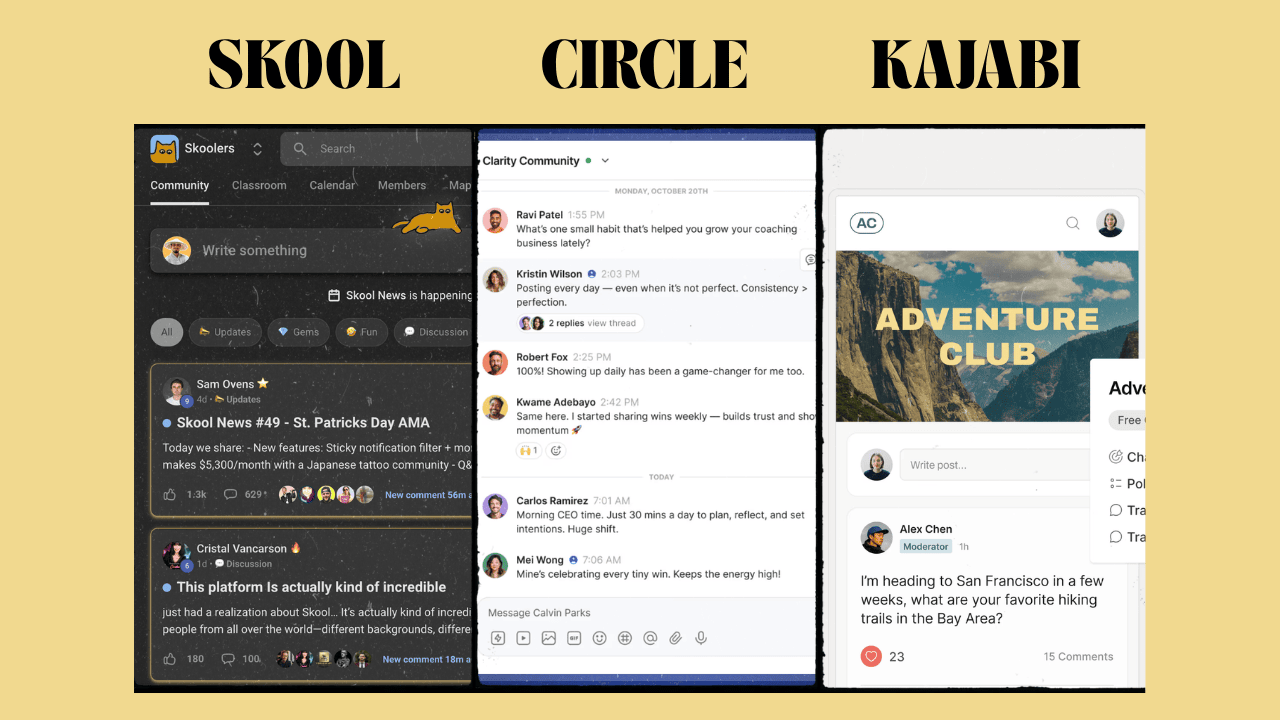
- Circle: best for branding and community management. From $89/month (annual) + 2%.
- Mighty Networks: best for engagement-heavy learning communities. From $79/month (annual) + 2%.
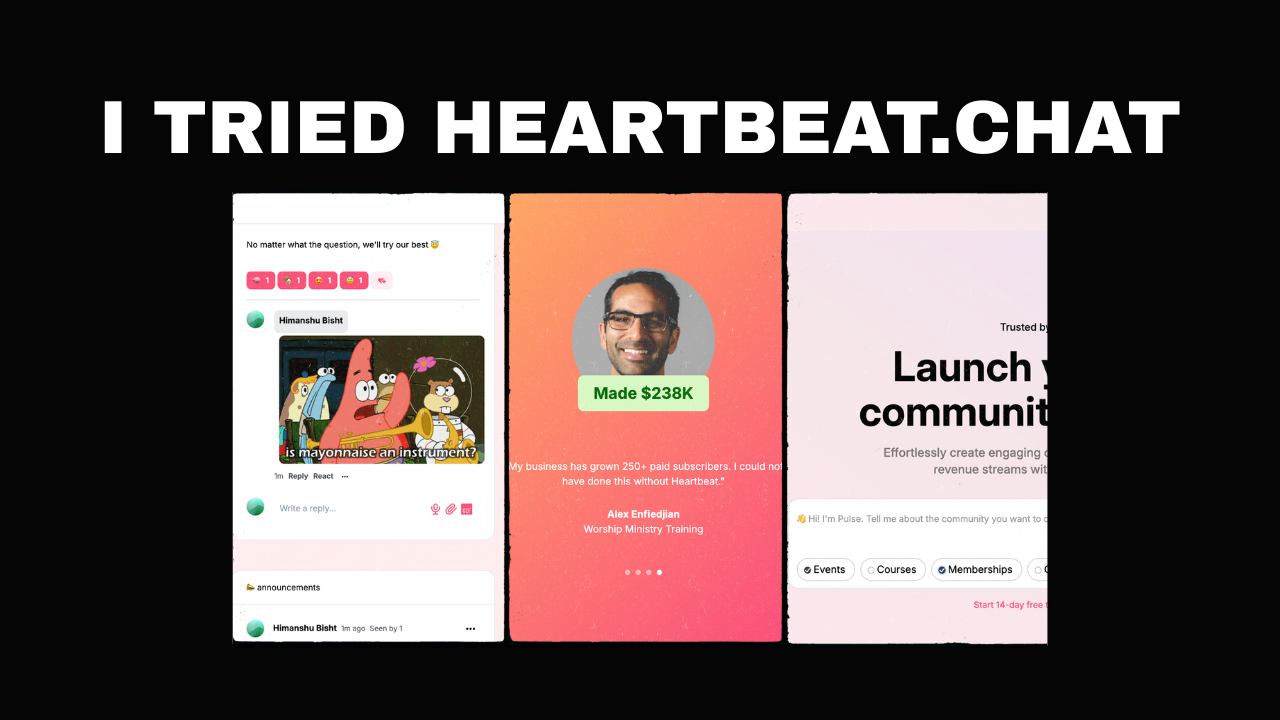
- Heartbeat: the closest to Skool’s simplicity, with deeper courses. From $40/month (annual) + 5%.
- Whop: best if you sell anything beyond a community. No monthly fee, 2.7% + 30¢ per payment, plus a marketplace and clipping campaigns for extra reach.
- Kajabi: best for replacing your email, funnel and course tools. From $143/month (annual).
- Systeme.io: best budget all-in-one. Free plan with a 0% platform fee.
- Teachable: best for courses that need quizzes. From $29/month (annual), certificates from $139.
- Podia: best for selling digital products with a light community. From $42/month (annual).
- Nas.io: best for charging for WhatsApp, Telegram or Discord groups. Listed from $20.75/month.
I run my own community on Skool and have moved clients onto Circle, Heartbeat and Whop. One of those moves was a yoga teacher in Bali who had spent years working in design.
She refused to run her community on a page that looked like everyone else’s, so I picked Circle as its home.
Prices below come from each vendor’s pricing page or help center, checked in October 2026.
Investing in premium community platforms feels risky when you’re just testing the waters, though it is usually the better long-term option. If you have no budget yet, the free Skool alternatives further down cost nothing to run.
Affiliate disclosure: Some links on this page are affiliate links. If you buy through them, I may earn a commission at no extra cost to you. I will appreciate if you use them.
Skool Alternatives Compared
Skool Pro sits in the first row as the baseline, so every alternative to Skool below can be read against what you pay now.
| Platform | Starts at | Platform fee on sales | Cost at $5K/month in sales | Best for |
|---|---|---|---|---|
| Skool Pro (baseline) | $99/month | 2.9% + 30¢, processing included | $274 | Engagement and Discovery traffic |
| Skool Hobby | $9/month | 10% + 30¢, processing included | $539 | Testing a paid idea |
| Circle | $89/month (annual) | 2% + Stripe | $364 | Branding and community management |
| Mighty Networks | $79/month (annual) | 2% + Stripe | $354 | Engagement-heavy learning communities |
| Heartbeat | $40/month (annual) | 5% + Stripe | $424 (Grow) | Skool’s simplicity with deeper courses |
| Whop | $0/month | 2.7% + 30¢, processing included | $165 | Selling several products, no monthly fee |
| Kajabi | $143/month (annual) | 0% with Kajabi Payments | $318 | Replacing email, funnel and course tools |
| Systeme.io | Free | 0% + Stripe or PayPal | $175 | Budget all-in-one |
| Teachable | $29/month (annual) | 7.5% on Starter, 0% from Builder | Not modeled | Courses with quizzes |
| Podia | $42/month (annual) | 5% on Mover, 0% from Shaker | $259 (Shaker) | Digital products with a light community |
| Nas.io | Listed at $20.75/month | 2.9% on digital products | Not modeled | Paid WhatsApp, Telegram or Discord groups |
Costs assume $50 payments from US cards, with annual billing where offered. The cost section shows the method and the $2K and $10K figures.
Skool Pricing and Fees in 2026
Skool has two plans, and they differ mainly in price and transaction fee. Skool was created by Sam Ovens and is backed by Alex Hormozi.
Hobby costs $9 a month, or $90 a year (about $7.50 a month). Skool keeps 10% + 30¢ of every payment.
Pro costs $99 a month, or $990 a year (about $82.50 a month). Skool keeps 2.9% + 30¢ on payments up to $899, and 3.9% + 30¢ on single payments above that.
Both rates include card processing, so no separate Stripe fee sits on top. Billing is per community, so a second community means a second subscription.
The Problem with Skool
No branding: Your community lives at skool.com/yourname with Skool’s colors and Skool’s logo. The Pro plan’s custom URL is still a subpath, not your own domain.
Basic Courses: Lessons can unlock by level or on a schedule, but there are no quizzes, no completion certificates and only light progress tracking. So it’s not a course platform.
No email sequences or funnels: Skool can send broadcasts to members. Nurture sequences, landing pages and lead capture still need another tool.
The marketplace problem: Members see other communities suggested inside yours. The platform’s low barrier has also filled that marketplace with get-rich-quick offers your brand sits next to.
Limited management tools: Segmentation is basic, and onboarding automation runs through Zapier or webhooks. That is fine at 50 members and painful at 500.
Cost at scale: A single $3,000 cohort seat costs about $117 in Skool Pro fees, because of the 3.9% rate above $899. The same sale costs about $81 on Whop and about $87 on Kajabi or Systeme.io.
Different community models need different platforms. A casual hobby group, a free-flowing creative space or a developer community can feel boxed in by one feed and a classroom.
How I Judged These Skool Alternatives
Engagement carried the most weight, because a paid community survives only while members keep showing up. I looked for comments, reactions, direct messages, live events and anything that brings members back without a push from the owner.
Content organization came next. Members should find a lesson or an old discussion in seconds, through folders, tags or search that still work at 1,000 members.
Monetization decides your business model, so I checked how each platform takes payments, what it keeps, and whether it can sell more than one product.
Mobile apps and analytics rounded out the list. Members mostly check in from their phones, and owners need to see who is drifting away before they cancel.
Community-First or Course-First?
Most platforms like Skool lean one of two ways. Knowing which one you need cuts this list in half.
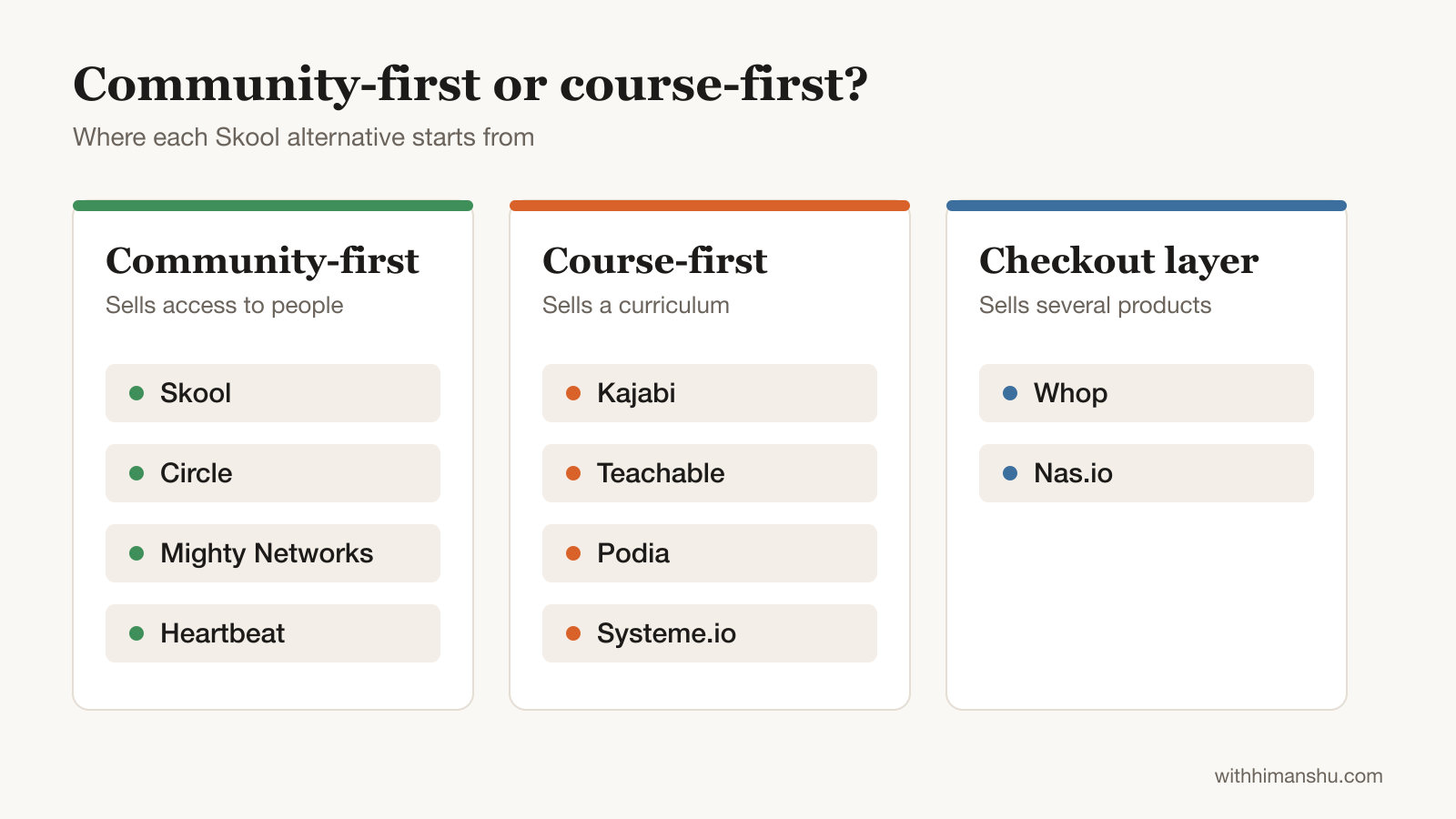
A community-first business sells access to people: discussion, accountability, live calls. Circle, Mighty Networks and Heartbeat are built for that, and so is Skool.
A course-first business sells a curriculum, with the community as support. Kajabi, Teachable, Podia and Systeme.io start from the course and add a member space on top.
Whop and Nas.io sit outside both camps. They are checkout layers for creators who sell several products or already run a group elsewhere.
Best Paid Skool Alternatives for a Community
Circle, Mighty Networks and Heartbeat lead for creators who want a better community home. Whop, Kajabi and Systeme.io suit creators who sell more than a community, while Teachable, Podia and Nas.io fill narrower course, product and messaging-app needs.
1. Circle: Best Skool Alternative for Branding and Community Management
Best Skool alternative for: creators whose community carries its own brand and needs more than one feed.
Circle is the option I recommend most often to creators ready to invest in their community. Its spaces for discussions, events and courses sit inside a familiar social layout, with chat built in.
The platform was built for monetization, with native payments, multiple membership tiers and course delivery in the same place. Your community runs on your own domain with your colors, so members see your brand rather than Circle’s.
Direct integrations with email platforms, payment processors and Zapier connect it to the rest of your stack. The learning curve is short compared with other premium platforms, which saves setup time for you and your members.
At $5,000 a month, Circle costs about $90 more than Skool Pro. Two extra $50 members, or a branded space that justifies a 2% higher price, covers that gap. Workflows that sort and onboard members automatically also free hours for content and sales calls.
Pricing: Professional costs $89/month on annual billing with a 2% transaction fee, 3 admins and 20 spaces. Business costs $199/month with a 1% fee and adds workflows, APIs and activity scores. Scale costs $419/month and adds AI agents. Branded iOS and Android apps need custom-priced Circle Plus. Stripe’s processing comes on top. The 14-day trial needs no card.
Bottom line: choose Circle when your community carries its own brand and has a budget to match. If engagement and cost matter more than branding, Skool still beats Circle on both.
2. Mighty Networks: Best for Engagement-Heavy Learning Communities
Best Skool alternative for: engagement-heavy learning communities and cohort programs.
Mighty Networks treats a community as a private social network rather than a forum. New members get icebreaker prompts on arrival, and polls come in several visual formats instead of Skool’s plain list. People Explorer matches members by interest and location.
Courses go well beyond Skool’s classroom. You get on-demand and cohort-based courses, live challenges, quizzes and tests, drip scheduling, native video upload, and automatic badges and certificates on every plan.
A cohort bundles the course, its discussions and a member directory into one space, which is what a group program needs. Every plan also includes livestreaming hours, though the entry plan caps each stream at 100 viewers.
The interface is heavier than Circle’s and takes members longer to learn. Zapier and Kit integrations only arrive on the Scale plan, and payments run through Stripe only.
Members must also create an account before they can buy, and that extra step costs conversions on cold traffic.
Pricing: Launch costs $79/month billed annually with a 2% transaction fee. Scale costs $179/month with a 1% fee, API access and Zapier. Growth costs $354/month with a 0.5% fee. Mighty Pro is custom priced and adds branded mobile apps. All plans include a custom domain and unlimited members, and the 14-day free trial runs on the Growth plan.
Bottom line: choose Mighty Networks when engagement is the product and structured group learning is how you deliver it. If your members mostly read and rarely post, its extra features will sit unused while you pay for them.
3. Heartbeat: Closest to Skool’s Simplicity, With Deeper Courses
Best Skool alternative for: creators who like Skool’s simplicity and want courses, branding and automation for less.
Heartbeat is what I recommend to people who tell me Circle feels like too much. Channels, courses, events, documents and the member directory all sit in one left sidebar. Most communities go live within a week.
Where it beats Skool is depth without complexity. Courses can be evergreen, dripped or cohort-based with assignments, and documents give members a searchable library instead of files buried in classroom tabs.
Match-Ups pair members for intro calls on a schedule you set. Automation workflows come on every plan, including the cheapest.
Heartbeat’s weak spots are member caps and fees. The Build plan stops at 350 members and takes 5% of payments on top of Stripe. Live events run through Zoom rather than a native stream, and native video hosting is a paid add-on until the Grow plan.
Pricing: Build costs $49/month ($40 billed annually) for up to 350 members, with a 5% transaction fee, a custom domain and 5 workflows. Grow costs $149/month ($124 annually) for up to 5,000 members, with a 2.5% fee, unlimited workflows, an affiliate program, API and white-label emails. Scale costs $849/month ($766 annually) with a 1.25% fee and a white-label app. Stripe’s fee comes on top. You can trial it for 14 days without a card.
Bottom line: Heartbeat suits anyone under a few hundred members who wants courses, branding and automation without a learning curve. At $5,000 a month, Grow costs about $424, the same as Circle’s Business plan, so features decide between them.
Try Heartbeat free for 14 days
4. Whop: Best Skool Alternative With No Monthly Fee
Best Skool alternative for: creators selling products, courses and a community from one storefront.
Whop charges no monthly fee. Each domestic card payment costs 2.7% + 30¢ with processing included. That makes it the cheapest way to run a paid community while you are still proving people will pay.
It also does more than Skool on the selling side. Courses support quizzes and certificates, and you can sell digital downloads and software access beside the membership.
Discord integration assigns member roles automatically, and an app store adds forums, chat, events and your own affiliate program.
Whop’s marketplace is crowded with low-effort money-making communities, and your offer will sit beside them. Whop charges a separate fee on marketplace sales, so the current rate in your dashboard is worth checking before you count on that traffic.
The interface is noticeably more complex than Skool’s single feed, and it shows in member onboarding.
Pricing: $0 monthly. Each domestic card payment costs 2.7% + 30¢. International cards add 1.5%, and currency conversion adds 1%.
Bottom line: choose Whop when community is one product among several and you are not ready for a monthly bill.
5. Kajabi: Best for Replacing Your Whole Tool Stack
Best Skool alternative for: established creators who want email, funnels, website, courses and community on one bill.
Kajabi is the mansion when Skool is the bedroom. It bundles a website builder, email marketing with automations, sales funnels and checkout pages. It adds a full course builder with assessments and certificates, plus a community layer with challenges and live meetups.
The price reflects all of that. Basic costs $143 a month on annual billing ($179 monthly) and caps you at 5 products and 2,500 contacts. Growth costs $199 annually ($249 monthly) and lifts that to 50 products and 25,000 contacts.
Setup takes days, not the afternoon Skool takes.
If you already pay for Skool plus Kit plus a funnel builder, Kajabi often costs less than the stack it replaces. If you only want a community, you will pay for tools you never open.
Pricing: Basic $143/month, Growth $199/month, Pro $399/month, all billed annually. Kajabi takes no platform percentage when you use Kajabi Payments, which charges 2.9% + 30¢ per US payment on Basic. A third-party payment gateway adds 2% on Basic, 1% on Growth and 0.5% on Pro.
Bottom line: Kajabi suits an established creator consolidating courses, email and funnels. For a community-only business, Skool or Circle starts cheaper than Kajabi.
6. Systeme.io: Best Budget All-in-One Skool Alternative
Best Skool alternative for: course sellers who want funnels, email and a community on one cheap bill.
Systeme.io started as a funnel builder and now runs email, courses, a checkout and a community from one login. The free plan never expires, includes a community and one course with up to 500 students. It also takes 0% of your sales, though Stripe or PayPal still charges processing.
The community lacks the machinery that keeps a Skool group busy. There are no points, levels or leaderboards, no discovery network and no branded mobile app, so activity tends to gather around the owner and a few regulars.
When I reviewed Systeme.io, its free-plan limits mattered more than its price. One automation rule, one email campaign and one tag leave room for a single lead magnet and a single offer.
Some creators split the job between two tools. Systeme runs their funnels, email and checkout, while Skool hosts the community.
Pricing: Free for up to 2,000 contacts, with one community and one course. Startup costs $17/month, Webinar $47/month and Unlimited $97/month. Every plan takes a 0% platform fee.
Bottom line: Systeme.io suits a community that supports a course. A community sold as the product will usually do better on a platform built for engagement.
7. Teachable: Best for Courses With Quizzes and Certificates
Best Skool alternative for: course-first businesses that need quizzes, certificates and structured feedback.
Teachable fixes Skool’s biggest course gap: Skool can host lessons, but it cannot assess anyone. Teachable’s course builder gives you a drag-and-drop curriculum, quizzes with passing scores, graded assignments and Zoom sessions embedded inside lessons. Teachable lists completion certificates from the Growth plan up.
Community is the weak spot here, because Teachable has closed its Community feature to new schools. Pricing is built on product caps. Starter also takes a 7.5% transaction fee that Skool’s Pro plan does not.
Pricing: Starter costs $29/month billed annually ($39 monthly), with 5 products and a 7.5% fee. Builder costs $69/month annually ($89 monthly), with 10 products and 0% with Teachable Payments. Growth costs $139/month annually ($189 monthly), with 50 products. Every plan allows unlimited students.
Bottom line: Teachable wins when the course is the product and the community exists to support it. When members talking to each other is the product, Skool beats Teachable.
8. Podia: Best for Digital Products With a Light Community
Best Skool alternative for: solo creators selling courses, downloads and coaching who want a simple member space.
Podia was the first platform I picked after leaving Teachable, and I hosted courses on it for over eight months. It bundles a website, email, a storefront and a forum-style community into one account.
The community needs the most care. Members get topic-based spaces with comments and tier-based access, but they mostly respond to prompts and rarely start conversations. In my Podia review, I called it a forum with gated access, not a community in any real sense.
Pricing: Mover costs $42/month billed annually ($49 monthly) with a 5% transaction fee. Shaker costs $84/month annually ($99 monthly) with no Podia fee. Earthquaker costs $150/month annually. Stripe or PayPal processing applies on every plan. A 14-day trial is available.
Bottom line: Podia fits a creator whose products are the business and whose community is a bonus.
9. Nas.io: Best for Monetizing WhatsApp, Telegram or Discord Groups
Best Skool alternative for: charging for an audience that already lives in WhatsApp, Telegram or Discord.
Nas.io, which rebranded as Nas.com in 2026, takes the opposite approach to Skool. Instead of moving your community into a new app, it lets you charge for access to the groups you already run. Memberships, courses, coaching, challenges and ticketed events sit on top.
Challenges are the standout feature. You set milestones, track member progress and run group challenges natively, which Skool and Whop leave you to improvise. Events with ticketing and attendance tracking are stronger than Skool’s calendar too.
Nas.io ended its free plan on 31 March 2026, so the old free-to-start pitch no longer applies. Paid plans now take a smaller cut of digital sales than the old 7.9% fee did.
Pricing: Pro is listed at $20.75/month with a 2.9% fee on digital products. Platinum is listed at $66.58/month with a 1% fee. Payment processing applies on top. A 7-day trial is available.
Bottom line: choose Nas.io when your audience already talks in a messaging app and you want to charge for it this week. Once the group becomes the product, a dedicated platform gives members a better home.
What Each Skool Alternative Costs at $2K, $5K and $10K a Month
Platform percentages and card processing grow with every sale, so the monthly price is only part of what a Skool alternative costs. At $5,000 a month, Whop is cheapest at $165, and Skool Pro ($274) still undercuts Circle, Mighty Networks and Heartbeat.
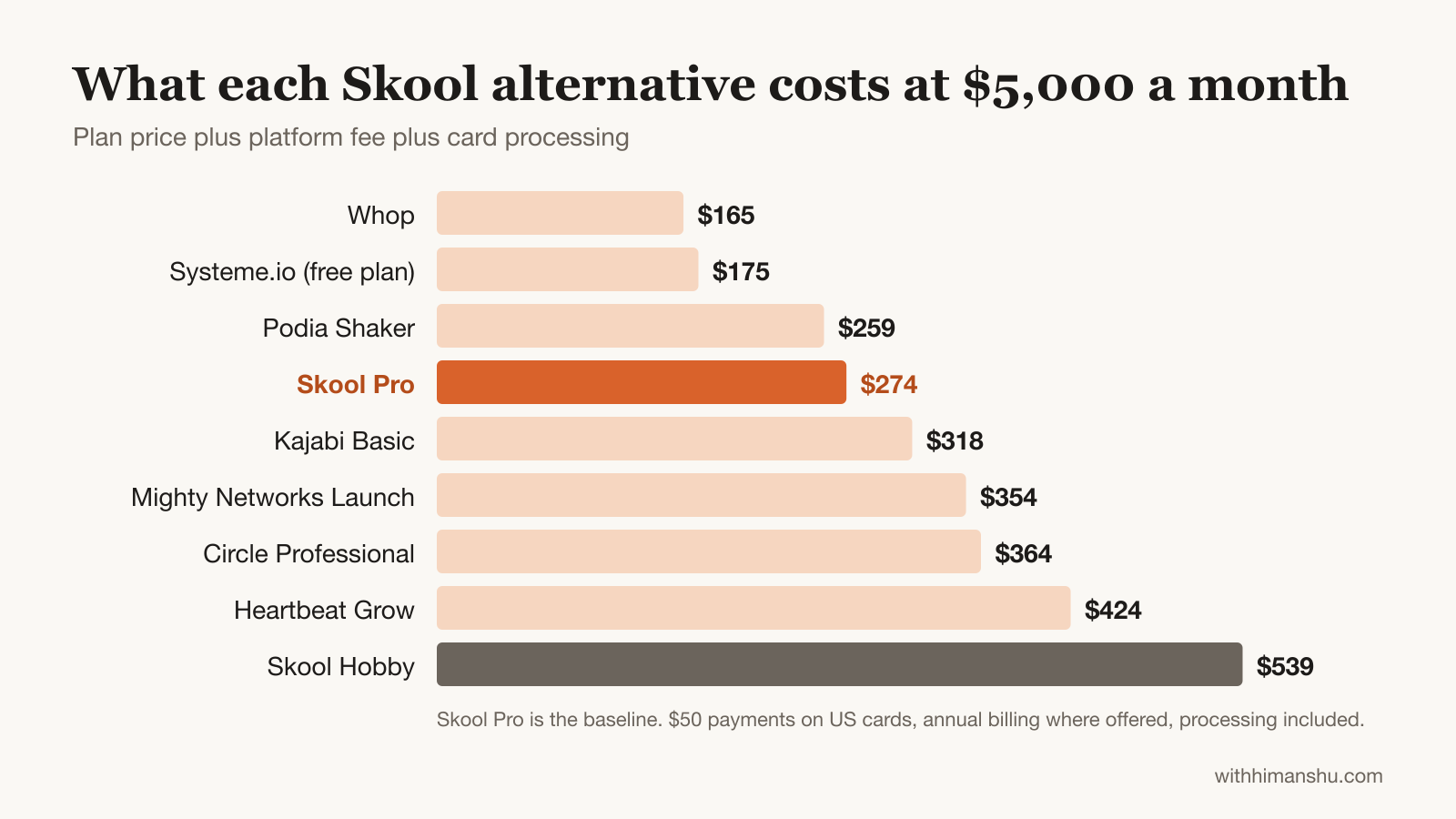
The figures below assume $50 payments from US cards, so $2,000 a month means 40 payments. They use each platform’s quoted price, with annual billing for Circle, Mighty Networks, Heartbeat, Kajabi and Podia. Stripe’s 2.9% + 30¢ is added wherever the platform doesn’t include processing.
Monthly cost at $2,000 / $5,000 / $10,000 in member revenue, ordered by cost at $10,000:
- Whop: $66 / $165 / $330
- Systeme.io (free plan): $70 / $175 / $350
- Podia Shaker: $154 / $259 / $434
- Skool Pro: $169 / $274 / $449
- Kajabi Basic: $213 / $318 / $493
- Mighty Networks Launch: $189 / $354 / $629
- Circle Professional: $199 / $364 / $639
- Heartbeat (cheapest plan at each level): $210 / $424 / $724
- Skool Hobby: $221 / $539 / $1,069
Skool Pro also undercuts Circle, Mighty Networks and Heartbeat at all three levels. Leaving Skool for one of those platforms buys branding or structure, and it costs more.
Whop and Systeme.io stay cheapest because neither charges a subscription. Systeme stays that cheap only while one community and one course cover your needs.
Which Skool Alternative Has No Transaction Fees?
Several alternatives take no platform percentage, though card processing still applies on every one of them.
- Kajabi takes 0% with Kajabi Payments.
- Systeme.io takes 0% on every plan, including the free one.
- Podia takes 0% on Shaker and Earthquaker, and 5% on Mover.
- Teachable takes 0% on Builder and above with Teachable Payments, and 7.5% on Starter.
Whop takes no separate platform cut either. Its 2.7% + 30¢ includes processing, which is less than Stripe alone charges on Systeme.io. Skool Pro works the same way, since its 2.9% + 30¢ covers processing.
Circle, Mighty Networks and Heartbeat all add a percentage on their entry plans, on top of Stripe.
Best Free Skool Alternatives for Testing an Idea
Free platforms suit a community concept you are still testing. They cost nothing, but most can’t take payments natively, and you build on someone else’s rules.
Many creators still monetize free communities by selling access on a separate page and adding members by hand.
Free platforms also keep your member data, so leaving means starting a paid community without an email list. Once a community reaches roughly 100 to 500 engaged members, a paid platform tends to pay for itself in saved time and smoother sales.
Discord
Best for: real-time communities in technology, gaming, trading and design.
Discord has grown far beyond its gaming roots. Channels keep topics separate, voice channels allow drop-in conversations, and bots handle welcome sequences and moderation.
Developer groups thrive on Discord, since technical audiences already know the interface. Non-technical users and older audiences often find the learning curve steep.
Busy servers need active moderation as spam grows, and Discord has no proper home for structured courses or a knowledge base.
Eligible servers can now charge through Discord’s Server Subscriptions, with owners keeping 90% after deductions. Many creators still sell access with Whop, especially for younger audiences.
Facebook Groups
Best for: new creators testing a consumer community without financial risk.
Facebook remains the largest social network in the world, so your potential members likely already have accounts. That removes the friction of asking people to join an unfamiliar platform.
Facebook Groups give you unlimited members, posts, polls, live video, events and a units feature for organizing lessons, all free. Groups also surface through Facebook’s recommendation engine, which gives organic growth no standalone free platform can match.
For a paid community, the feed buries important posts, and the algorithm decides which members see your announcements. There is no native paid membership, so payments and access run through outside tools.
Other Free Options
Slack’s free plan suits professional networking, but it shows only the last 90 days of messages and has no native payments.
A subreddit places your community where millions already find their community, with public discovery through Reddit’s search visibility. I have run subreddits for years as an owner and moderator. A whole sub can be banned in minutes with nobody answering your call.
Telegram suits AI, crypto and international audiences, with broadcast channels and bots, though its chronological feed buries information fast. LinkedIn Groups can help you build a community around B2B careers, but members visit occasionally rather than daily, so engagement stays low.
Platforms I Left Out
- Thinkific: a strong course platform with quizzes on every plan and certificates from Start ($82/month billed annually). Basic costs $40/month billed annually and includes one community, but the community sits beside the courses rather than at the center.
- Disciple: built around a branded app, priced for organizations more than solo creators.
- Bettermode: aimed at SaaS customer communities and support forums.
- Patreon: good for fan memberships and paid posts, but weak for discussion and courses. New creators pay a 10% platform fee plus payment processing.
How to Move From Skool Without Losing Members
Skool bills your members itself. Their subscriptions don’t transfer, so every paying member has to sign up again on the new platform.
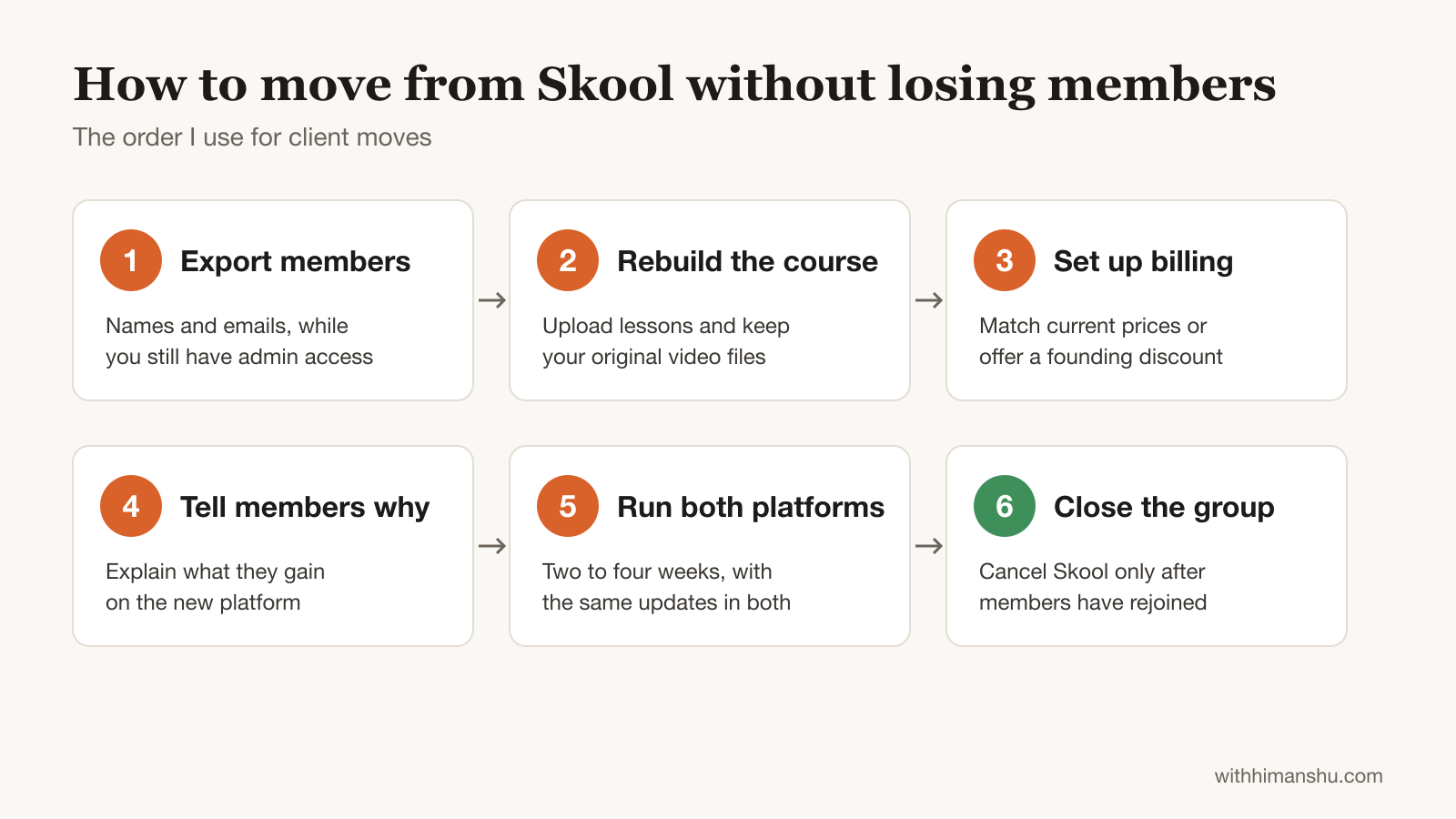
A careful migration keeps that loss small. These steps follow the order I use for client moves:
- Export your member list first. Download every member’s name and email while you still have admin access. That list is the only way to reach people after the group closes.
- Rebuild the course before announcing anything. Upload lessons to the new platform and keep your original video files, since Skool won’t move them for you.
- Set up billing on the new platform. Offer movers their current price, or a founding-member discount, so switching never costs them more.
- Tell members why you are moving. Explain what they gain, such as a better course area, an app or fewer distractions.
- Run both platforms for two to four weeks. Post the same updates in both, and point every Skool post to the new home.
- Set a firm closing date. Cancel Skool subscriptions only after members have rejoined, then close the group.
Some members drop off in any move. An email list you own, built from the first subscriber, turns the next move into one email instead of a rebuild.
When Staying on Skool Is the Better Choice
Leaving Skool makes sense for branding, course depth or fees on high-ticket sales. For a lot of creators, though, Skool’s gamification, Discovery traffic and lower fees outweigh those gaps.
Its gamification turns posting into a habit. Points, levels and a monthly leaderboard bring members back daily, and course unlocks reward the people who contribute. Circle and Mighty Networks offer gamification too, but Skool builds the whole product around it.
New members also arrive without extra marketing. Skool lists communities on its Discovery page. Its Growth Boost promotes your group in Discovery and off-site ads. Skool keeps a commission (30% in its example) on the paying members it brings, for as long as they stay.
Among the paid alternatives here, Whop’s marketplace and Circle’s newer, opt-in Discover directory send buyers in a similar way. Skool ranks groups in Discovery by member growth, activity and retention, so a small, active group can outrank a large, quiet one.
If engagement and new members matter more to you than your own domain, moving up to Skool Pro is usually a better decision than leaving.
Choosing the Right Platform for Your Community Stage
The best platform for your community depends on your stage more than your niche.
Validation stage: test where your audience already gathers. Facebook Groups suit consumer audiences, Discord suits tech and gaming communities, and LinkedIn Groups suit B2B tests.
Skool’s $9 Hobby plan is a cheap paid test with Discovery traffic included, though Whop costs less once sales start.
Growth stage: once engagement is consistent, Skool Pro, Heartbeat and Mighty Networks all fit, depending on whether you value gamification, simple courses or live teaching. The shift usually comes when managing the community takes too much time, or members ask for features it lacks.
Monetization stage: at several thousand dollars a month, platform cost becomes a small share of revenue. In my experience, Circle is the most complete home for a community-based business.
Kajabi fits when the community sits inside a course and email business, and Whop fits when you sell several products.
My personal opinion
Your community’s success depends far more on your leadership, content and engagement than on your platform.
The most active communities I have seen thrived first on the simplest platforms, because they focused relentlessly on delivering value to members.
My clients did better by starting where their audience already was and switching only when the community outgrew it. Most of them changed platforms at least once as their communities grew.
The right tool is the one that lets you run your vision with the least friction, whether that is a free social platform or a premium community solution.
If you have a question about a specific platform, you can leave it in the comments, and I will help you work through the decision.
Frequently Asked Questions
What is the best alternative to Skool?
Circle is the best Skool alternative for most creators who want their own branding and more structure. Mighty Networks suits engagement-heavy learning communities, and Heartbeat suits creators who want Skool’s simplicity with deeper courses. Whop is the best option with no monthly fee.
Is there another platform like Skool?
Heartbeat is the closest in feel, with one sidebar, a quick setup and courses built in. Circle and Mighty Networks match Skool’s community features and add custom domains, though both take a percentage on their entry plans on top of Stripe.
Is there a free version of Skool?
No. Skool’s cheapest plan, Hobby, costs $9 a month plus 10% + 30¢ per payment after a 14-day trial. Systeme.io’s free plan includes a community and one course with up to 500 students, and Discord and Facebook Groups cost nothing to run.
Is there a Skool alternative with no monthly fee?
Yes. Whop charges no subscription and takes 2.7% + 30¢ per domestic card payment, processing included. Systeme.io’s free plan also has no monthly fee and a 0% platform fee, with Stripe or PayPal charging processing.
What is cheaper than Skool for a paid community?
Whop and Systeme.io both cost less than Skool at every revenue level I modeled, and Podia Shaker comes in under Skool Pro too. Whop charges 2.7% + 30¢ per payment with no subscription. Systeme.io’s free plan takes 0%, leaving only Stripe or PayPal processing. At $5,000 a month, both cost under $180, against $274 on Skool Pro.
Does Skool charge transaction fees?
Yes. Hobby keeps 10% + 30¢ of every payment. Pro keeps 2.9% + 30¢ on payments up to $899 and 3.9% + 30¢ on larger single payments, according to the Skool Help Center. Card processing is included in both rates.
What is the best Skool alternative for courses?
Teachable has the strongest assessment tools, with quizzes on every plan and certificates from Growth. Thinkific starts at $40 a month billed annually, with quizzes and one community on Basic and certificates from Start. Kajabi fits when you also want email and funnels in the same tool.
Should I choose Skool or launch on another platform?
Skool is the better choice when engagement, discovery and low cost matter most and you don’t need your own domain, quizzes or email funnels. Another platform fits when your brand, courses or email sales drive the business: Circle for branding, Kajabi for funnels and Teachable for courses.
Is Circle better than Skool?
Circle is better for branding, structure and integrations, while Skool is better for engagement, discovery and cost. Circle starts at $89 a month plus 2% and Stripe processing, per its pricing page. At $5,000 a month in member revenue, that comes to about $364 on Circle Professional, against $274 on Skool Pro.
What’s better, Skool or Patreon?
Skool is better for discussion, courses and member engagement. Patreon suits paid posts and fan memberships, and its standard fee for new creators is 10% plus payment processing. On Skool Pro, the 2.9% + 30¢ already includes processing.
Is Substack similar to Skool?
Partly. Substack runs paid newsletters with comments and chat, and takes 10% of paid subscriptions plus Stripe’s processing. It has no classroom or leaderboard, so it suits writers more than community builders.
Which Skool alternative has gamification like Skool?
Circle includes gamification on its entry Professional plan, and Mighty Networks lists points, leaderboards, member streaks and badges on its pricing page. Heartbeat and Kajabi lean more on course structure and automation. None of them builds the whole product around a leaderboard the way Skool does.
Can I move my Skool community without losing members?
You can keep the loss small, though some members drop off in any move. Skool bills members itself, so subscriptions don’t transfer and everyone has to rejoin. Exporting your member list first, matching current prices and running both platforms for two to four weeks helps most members follow you.
Which Skool alternatives have a branded mobile app?
Kajabi includes a branded app on its Pro plan, at $399 a month billed annually, according to its pricing page. Circle offers branded apps only on custom-priced Circle Plus, Mighty Networks on Mighty Pro, and Heartbeat on its Scale plan at $766 a month billed annually. Skool and Systeme.io don’t offer branded apps.
Can I use my own domain on Skool?
No. Skool communities live at skool.com/yourname, and the Pro plan’s custom URL is still a subpath. Circle, Heartbeat and Mighty Networks all let you run a community on your own domain, starting from their entry plans.
Is Skool worth it in 2026?
Yes, for most creators starting a paid community. Skool’s gamification, Discovery page and low fees on the Pro plan make it hard to beat for engagement-led groups. It is a weaker fit for brands that need their own domain, quizzes or certificates.
The Letter
Get the next article in your inbox.
What I am building, as it happens. The experiments, launches and numbers behind my own one-person business, including what did not work.
The tools, tested before I recommend them. Short notes on the platforms I try for selling courses, running a community and sending email, before they become full reviews.
The inner side of the work. Ideas on focus, meaning and energy for solo founders who want a business that feels as good as it performs.
Get The Letter in your inbox
One short email, usually weekly. You can unsubscribe any time.
Keep reading
More from Community building.