Complete Claude SEO Tutorial: How to Use Claude Code to Rank Higher on Search

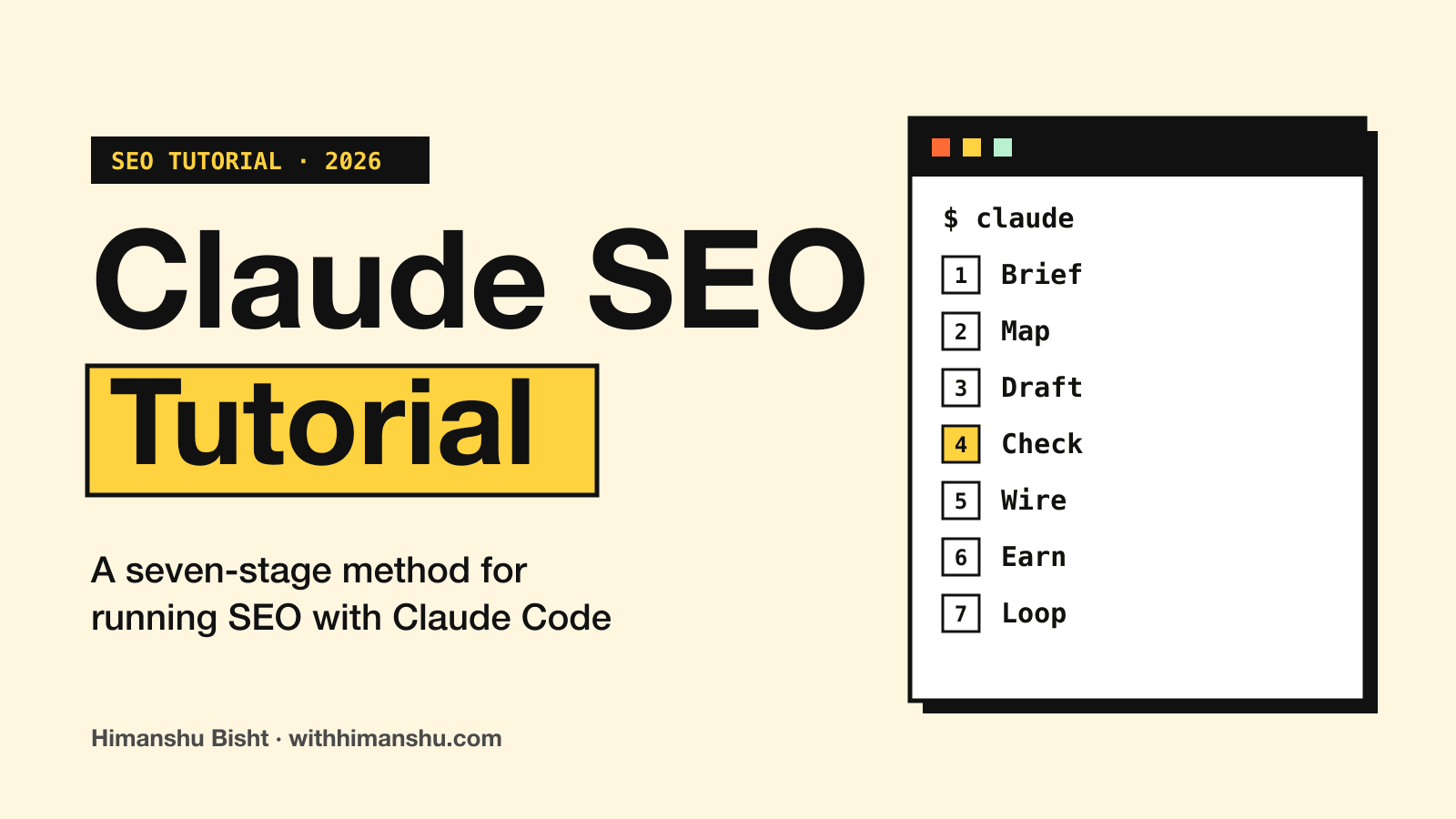
Claude Code can open every page of your website, study the results that outrank you and edit your files directly. For SEO, that puts research, writing, schema and internal links inside one tool.
If you have tried SEO in the Claude chat app instead, the result is familiar. You paste in a keyword and get back 1,500 tidy words that could belong to anyone in your niche.
Generic pages rarely rank. When you ask Claude to “do SEO”, it tends to return the article everyone else already published, with a few invented facts inside.
The usual fix is a keyword tool, a rank tracker and a backlink index. Together they cost more each month than Claude does.
So how do you get Claude to do SEO that ranks, without stacking up subscriptions?
I built a seven-stage process to answer that and named it the Claude SEO Method.
How does Claude SEO work?
Claude SEO works through seven stages, which I call the Claude SEO Method: Brief, Map, Draft, Check, Wire, Earn and Loop. Claude Code runs each stage inside your site’s files, one after the other. Every article it produces leaves three files behind: a keyword cluster, the article and a link audit.
Claude Code handles the on-page side. The off-page side needs a link building tool, since Claude has no data on the sites that link to you or the sources behind AI recommendations in your market.
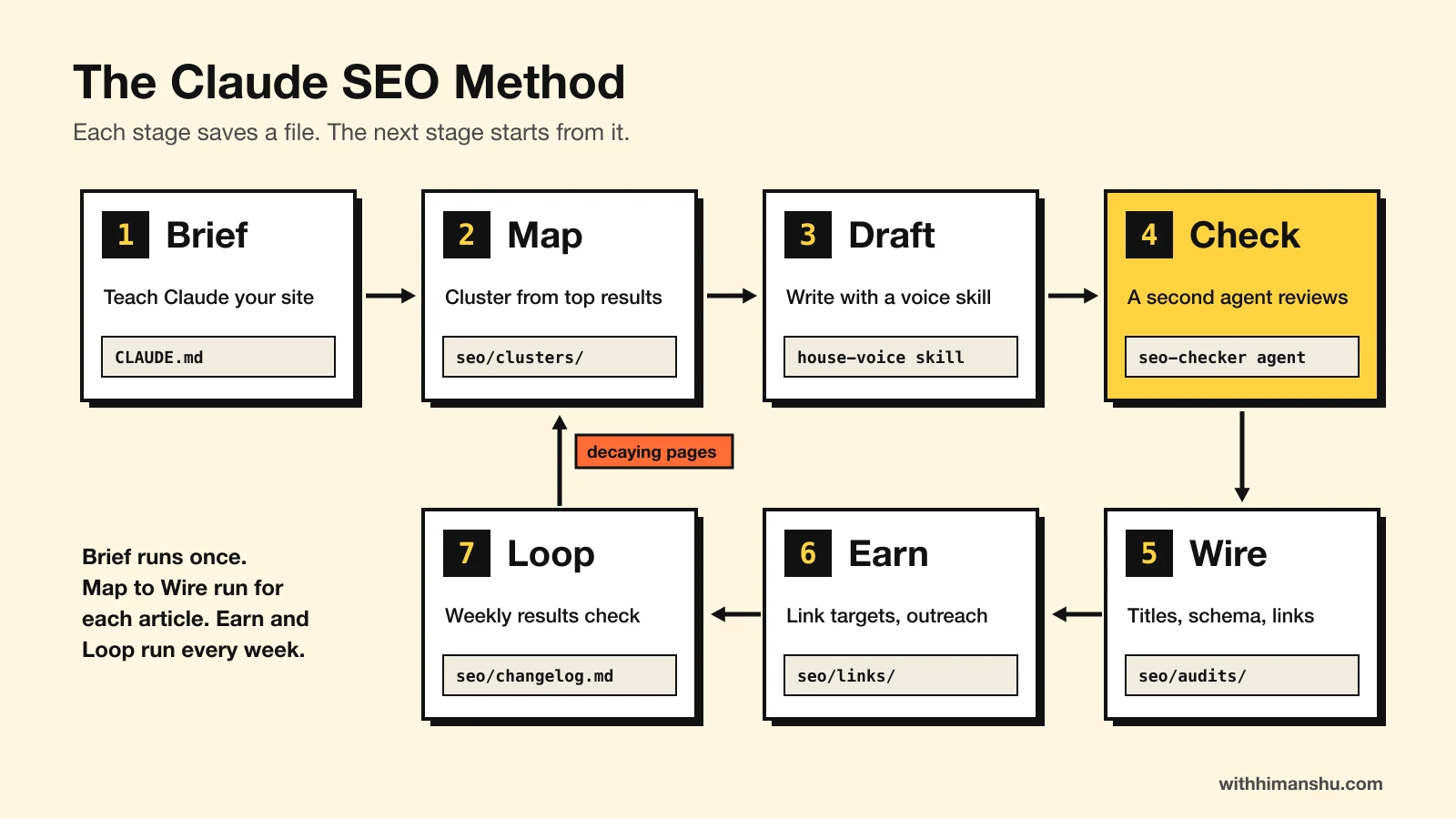
Each stage reads what the previous one saved. A session next month starts from those files rather than from whatever Claude remembers.
The same files still show why a page exists and what changed on it, even six months later.
Set up Claude Code for SEO
Claude Code comes with the Claude Pro, Max, Ultra, Team and Enterprise plans. It runs in a terminal, inside the folder that holds your site.
One command installs it on macOS, Linux or WSL:
curl -fsSL https://claude.ai/install.sh | bash
Windows PowerShell uses irm https://claude.ai/install.ps1 | iex. After that, you start it in your site’s folder:
cd my-site
claude
A desktop app covers the same ground for anyone who would rather avoid a terminal.
Sites built with Astro, Next.js, Hugo or plain Markdown are already folders of files. Mine runs on Astro, so every post, title tag and schema block is something Claude can read and change. WordPress sites connect through the WordPress MCP Adapter instead.
A git commit before any editing session keeps everything reversible. In the default permission mode, Claude also asks before each change, so nothing lands unseen.
The method keeps its working files in one folder at the root. Claude creates each one the first time a prompt below asks for it:
seo/
  site-index.md     every URL, its title, target query and inbound links
  experience.md     what is true about you
  changelog.md      every change, dated
  gsc/              Search Console exports, one dated folder each
  clusters/         one research file per article
  audits/           link audits and crawl reports
  links/            link targets and outreach drafts
Every Claude SEO prompt in this tutorial can be copied as it stands, with your own domain and paths swapped in. The examples use two made-up sites: a home-espresso blog and an invoicing app.
Stage 1, Brief: teach Claude your site before it touches a page
Claude knows SEO in general and nothing about your business. Until it learns your site, every answer stays general.
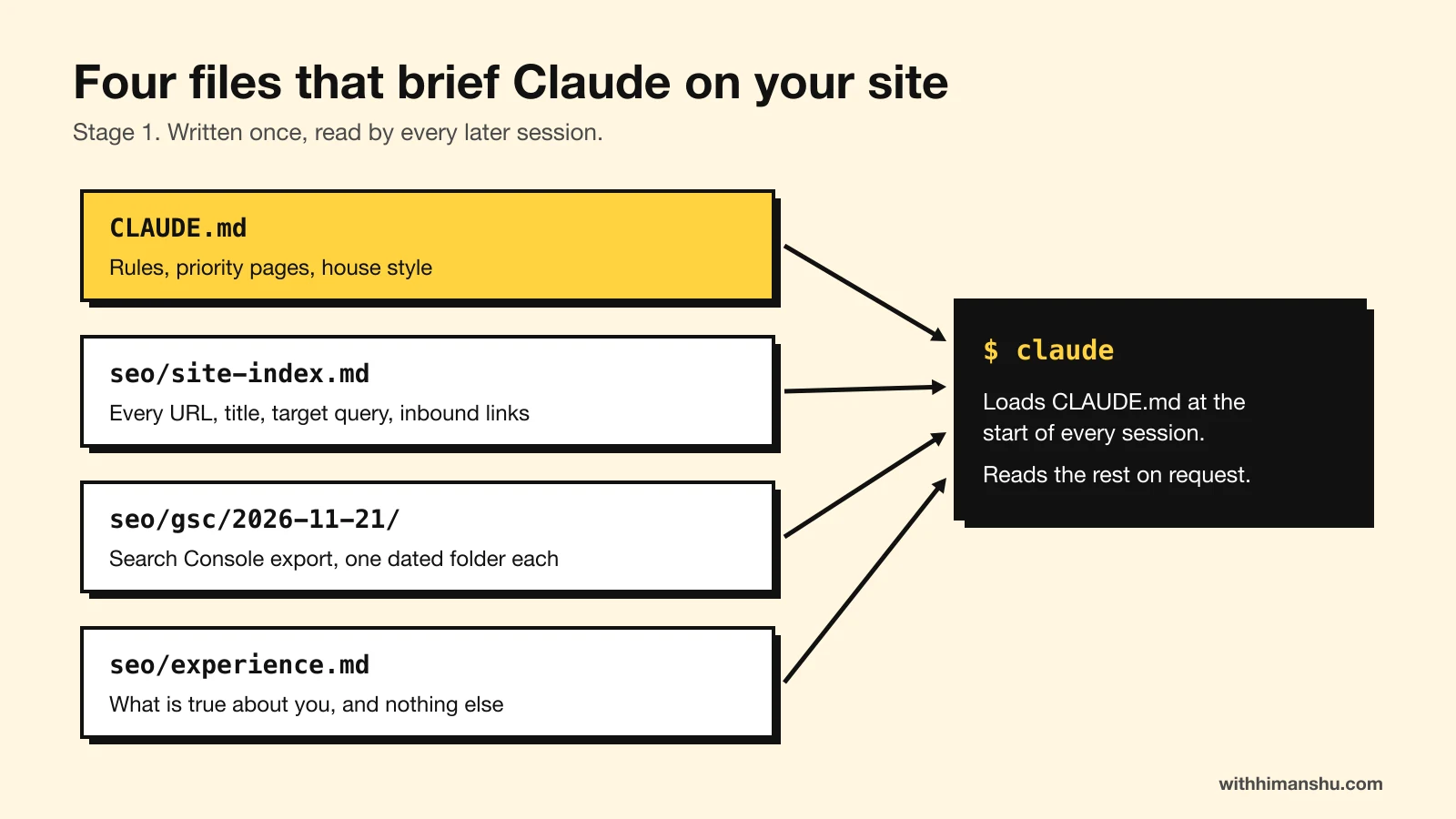
Four files fix that. One loads on its own at the start of each session, and Claude reads the other three when a prompt points to them.
CLAUDE.md
Claude Code loads CLAUDE.md from the project root whenever a session starts. Typing /init generates one with your build commands. The SEO brief goes underneath them.
For the espresso blog, it could read:
# Site
example.com. Home espresso gear: reviews, buying guides, how-tos. Two writers.

# Priority pages
/best-espresso-machines/, /espresso-grinder-guide/

# SEO rules
- Before proposing a new page, check seo/site-index.md for a page on the same query.
- Title tags under 60 characters, with the year and a verdict or a price.
- Affiliate links go through /go/ and carry rel="sponsored nofollow".
- First-person claims may only come from seo/experience.md.
- Every article saves three files: seo/clusters/<slug>.md, the article,
  and seo/audits/<slug>-links.md.
- Log every published change in seo/changelog.md with the date.

# Writing
Use the house-voice skill for any text a reader will see.
Anthropic’s guidance puts the useful ceiling at about 200 lines. Rules belong in it, while long reference material lives in the next three files.
The site index
Fetch every URL in the sitemap with curl. For each page record the URL,
title tag, H1, word count, the main query it targets and how many internal
links point to it. Save the result to seo/site-index.md. Then list any
two pages that target the same query.
That final instruction catches cannibalization early. On the espresso blog, it might pair “best espresso machine under $500” with “budget espresso machines”, two posts splitting one search.
The Search Console export
The Performance report exports a zip of CSV files, one of them for queries. Each table stops at 1,000 rows.
None of the files says which page ranked for which query. So the prompt asks Claude to guess and label the guess:
Using seo/gsc/2026-11-21/Queries.csv, list queries at positions 4 to 15
with over 500 impressions, and queries in the top 6 with a click-through
rate under 2%. For each, suggest the page on this site most likely to
rank for it, using seo/site-index.md, and mark it UNCONFIRMED.
Confirming a guess takes a minute: filter the report to that query and open the Pages tab.
Say the espresso blog sits fifth for “breville bambino review” with a 1.4% click-through rate, under a title that names no year. That page goes on the Stage 5 list.
The experience file
seo/experience.md lists what is true about you. That covers the gear or software you pay for, how long you have used it and any numbers you are willing to publish.
Without it, Claude writes “in my experience” about things you never did. The file gives every draft real details to draw on instead.
Stage 2, Map: decide what to write from what already ranks
Claude will write on any keyword you hand it, including one you already rank for and one you cannot win.
So the Map stage makes it study the topic first. Claude searches the web, opens the current top results and writes a cluster file before the article exists:
Topic: "best espresso grinder under 200". Work in this order and save
everything to seo/clusters/espresso-grinder-under-200.md.
1. Check seo/site-index.md. Stop if a page already targets this query.
2. Search the query and open the top 8 results. For each: title, length,
   headings, what it covers, what it gets wrong or leaves out.
3. Keyword analysis: the terms most of them use, with counts.
4. Gap analysis: what none of them covers that a reader needs.
5. Entities and related terms to cover.
6. Search intent, plus the fear or cost the reader would say out loud.
7. What I can truthfully add, from seo/experience.md.
8. An outline with H2s. Do not write the article.
Step 6 shapes the opening. A reader keeps going when the first lines name a worry they already have, such as buying a grinder that cannot handle espresso fineness.
The cluster file leaves out search volumes on purpose. Estimates differ from tool to tool, while Search Console impressions count the times your own pages were shown.
If your buyers ask AI before they search, LinkGecko adds one more input here. Its keyword scan reports who AI recommends for the query and which questions nothing answers well. Those questions become FAQ entries.
It is worth reading and correcting the cluster file before Stage 3, because every later stage builds on it.
Stage 3, Draft: how do you stop it sounding like AI?
A voice skill does most of it. A skill is a folder with a SKILL.md file inside, which Claude loads whenever a task matches the description at its top.
This one lives at .claude/skills/house-voice/SKILL.md:
---
name: house-voice
description: Writing rules for every article, email and page on this site. Use for any text a reader will see.
---

# Voice
- Plain sentences a person would say out loud. None over 28 words.
- State the point. Never announce it ("here's the thing", "let's break it down").
- No em dashes. No tables.
- Claim only what the source supports. Attribute every figure.
- Never invent first-person experience. Use seo/experience.md.

# Structure
- Open with the benefit of the subject, then the reader's real conflict.
- A quick-answer box under the intro. An answer-first FAQ at the end.
- Links sit on the entity, inside a sentence that would exist anyway.
A Claude SEO skill like this can start with five rules. Each time you correct a draft, Claude can turn the correction into a new rule.
My own writing skill grew that way. Its rule on choosing the opening conflict came from a single correction on one intro.
The draft prompt stays short, because the cluster and the skill carry the detail:
Write the article from seo/clusters/espresso-grinder-under-200.md. Follow
the outline and the house-voice skill. Put the primary keyword in the
title, the first 100 words, one H2 and the last paragraph. Save it to the
content folder as a draft.
The draft stays unedited until the checker’s report comes back.
Stage 4, Check: a second agent that never saw it being written
The session that wrote an article is a poor judge of it. It remembers why it made each claim, so it reads its own reasoning into the text.
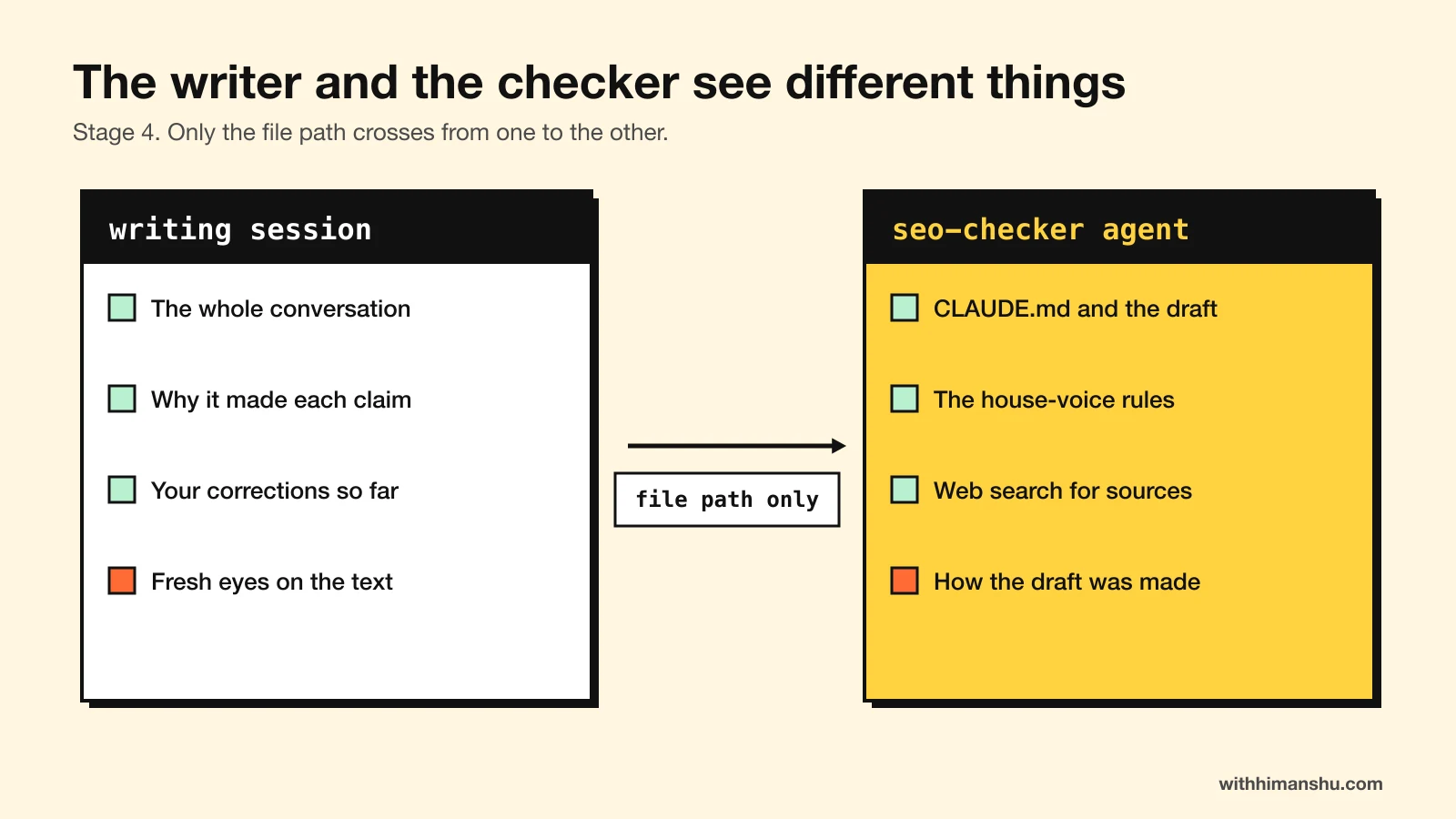
A subagent starts without that memory. It is a separate Claude with its own instructions and context window. It receives your CLAUDE.md and the task, but none of the conversation that produced the draft.
This file goes in .claude/agents/seo-checker.md:
---
name: seo-checker
description: Independent reviewer for a finished draft. Use after any article is written or revised.
tools: Read, Glob, Grep, WebSearch, WebFetch
---

You did not write this draft. Do not edit files. Report findings only.

1. Fact check every claim against a primary source. Mark each CONFIRMED,
   WRONG (with the correct fact and URL) or COULD NOT VERIFY.
2. Recompute every number in the article.
3. List every first-person claim and check it against seo/experience.md.
4. Audit each sentence against .claude/skills/house-voice/SKILL.md.
   Quote the offenders.
5. Intent: does the first screen answer the query?
6. Keyword: is it in the title, the intro, one H2 and the close?

End with the three weakest passages and a fix for each.
Starting it takes two lines:
Use the seo-checker subagent on src/content/blog/espresso-grinder-under-200.md.
Pass it only the file path.
The second line stops the writing session from slipping its reasoning into the request.
On this site, the checker has returned more than 30 findings on a single draft, including first-hand details Claude had invented. Another pass caught seven factual errors in a piece I thought was finished.
I fix or answer each finding, then log it at the bottom of the cluster file. If a reader later questions a claim, the answer is in that log.
Stage 5, Wire: on-page SEO, done in the repo
A site collects hundreds of small on-page fixes over time. When you fix them by hand, most of them sit on a to-do list for months.
Claude Code works through them in the files while you approve each one.
Titles and meta descriptions
From the Stage 1 list, take the pages with a click-through rate under 2%.
For each, write three title tags under 60 characters that keep the main
query and add the year plus a price, a verdict or a number. Show the
current title beside them. Apply the one I pick and log the old and new
titles in seo/changelog.md.
On the espresso blog, a bare “Breville Bambino Review” might become “Breville Bambino Review 2026: Pros, Cons and Real Shots”.
Keeping the old title in the log lets Stage 7 tie a later change in clicks to this edit.
Schema
Add JSON-LD to every post: Article with the author as a Person, Review on
reviews and FAQPage where the post has an FAQ. Build the site, check every
JSON-LD block in the built pages for valid syntax and required fields,
then give me three URLs to test in Google's Rich Results Test.
The markup helps search engines and AI assistants read the page correctly. Google now shows FAQ rich results only for a small set of government and health sites. HowTo results are gone altogether.
Internal links
Links run in two directions, so the audit covers both:
Internal link audit for /moka-pot-vs-espresso/. Save to
seo/audits/moka-pot-vs-espresso-links.md.
1. Links out: 6 to 10 pages on this site the article should link to. Put
   each link on the entity, inside a sentence that already exists.
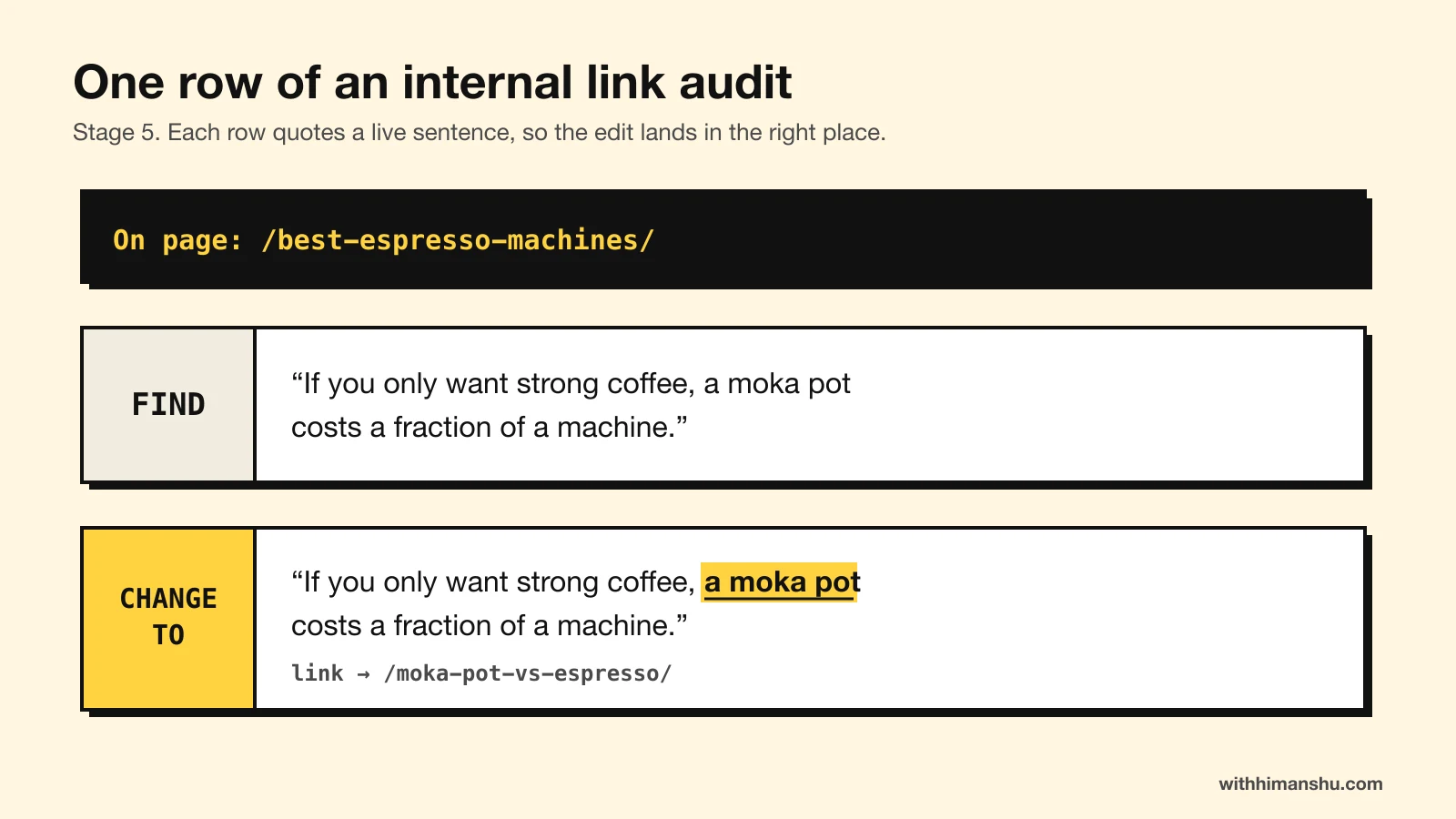
2. Links in: find existing pages that mention this topic. For each, quote
   the exact sentence from the live page as "Find" and give a "Change to"
   version with the link added. Every anchor different. No anchor equal to
   the page's title.
Each pair quotes a live sentence, so Claude knows exactly where every link goes.
The verification crawl
Edits across many files tend to break something nobody was looking at. The stage closes with a second crawl:
Build the site and parse every page in the build output (or fetch each
sitemap URL with curl). Compare the result with seo/site-index.md and
today's entries in seo/changelog.md. Report anything that changed and was
not meant to: status codes, canonicals, titles over 60 characters, schema
errors, rel attributes on /go/ links, and byline dates that differ from
the sitemap.
Curl and the build folder return the raw HTML. A summarizing web fetch can drop a status code or a rel attribute.
In October I pushed a round of fixes across this site. The crawl afterwards found eight new problems those fixes had caused. One template change had quietly altered the rel attribute on every outbound product link.
Stage 6, Earn: how does link building work with Claude?
Link building with Claude works through a link building tool connected to Claude Code. Claude cannot see the web’s links on its own, so the tool supplies the targets and Claude helps you work through them.
What off-page SEO covers
Off-page SEO is everything that happens on other sites: links from relevant pages, listings on review sites, mentions in best-of lists, Reddit threads that name you and quotes in articles. Search engines read those as signs that real people trust you.
AI assistants lean on the same pages. When a buyer asks ChatGPT which tool to pick, the answer usually quotes a few roundups, review sites and threads.
A page can pass every on-page check and still sit on page two, because nothing outside the site points to it. Claude Code has no index of the web’s links. It cannot see which pages an assistant reads before it answers.
That is the gap LinkGecko fills. It asks AI the questions your buyers ask, ranks the pages those answers cite and drafts a pitch for each one.
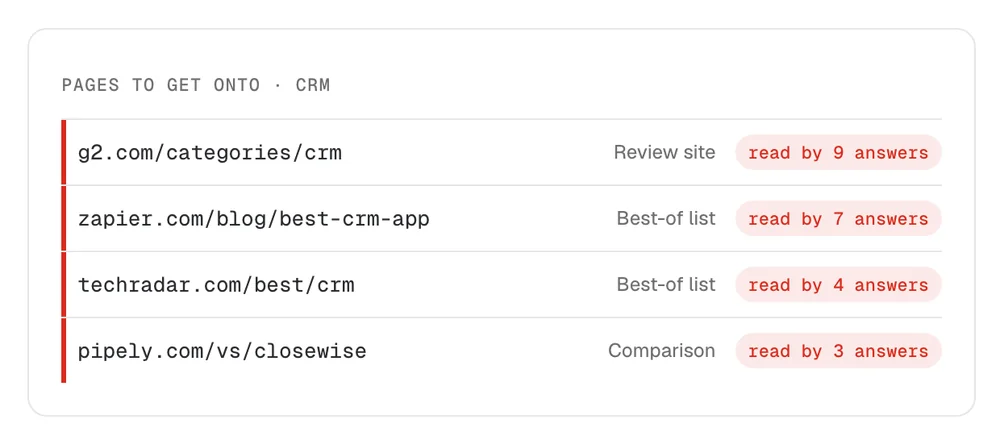
Find the pages AI answers read
Domain rating says little about whether an answer reads a page. LinkGecko ranks every page by how many answers cite it, so a modest roundup cited nine times comes before a famous site that no answer reads.
Each page comes with an email for its editor. The email quotes the buyer question the page answers, the tools it already covers and what yours adds.
Reddit link building without spamming
Buyers ask Reddit which tool to pick, and AI answers keep quoting those threads long after they were posted. Reddit link building in LinkGecko lists the threads behind your category’s answers and shows whether your product appears in each one.
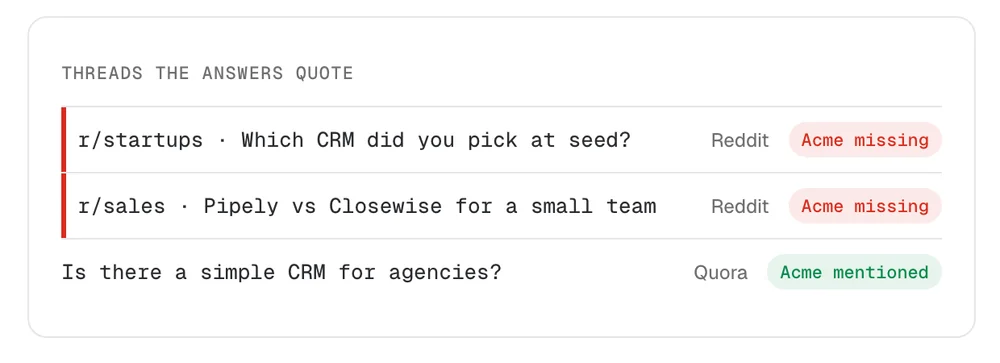
For each thread, it drafts a reply that helps the person asking first. You edit it and post it under your own name, within the subreddit’s rules.
The same goes for every other target. Each link comes from a page that buyers and AI answers already read, and nothing is bought.
Google’s spam policies count links bought for rankings as link spam. A bought link can be ignored, and a pattern of them can cost you rankings you already have.
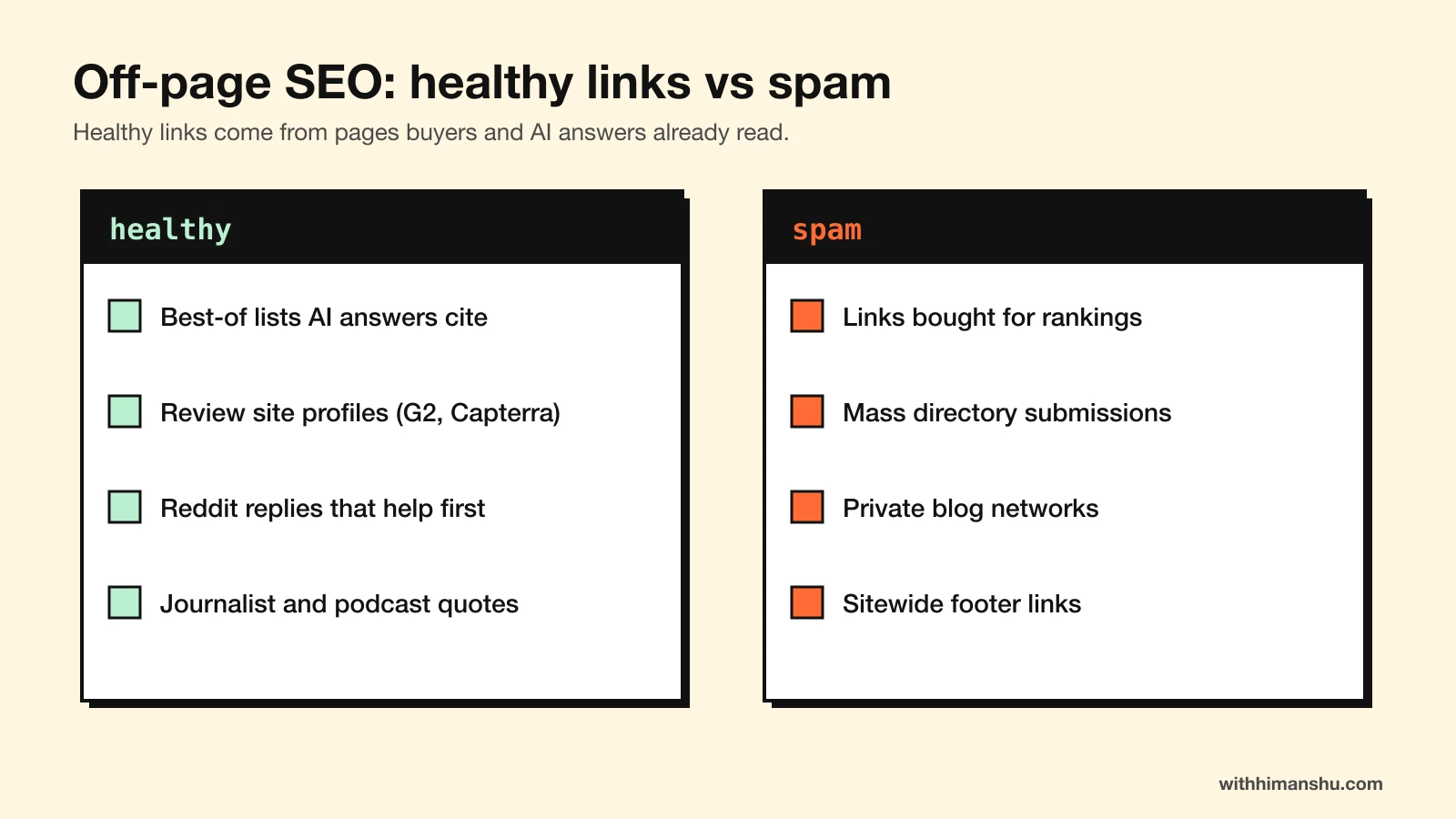
LinkGecko also matches journalist and podcast requests from HARO and five other feeds to your product, with a reply drafted for the ones that fit.
Sentiment and E-E-A-T checks
A mention helps only when what people say about you is good. LinkGecko’s sentiment check scores your brand’s trust, authority, reputation and overall sentiment.
Trust and authority are two of the four parts of E-E-A-T, the standard Google’s quality raters use to judge pages. Google calls trust the most important of them.
Each score comes with the quotes and sources behind it, so you can see which page pulls it down and answer it.
Claude link building through the MCP server
LinkGecko’s link building MCP puts every feature inside Claude Code as a tool. One command connects it:
claude mcp add --transport http linkgecko https://mcp.linkgecko.com
Typing /mcp inside Claude Code opens the sign-in. If you prefer a key, LinkGecko’s settings page gives one along with the exact command.
From then on, Claude link building runs in the same session as your on-page fixes. You ask in plain language, and the answers come from your own runs.
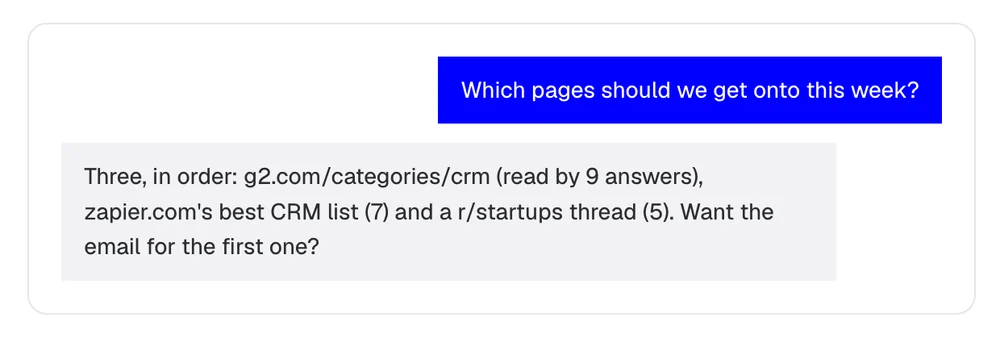
Software companies feel this stage most, since many buyers now ask ChatGPT which tool to pick. The first request creates the brand and runs an analysis:
Set up a LinkGecko brand for yourbrand.com, an invoicing app for
freelancers, then run the first analysis.
That run costs one credit. LinkGecko asks before spending it, and everything after it reads the stored result:
Which sites cite our competitors for "best invoicing app for freelancers",
and not us?
Run a sentiment check on yourbrand.com and show the sources behind it.
Write the outreach email for the most cited site we're missing from.
Find Reddit threads about invoicing apps where we could genuinely help.
Save the list and the drafts to seo/links/2026-11-21.md.
What comes back is a short ranked list with a draft for each entry. For the invoicing app, it might start with a G2 category page read by nine answers, then a Zapier roundup read by seven.
A list that short turns doing link building yourself into a weekly habit. Getting named on those pages is also most of the off-page work in generative engine optimization.
You edit each draft and send it from your own inbox. Three a week fits around everything else.
You can also do the research by hand, more slowly. Ten buyer questions asked in Perplexity and Google’s AI Mode, with every cited page noted, give a rough version of the list. Claude Code can keep that log in seo/links/, though it cannot ask the assistants for you.
Stage 7, Loop: the weekly check that keeps it working
SEO changes take weeks to show up in the data. By then, it is hard to remember which edit caused the change unless you wrote it down.
The Loop stage is one prompt, run each week after a fresh export lands in its own dated folder:
Compare the newest folder in seo/gsc/ with the one before it.
1. Queries and pages that gained or lost more than 3 positions.
2. Pages that lost more than 20% of their clicks: mark each for a
   refresh that starts again at Stage 2.
3. For each mover, find any change in seo/changelog.md from the last
   6 weeks.
4. Ask LinkGecko what changed since last week's run.
5. Give me three actions for this week, ranked.
Append a dated summary to seo/changelog.md.
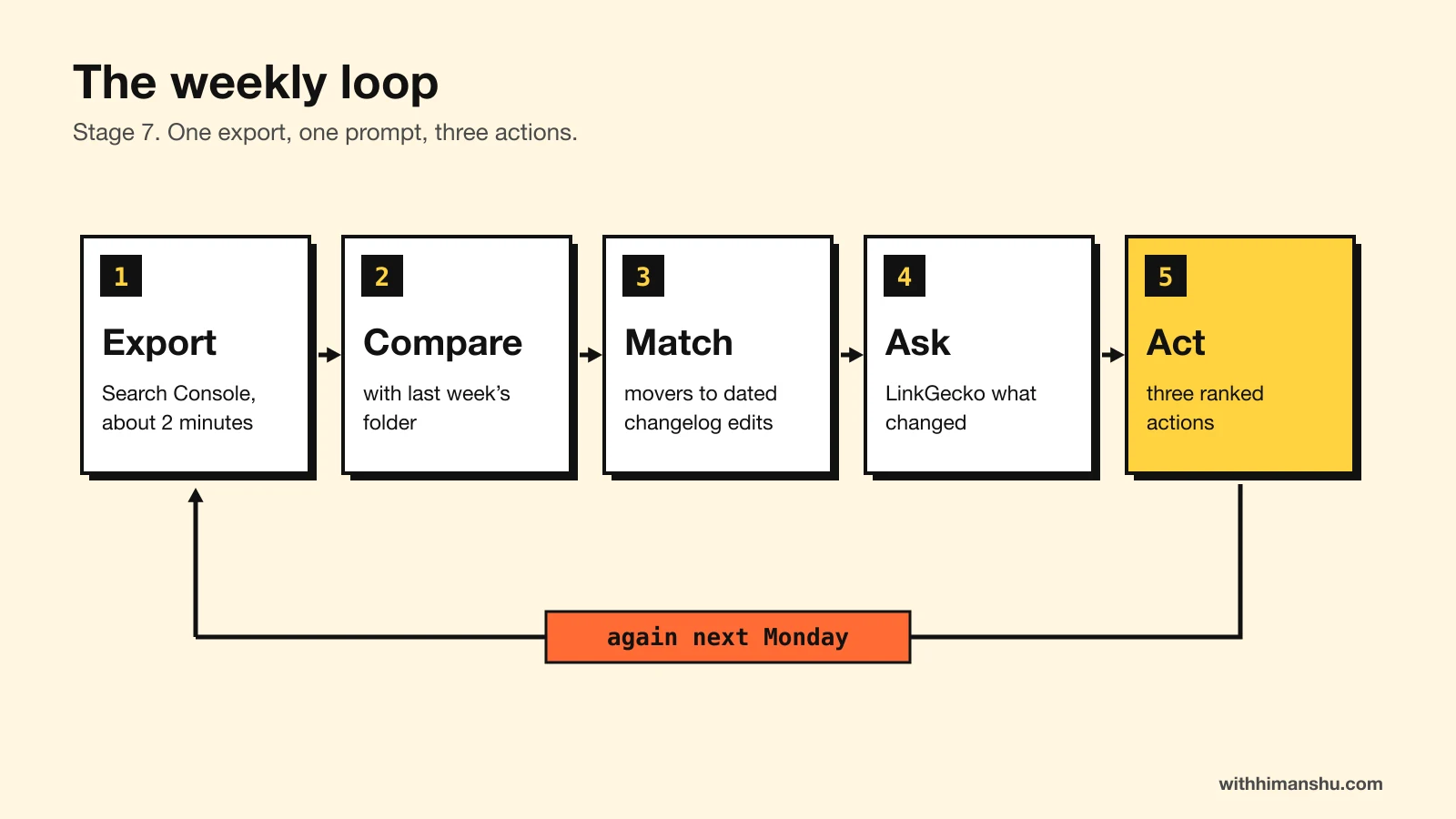
Point 2 handles content decay. A page that keeps losing clicks goes back through Map, with a fresh look at whatever now outranks it.
The export stays a manual two-minute step, since this setup gives Claude Code no direct line into Search Console. A Desktop scheduled task can still run the LinkGecko half each Monday, provided the app is open and the computer awake.
The changelog lets you trace every rise or fall back to a dated edit, so you know what to repeat and what to undo.
Where Claude Code still needs you
Claude Code can turn out a hundred near-identical pages in an afternoon. Volume like that is a liability, so the method stays with pages you would have written anyway.
It also has no sense of your business priorities. Which page earns money, which product you stopped recommending and which claim a partner asked you to remove are decisions only you can make.
Claude SEO works when Claude gets a brief, a fixed order of work and an independent check on what it writes. A good first step this week is Stage 1, since every later session starts from that brief instead of a blank page.
FAQ
Can Claude do SEO?
Yes. Claude Code handles on-page SEO: it researches each topic from what ranks today, writes and fact-checks articles, adds schema and fixes internal links in a site’s files. Backlink data has to come from a separate tool.
What is the Claude SEO Method?
It is a seven-stage routine (Brief, Map, Draft, Check, Wire, Earn, Loop) that runs a site’s SEO from Claude Code. Claude does the on-page work from the repo, while LinkGecko supplies link targets and outreach drafts.
Is Claude SEO the same as the claude-seo plugin?
No. claude-seo is a free, open-source plugin for Claude Code that runs site audits through slash commands. The Claude SEO Method also covers research, writing, checking and link building. The two can be used together.
What is off-page SEO?
Off-page SEO is everything that happens on other sites: links from relevant pages, review site listings, mentions in best-of lists, Reddit threads and quotes in articles. Search engines and AI assistants read those as signs that real people trust you.
Can Claude Code do link building?
Not on its own, since Claude has no index of the web’s links. Connected to a link building tool such as LinkGecko through MCP, Claude Code can list the pages AI answers cite, draft the outreach and save it with the rest of your SEO files.
What is a link building MCP?
A link building MCP is a server that gives an AI assistant link building tools. LinkGecko’s MCP lets Claude, ChatGPT or Cursor find link targets, check brand sentiment and draft outreach from a chat.
Is Claude better than ChatGPT for SEO?
For site work, Claude Code has the edge over the ChatGPT chat app because it works inside your files. It can read every page, apply edits and crawl the result. The Claude and ChatGPT chat apps see only what you paste into them.
Can Claude do keyword research?
Yes. Beyond studying competitors, Claude can group the queries in a Search Console export into topics and spot the clusters no page on your site covers yet.
Can I use the Claude app instead of Claude Code?
Partly. The Claude app can research and draft. It cannot open your site’s files, run a crawl or apply edits, so the Brief, Wire and Loop stages need Claude Code.
Which Claude plan do I need for Claude Code?
Claude Code is included with the Claude Pro, Max, Ultra, Team and Enterprise plans. A Claude Console account with prepaid API credits also works.
Do I need Ahrefs or Semrush to do SEO with Claude?
No. Search Console covers your own queries and positions, and LinkGecko supplies link targets. A keyword suite adds volume estimates, which this method leaves out.
Does Claude Code work for WordPress SEO?
Yes, through the WordPress MCP Adapter. Claude can read posts through it. It writes changes back only where the site owner has enabled those abilities, and WordPress recommends read-only access over public connections.
Will Google penalize content written with Claude?
Not for being written with Claude. Google’s guidance on generative AI content holds it to the same Search Essentials as any page. Its spam policy targets many pages generated without adding value for readers.
How much does LinkGecko cost?
LinkGecko starts at $19 a month for 3 brands and 30 credits. The seven-day trial includes 5 credits and needs a card, which covers a first analysis and a few drafts.
How long does Claude SEO take to show results?
Title and content changes usually need a few weeks of data before they can be judged. Mentions in AI answers move on their own schedule, from days to months.
The Letter
Get the next article in your inbox.
What I am building, as it happens. The experiments, launches and numbers behind my own one-person business, including what did not work.
The tools, tested before I recommend them. Short notes on the platforms I try for selling courses, running a community and sending email, before they become full reviews.
The inner side of the work. Ideas on focus, meaning and energy for solo founders who want a business that feels as good as it performs.
Get The Letter in your inbox
One short email, usually weekly. You can unsubscribe any time.
Keep reading
More from Marketing strategies.