How to Build Your Best Converting Sales Funnels on WordPress

Ever thought of building a wildly profitable sales funnel on WordPress?
Whether you are selling digital products like online courses, coaching or consulting, or physical products like T-shirts or souvenirs, you need a sales funnel.
If you have ever wondered how to design a beautiful sales funnel with WordPress, you are at the right place.
This post will guide you step by step into the process. In fact, this blog started as part of my own WordPress sales funnel.
I have mentioned all recommended upsell and funnel plugins here. However, this post explains the complete process.
Before I jump into the technicalities of a WordPress funnel, here are the basics.
Affiliate disclosure: Some links on this page are affiliate links. If you buy through them, I may earn a commission at no extra cost to you. I will appreciate if you use them.
Basic Sales Funnel Structure
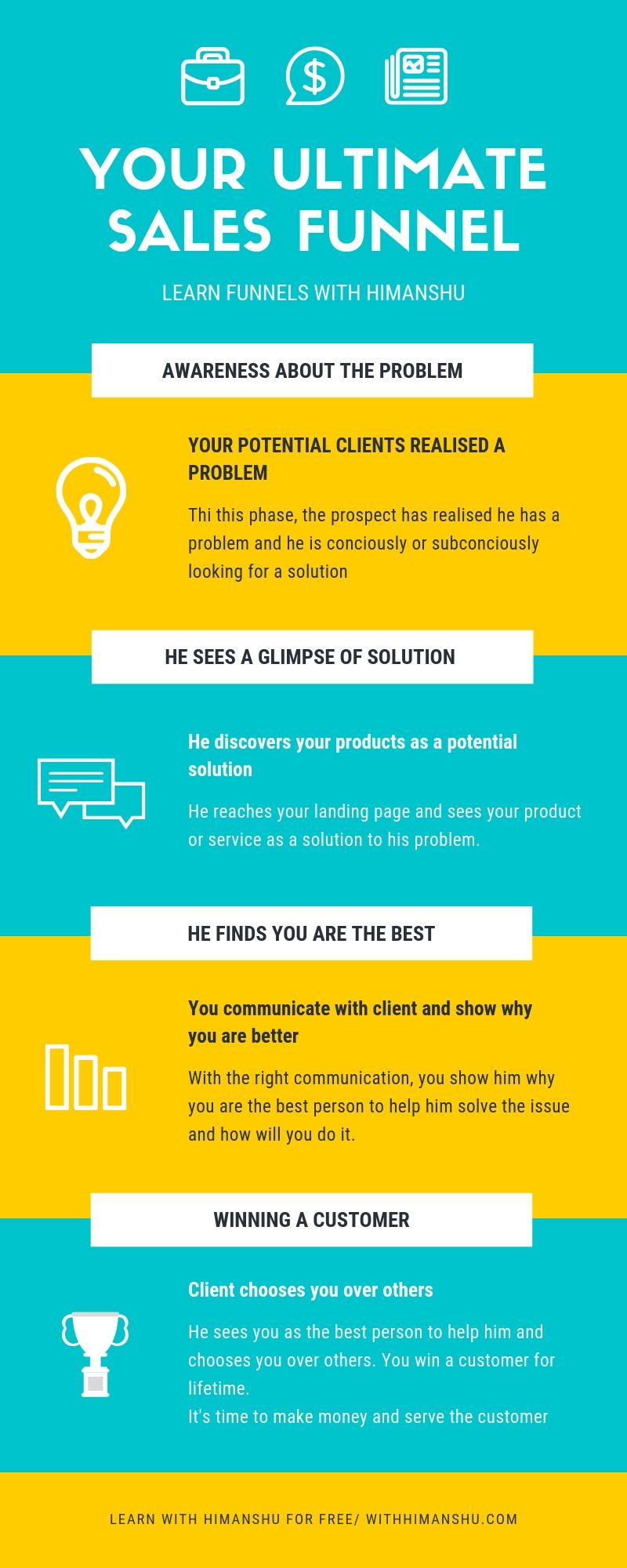
Sales funnels are revolutionary. Personally, I am crazy about the idea of funnels because, in my opinion, this is how ideal marketing should look.
Even though there are options like ClickFunnels to build your marketing funnels, I prefer the WordPress and Kit combination to design my sales funnels.
And here are the reasons for it.
Why WordPress is good for building sales funnels
WordPress gives you more control over your landing pages, Optin pages and lead-capture. Since WordPress is a free software, you can always change your hosting and export your complete funnels to another platform.
Unlike DONE-FOR-YOU funnels, you go through the essential learning curve while building your funnels on WordPress. While it might be a little time consuming if you have no clue about WordPress, it saves you from getting scammed by fake-gurus who are trying to sell over-hyped funnel software without putting any actual value.
I have used Thrive Themes WordPress sales funnel builder for this tutorial as I found it the best among any other WordPress alternative.
It allows me to completely transform my WordPress website into a custom sales funnel without hiring any developer or designer.
Here are some of the essential topics I will cover in this post.
Build Converting WordPress Sales Funnels
It is an extensive guide so fasten your seatbelts. After you will carefully finish reading this post, you will learn
- What is a Sales Funnel
- Why focus upon a WordPress sales funnel builder (Graphic explanation ahead)
- Designing Converting Sales Funnels with WordPress
- What is the Best WordPress themes and plugin to design your funnel
- Best Email Autoresponders to communicate with your customers
You Can’t Ignore “THIS” About a Sales Funnel
While you will be well aware of the idea of sales funnels, let me tell you the most simplistic way to understand a sales funnel.
As we will approach talking sales funnels on WordPress, you will feel like a pro funnel hacker way before.
As you can see from the infographic above, sales funnel is more about winning a client instead of simply selling your products.
In my courses and webinars, I always advised paying more attention to lifetime value instead of simply selling a product. This is what most of the successful companies do with their process.
The journey of a buyer from finding a solution to his (or her) problems to taking a decision to buy is a more or less a bumpy ride.
You will need to have the right communication system to help them take the decision.
The best way to create a communication channel for your sales funnels is by building an email list.
I use Kit for this. It is my primary way of building a relationship with my clients.
Enough, recommendations, let’s understand the process of building a simple sales funnel.
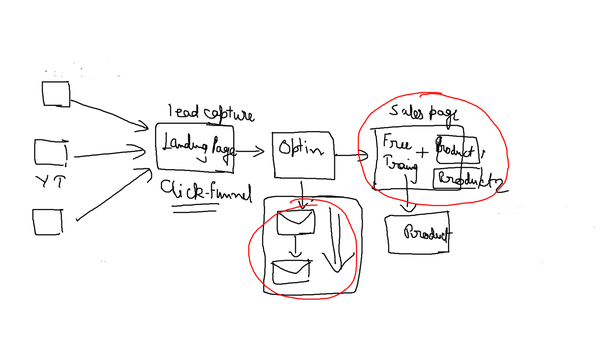
Can you see, ClickFunnels over there? Simply, replace it with WordPress Thrive Themes landing page and you are all good.
So, there are 5 Different phases of a successful custom funnel
- Traffic sources to get eyeballs to your funnel
- Landing Page to capture visitor attention
- Optin System to capture the leads
- Email communication system to connect with your customers
- A Sales Page to offer your products.
WordPress Funnels vs ClickFunnels: an Honest Comparison
WordPress is free software to create your websites, blogs and funnels. Even though this is an advanced concept, building a WordPress funnel can save you the $97 to $297 a month that ClickFunnels costs.
While ClickFunnels, will make your job a lot easier by providing a simple drag-and-drop system, you do not own your funnels on a SaaS software like Kartra or ClickFunnels.
As soon as you decide to leave a hosted service like this, all your funnels will be deleted and you will end up starting everything from scratch.
However, this is not a case with Self-hosted, DIY funnels you create with WordPress.
The only challenge with WordPress is, you need to have at least “some” knowledge about WordPress software and how you can host your websites on it.
Design Your DIY Sales Funnel
If you are coming from an affiliate marketing background, pick an affiliate product you have used and trust if you don’t own one right now.
This is important as you should always have a result-oriented mind before you start building your funnel.
Best WordPress Sales Funnel Builder Theme
After testing multiple applications like OptimizePress, GetResponse and ClickFunnels, I picked Thrive Themes over others. OptimizePress came closest among the WordPress sales funnel themes I tested, and it is the better pick if you mainly sell digital products through its checkout.
I got significant funnel training from Thrive Themes, and its affiliate program pays a 35% commission on sales. While I could make more money promoting a SaaS software, I feel my duty to share what I use instead of just sharing for the sake of money like many gurus are doing.
This is not the highest paying affiliate program in the world, but Thrive themes is the most complete WordPress funnel theme and plugin bundle.
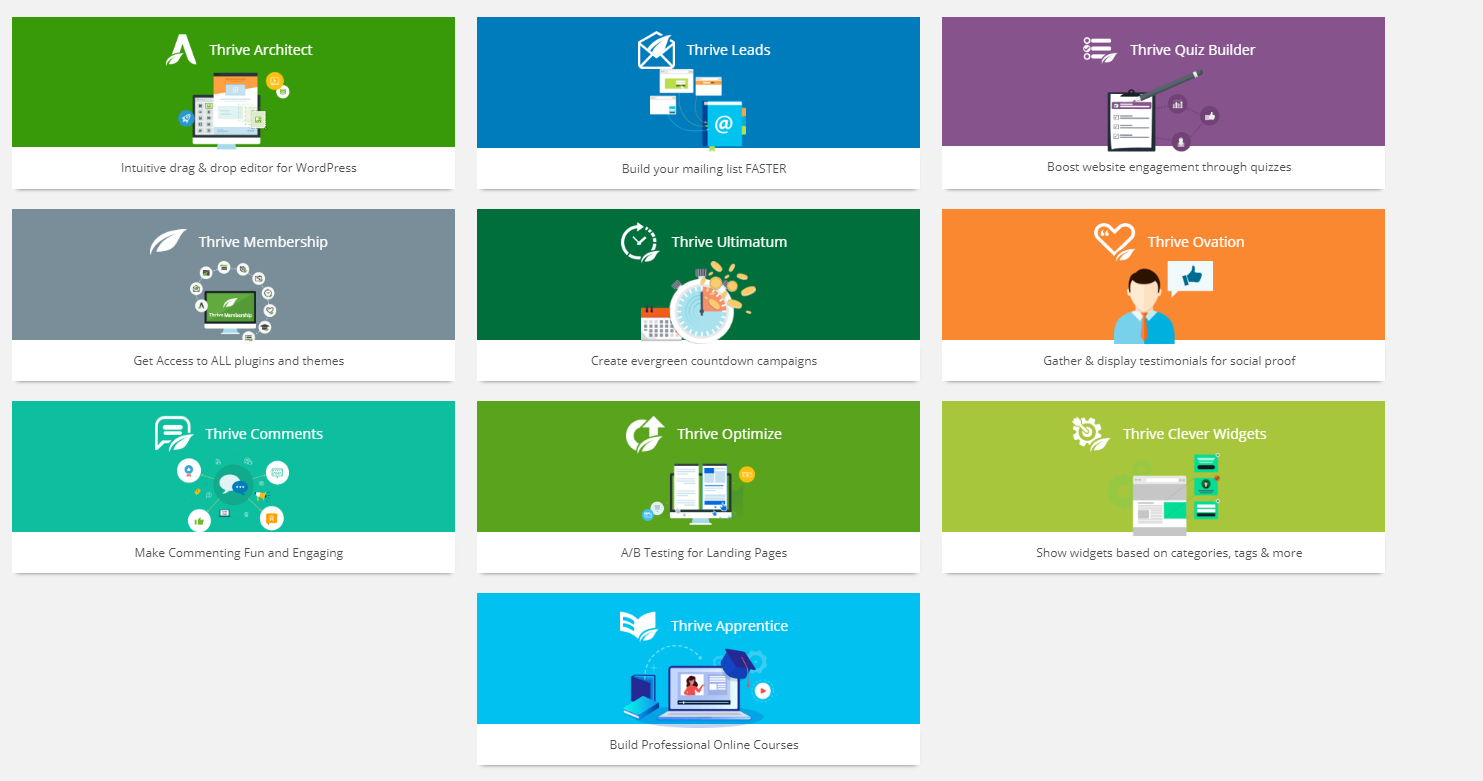
With eight plugins plus Theme Builder, Thrive Suite is the most complete plugin bundle you will ever get to create a high-converting marketing funnel on self-hosted WordPress.
Step-by-Step Guide to Your First Ever WordPress Funnel
As I have already covered, WordPress funnels are no different from any other sales funnels. You are simply using a self-hosted website to create one.
Step 1
Get a Domain Name
You can go to Namecheap and find out some good domain name for your funnel. This can be something related to your brand name or even your own name.
As you can see, “withhimanshu.com” is the domain name I used to create my funnels and blogs.
Step 2
Get a Stable Hosting
DIY funnels are different from ClickFunnels. Where you get Free hosting on ClickFunnels, you need a place to host your DIY WordPress Funnels.
I used A2 Hosting (now Hosting.com) Linux hosting as my base. You will get Free SSL certificate with it and surely powerful and reliable support.
Step 3
Design Your Funnel Structure
Simple DIY funnel structure for self-hosted websites
Your brand new funnel must include the following elements
- A Landing Page
- Optin System
- Sales page or thank you page
- An Email System
That is it. If you already know what products you want to sell, you are 3 Steps away from launching your first funnel.
Step 4
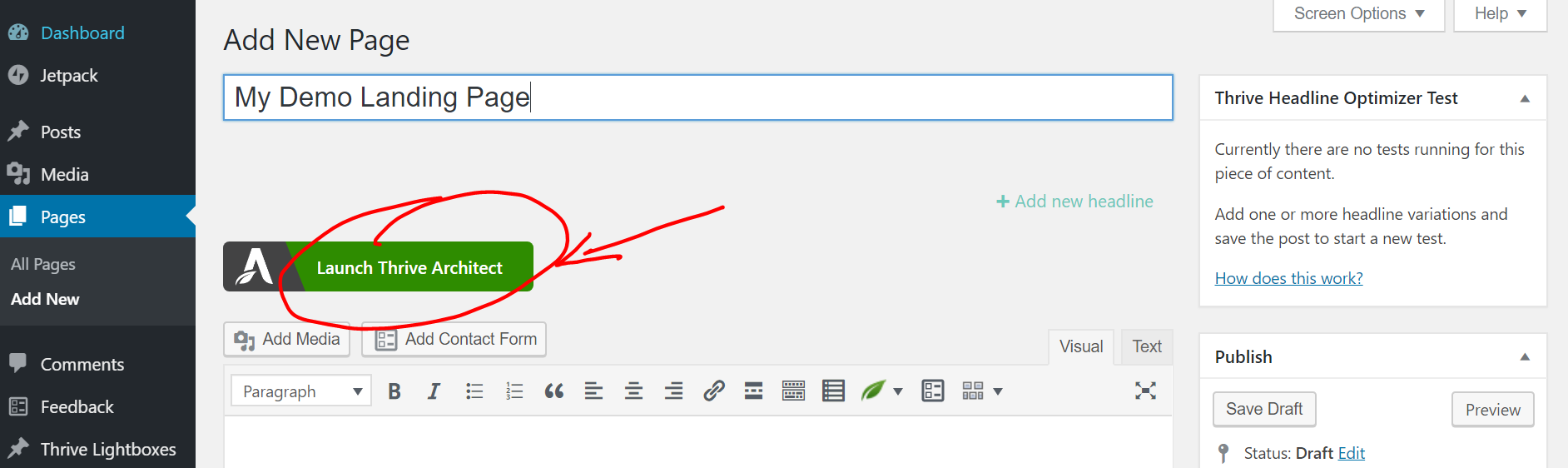
Create Your WordPress Page and Launch Thrive Architect
If you have installed Thrive themes properly, all you need to do is to create your new page on WordPress (as you can see in the image below)
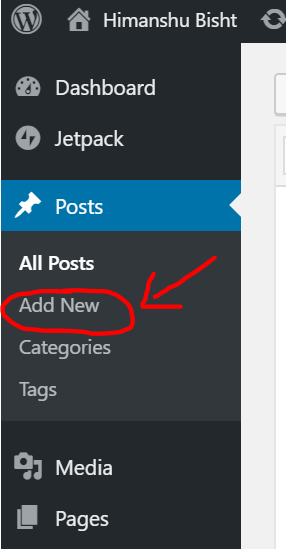
Now You Need to Launch Thrive Architect by Clicking on the green button you can see below
Step 5
Choose from Multiple Ready-to-Use Funnels
As you are almost ready to create your first ever WordPress funnel landing page, this (see the image below) will be the screen which appears after you click on the button.
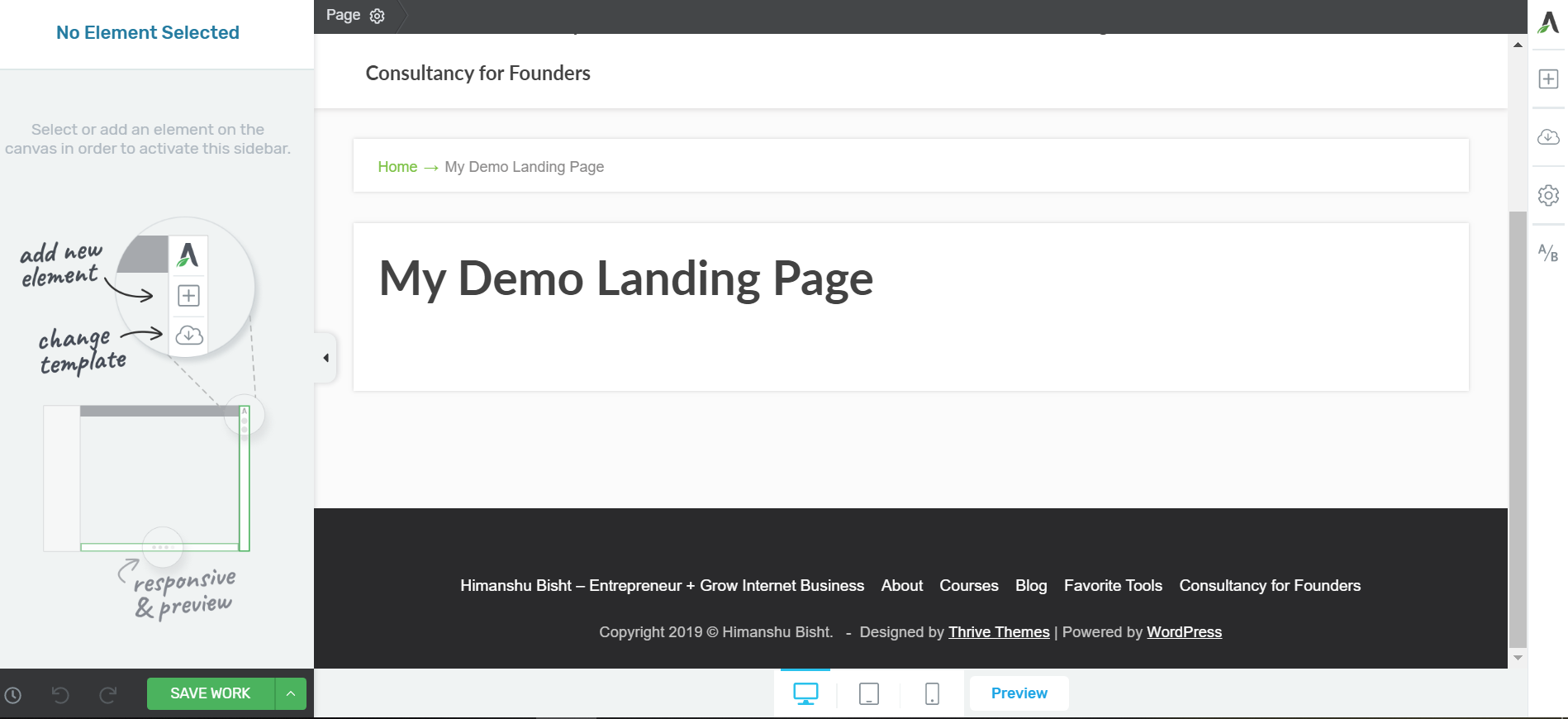
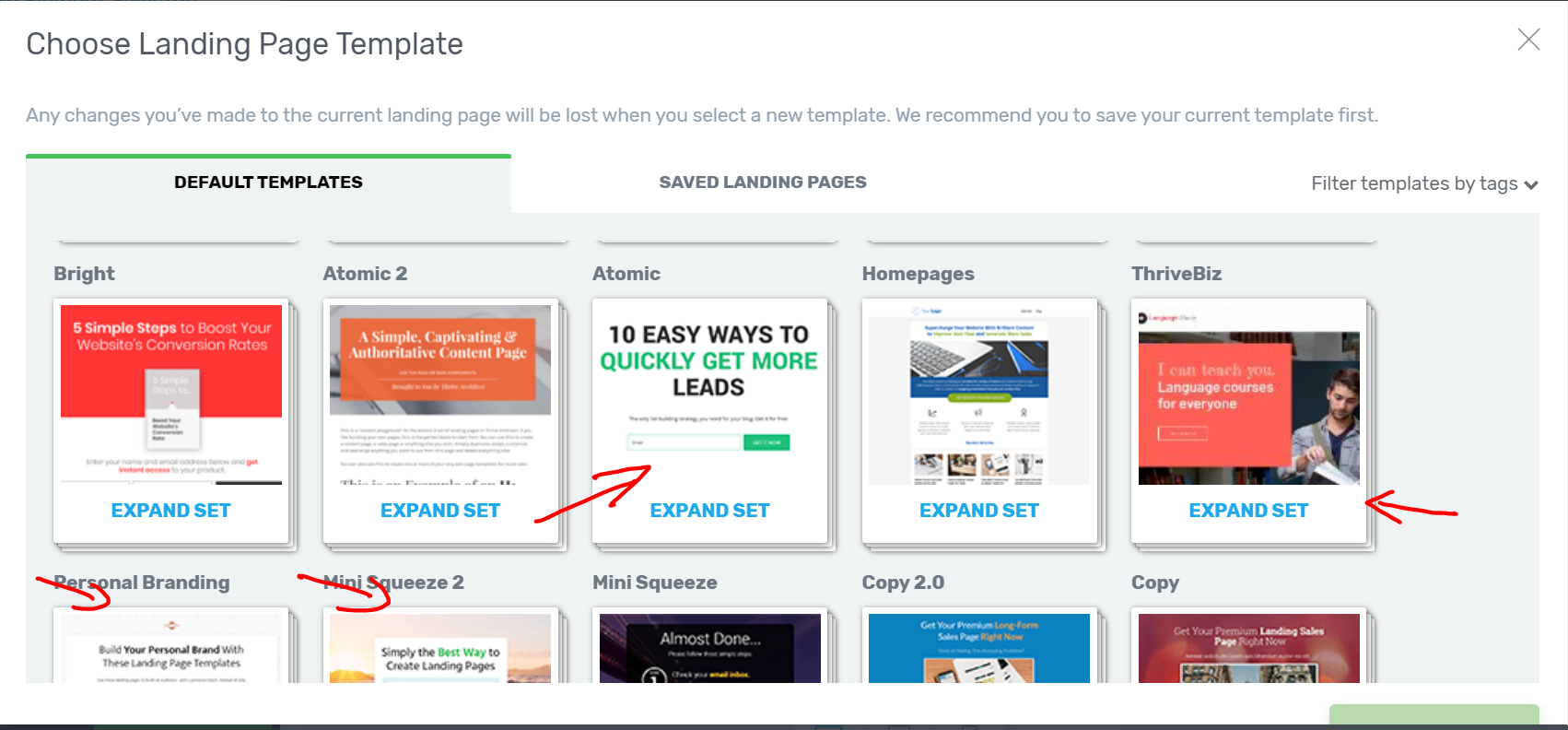
You can pick from hundreds of landing page templates below. These templates include categories like business, consultancy, webinar, lead-capture and bridge funnels.
See some of the examples here
That is it.
Use drag and drop features given by the WordPress theme and create the thank you page in a very similar way.
You will find your lead-capture already available with your landing page and you can find the option to edit it just like any other element on the page.
It’s super-duper simple if you are even a little bit familiar with the WordPress interface.
Advanced Features to Explore While Building Your Funnel
You will find advanced options like A/B split testing with Thrive Optimize to see which page converts better than others.
This is actually an interesting option to identify how your sales copy is working. If writing the copy is the bottleneck, you can write the sales page copy with Funnel Scripts.
It’s fun to build your first ever WordPress sales funnel and you will eventually become a master of it under the right guidance.
WordPress Funnel Cost
There are various costs associated with building a DIY WordPress funnel.
None of them are optional. Here is the minimal set of tools I used to build my funnels, with current prices:
- Domain name: a yearly fee from a registrar such as Namecheap
- Hosting: managed WordPress hosting such as WPX starts at $17.99 a month
- Thrive Suite: $299 for the first year, then $599 a year, or $149 a quarter
- Email marketing: Kit (formerly ConvertKit) has a free plan
Concluding Everything: Is WordPress Funnel for You
WordPress funnels are not for everyone. Just like any other software, it has its own limitations. There is a sharp learning curve which is not the case with ClickFunnels.
Furthermore, WordPress updates will annoy you every third day and you can end up beating your head.
I found most WordPress plugins are full of bugs and if you are a beginner in WordPress, better go for the alternative.
No matter what, it’s the skill and not the tools which will truly make you a great marketer and entrepreneur.
FAQ
Can you build a sales funnel on WordPress?
Yes. A domain, hosting, a funnel page builder such as Thrive Architect, an email tool and a checkout cover every stage of a basic funnel on WordPress.
What are the stages of a sales funnel?
A simple funnel moves people from a traffic source to a landing page, where an opt-in form captures the lead. Email follow-up builds the relationship, and a sales page makes the offer.
What is the best WordPress sales funnel builder?
Thrive Suite was my pick because it bundles a page builder, opt-in forms, A/B testing and a course plugin. OptimizePress is a good alternative if you need a built-in checkout for digital products.
Is a WordPress funnel cheaper than ClickFunnels?
It usually is, at least in the first year. Thrive Suite costs $299 for year one and renews at $599, while ClickFunnels costs $97 to $297 a month.
The Letter
Get the next article in your inbox.
What I am building, as it happens. The experiments, launches and numbers behind my own one-person business, including what did not work.
The tools, tested before I recommend them. Short notes on the platforms I try for selling courses, running a community and sending email, before they become full reviews.
The inner side of the work. Ideas on focus, meaning and energy for solo founders who want a business that feels as good as it performs.
Get The Letter in your inbox
One short email, usually weekly. You can unsubscribe any time.
Keep reading
More from Productivity.


2 comments
What an excellent article Himanshu. Thank you for saving me another $90 I was about to pay for Kartra.
I am going for WordPress as I feel comfortable using WordPress for my all blogs.
Love
Thank you for writing this Rahiya!
Yes! WordPress works like charm.