Stan Store review: there is one problem with it

Stan Store turns the single link in an Instagram or TikTok bio into a shop for courses, coaching calls, templates and memberships. More than 80,000 creators use it, by Sacra’s estimate, which makes it one of the largest creator storefronts in 2026.
A typical bio link sends a buyer to a download store, a booking tool, a course platform and an email form. Stan puts all of it on one mobile page.
If you sell from your bio, you have probably watched a follower tap through three screens, hit a login wall and vanish before paying. Stan was built for that exact moment.
But for a lot of creators, the convenience comes bundled with a trade the pricing page doesn’t spell out. It tends to surface months later, once the store makes real money.
So the question is, is Stan Store a good place to build a business, or only a good place to start one?
I went through Stan’s fee schedule, its help center and its 18-page terms of service to find the answer.
Quick verdict: 7/10. Stan sells digital products from a bio link with less friction than the alternatives compared below. It charges 0% platform fees and starts at $29 a month.
In exchange, Stan creates and manages your Stripe account, keeps your store on a stan.store address and gives your paying members no documented route out. It suits low-ticket products and calls. Recurring memberships belong somewhere you control.
Affiliate disclosure: Some links on this page are affiliate links. If you buy through them, I may earn a commission at no extra cost to you. I will appreciate if you use them.
What Stan Store is and who it’s built for
Stan Store is a link-in-bio storefront from Find Community, Inc., which trades as Stan. John Hu and Vitalii Dodonov founded it in 2020.
In May 2025, Steven Bartlett took a co-owner stake that Prolific North reported as worth tens of millions. Sales processed through the platform had passed $250 million by then.
The product is one mobile page with stacked product cards. A card can hold a digital download, an online course or a coaching call booked through Zoom or Google Meet.
Webinars, recurring memberships, a community, lead magnets and plain external links fit the same format. Stan’s homepage showcases a business coach, a fitness coach, a social media coach and a real estate coach, all selling to followers they built on social media.
That separates it from Gumroad’s Discover section or Whop’s marketplace, where a product can reach strangers.
What Stan Store gets right
A buyer taps the bio link, taps a product and pays on the same screen. There is no customer account to create and no separate cart page.
The builder works like editing a phone screen: pick a theme, add a header image, then stack products. Someone with a finished PDF and a booking calendar can be live the same afternoon.
Stan AutoDM is Stan’s Instagram comment-to-DM tool. You choose a keyword and ask followers to comment it. Stan then sends each commenter a DM with your link, and tracks sends, opens, clicks and purchases.
It covers the basic keyword flow many creators otherwise build in ManyChat. The two can’t share an Instagram account, because Stan requires disconnecting ManyChat before AutoDM works.
As a ManyChat user, I’d keep ManyChat for anything with branching. Stan’s version has no multi-step flows or quizzes yet.
Stan holds a 4.7 rating from 2,202 Trustpilot reviews, a profile it claimed in April 2022 and backs with a paid Trustpilot subscription. Trustpilot’s summary of recent reviews singles out fast, patient support replies.
The course builder covers modules, lessons, drip schedules and downloadable files, with completion rates per student. Stan’s setup guide lists no quizzes or certificates, so it fits mini-courses better than certification programs.
The community feature is a simple feed with posts, resources and an iOS app for members. Admins still manage everything from a browser. The feed has no points, levels or member directory either.
If community is the main product, Skool does far more with gamification and discovery. I run my own community on Skool.
Stan Store pricing: Creator vs Creator Pro
Stan’s pricing is two plans with no free tier. Creator costs $29 a month or $300 a year, which works out to $25 a month. Creator Pro costs $99 a month or $948 a year, about $79 a month.
A 14-day trial covers either plan. You can start selling during the trial once Stripe or PayPal is connected.
Creator includes the storefront, unlimited courses, bookings, recurring memberships, community, lead magnets, analytics and AutoDM. For a coach selling calls and a few downloads, that’s the full toolkit.
Creator Pro adds the tools that raise order value, plus the ones that let you email your list:
- payment plans, discount codes and limited-quantity offers
- upsells, order bumps and funnels of up to 20 products
- Stan Payments, Afterpay and Klarna
- affiliate management for people who resell your products
- email broadcasts and automated email flows
- Meta, Google, Pinterest and TikTok pixels
Stan also caps manually imported contacts at 5,000 per store, across all lists combined. A trial account can import only 10.
Contacts gathered through your own Stan products don’t count toward that cap. A creator bringing a 12,000-person list from another tool would still hit the limit on the first upload.
A $17 order bump taken by one in five buyers across 20 monthly sales brings in about $65 after Stripe fees. That nearly covers the $70 gap.
Payment plans open a $500 program to more buyers: four payments of $125 reach people who can’t commit $500 at once.
Both plans are open on the 14-day Stan Store trial. Stan says cancelling within those 14 days avoids any subscription charge.
Stan Store fees: what 0% leaves out
Stan takes 0% of each sale. The per-sale fees come from Stripe or PayPal, which Stan lists in its help center.
For a US creator, a standard card sale costs 2.9% plus $0.30. A buyer from another country adds 1.5%. Recurring payments carry another 0.5%.
UK sellers pay 1.5% plus £0.20 per standard sale. Australian sellers pay 1.75% plus A$0.30.
Afterpay costs 6% plus $0.30. Klarna sits at 5.99% plus $0.30, so offering buy now, pay later on a $300 course costs about $18 per sale. PayPal sales cost 3.49% plus a fixed fee.
Each cash-out from a Stan-managed Stripe account also costs 0.25% plus $0.25, with a $1 minimum. Selling in a currency different from your Stripe account’s currency adds another 1%.
A creator selling a $47 template 20 times a month on the Creator plan pays this:
- Revenue: $940
- Stripe fees: $33.26 (20 sales at $1.66 each)
- One monthly cash-out: $2.52
- Stan subscription: $29
- Total cost: $64.78, or 6.9% of revenue
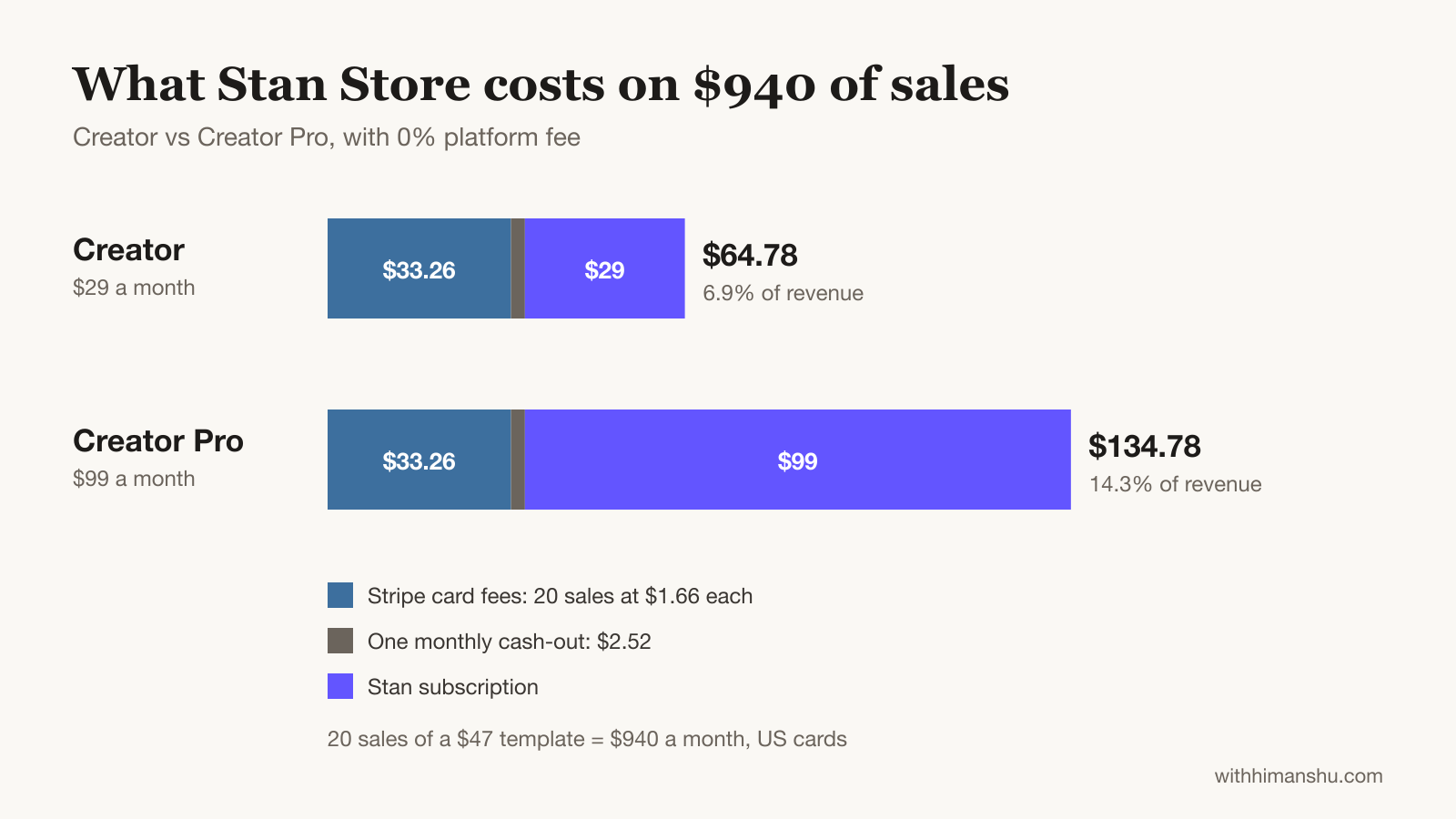
On Creator Pro, the same month costs $134.78, or 14.3% of revenue. Weekly cash-outs cost about $4 a month instead of $2.52, because each smaller payout hits the $1 minimum.
Stan calculates sales tax through Stripe Tax for sellers in the US, Canada, the UK, Australia, New Zealand, Switzerland, Norway and the EU. Stripe has to be connected, so a PayPal-only store can’t use it.
The one problem: Stan holds your money, your address and your members
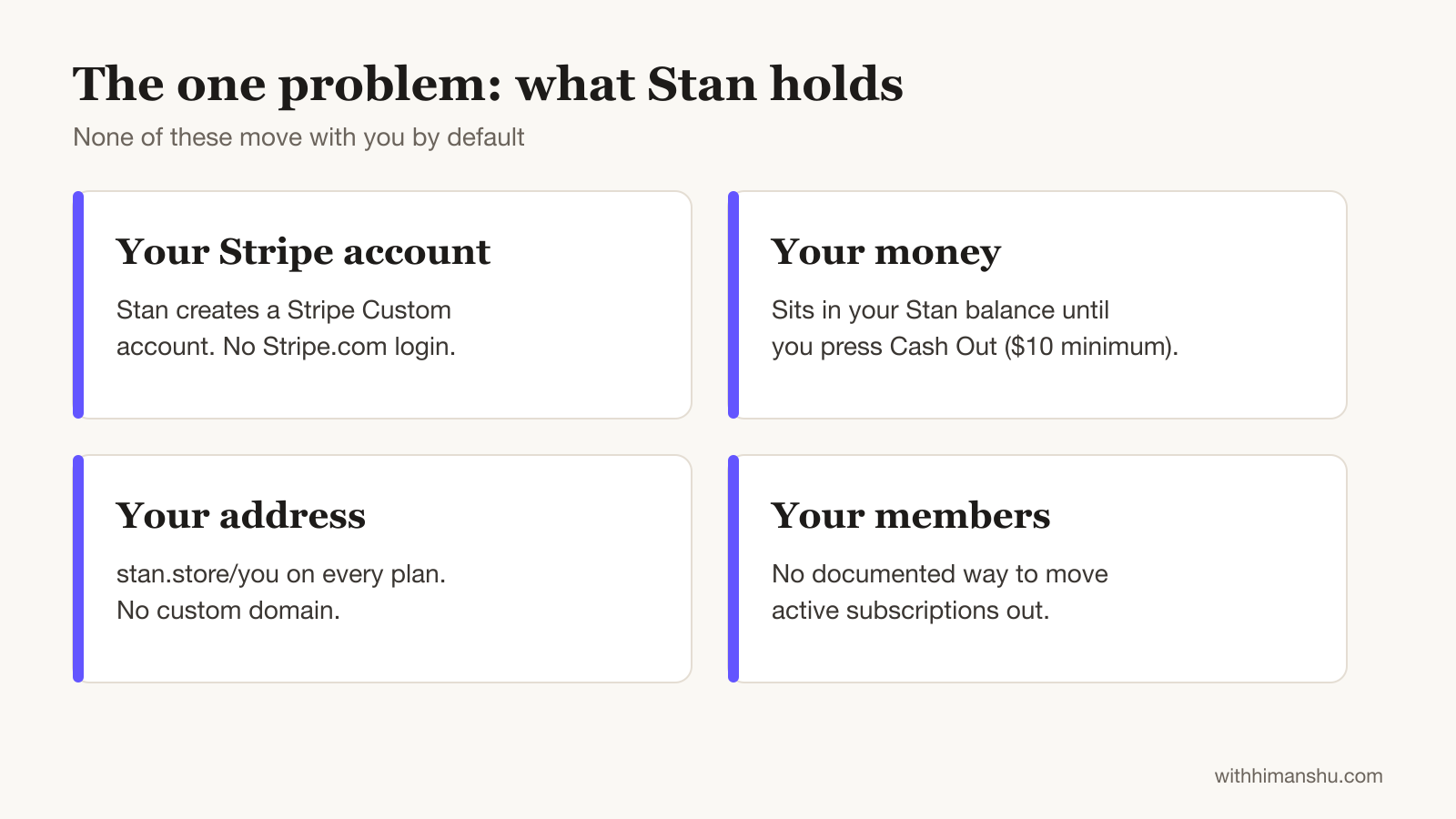
Stan holds the payment account, the web address and the subscriber relationships. By default, none of them move with you.
Your Stripe account is a Stan account
When you connect Stripe, Stan doesn’t link the Stripe account you may already have. It creates and manages a new Stripe Custom account through its own setup flow.
You can’t log in to that account on Stripe.com or in the Stripe app. Stan’s help center says Stripe support sends Custom account holders straight back to Stan.
Bank details and identity checks run through Stan’s dashboard as a result. Stan also states it can collect funds from your connected Stripe account to recover refunds or correct errors.
Creators who joined before August 1, 2023 sit on Stripe Express instead, which gives them a Stripe login. Stan is also testing direct connection of an existing Stripe account, open only to a share of new creators who onboarded on mobile web after May 1, 2025.
Stripe Custom accounts cover around 40 countries, and India isn’t on the list. Indian creators can only take payments through PayPal on Stan.
Cash-outs happen on Stan’s schedule
Money from a sale takes 2 to 7 business days to clear in the US, and up to 7 for international creators. After that, it waits in your Stan balance until you press Cash Out, because Stan offers no automatic payouts.
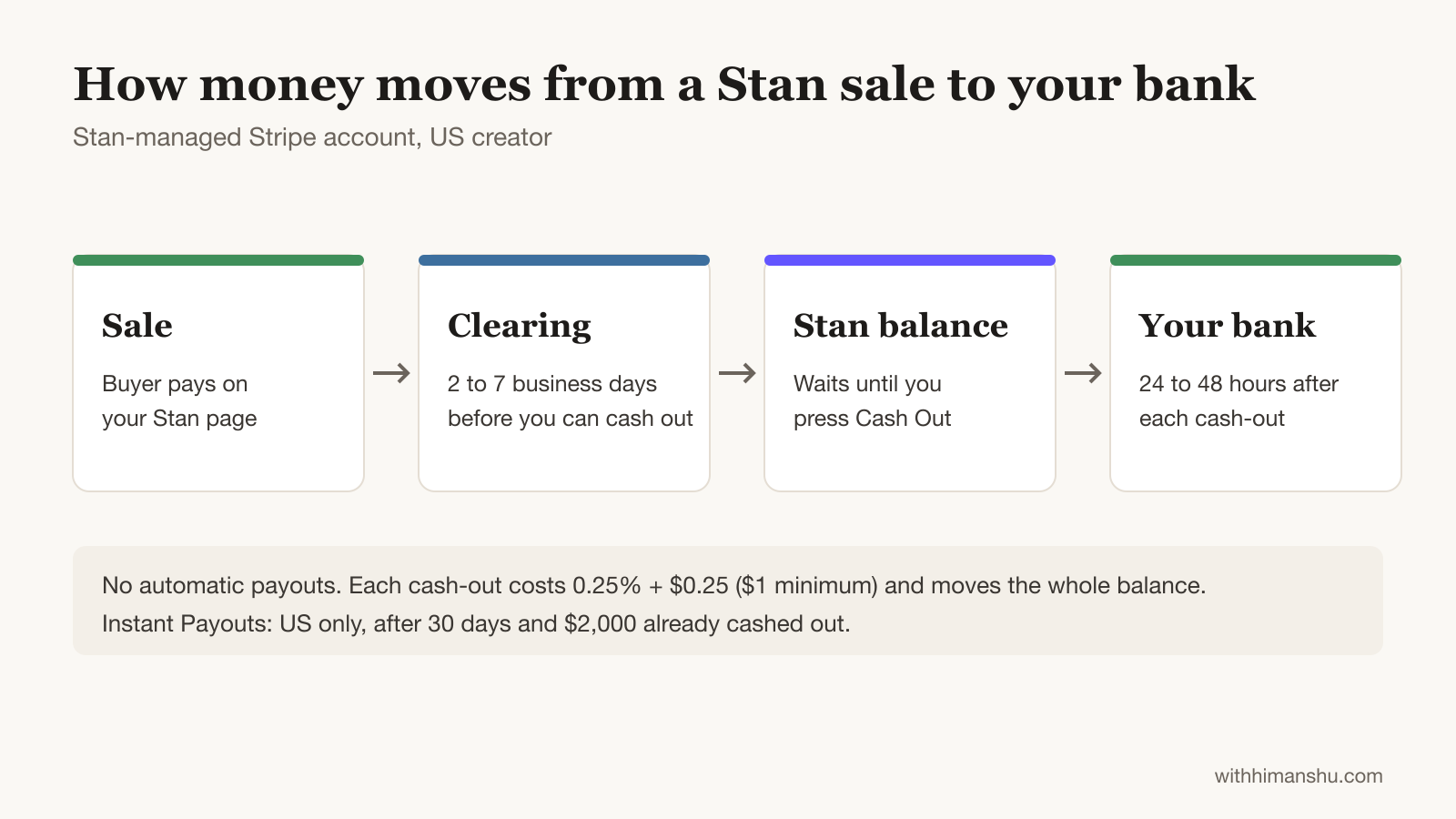
Each cash-out must cover the entire available balance, with a $10 minimum. The transfer reaches your bank within 24 to 48 hours.
Instant Payouts exist for US creators only. The requirements are a 30-day-old account, an eligible bank and $2,000 already cashed out the normal way. Stripe can still refuse access.
Your address stays stan.store/you
Stan doesn’t support custom domains on any plan. Your store, landing pages and product links all live at stan.store/yourusername. Forwarding a domain you own to that address is the only workaround.
A redirect keeps your own domain on business cards and slides. Every visit still ends on Stan’s URL, though.
Product links you share directly point at stan.store as well. Backlinks, search visibility and old social posts all build up around that address. After a move, each of them points at a closed store.
Your subscribers can’t follow you out
Stan’s help center documents no way to move active subscriptions to another platform. The only documented path is cancelling them one by one.
Cancelling your own Stan plan doesn’t stop your members’ billing either. Stan states that customers keep getting charged until you cancel each membership manually, even after you delete the product.
Shutting down a community means removing each member by hand, because the community survives when you delete its product.
Stan documents a transaction CSV from the Income tab, but not an export of the contact list itself.
The terms let Stan freeze the balance
Section 12 of Stan’s terms, revised November 25, 2025, covers termination. Stan can suspend or end an account at its sole discretion, for any reason, without prior notice.
The clause names suspension of “any part thereof including restricting your access to funds”. Section 14 adds that Stan can freeze payments to and from an account during an ownership dispute.
On a platform that connects to your own Stripe account, a suspension locks you out of the software while the payment account stays yours. On Stan, the same clause also reaches the balance in the Stripe account Stan manages.
How to use Stan Store without getting stuck
These setup choices keep Stan’s checkout while cutting the cost of a later move:
- Connect PayPal alongside Stripe. PayPal sales settle in an account you log into yourself. Each sale costs more, at 3.49% plus a fixed fee.
- Cash out on a fixed day each week. The $1 minimum payout fee costs about $4 a month. In exchange, the float rarely holds more than two weeks of sales.
- Buy a domain and forward it to your store. Printing your own domain everywhere means a future move only needs the redirect changed.
- Capture emails into a tool you own. An external link card can send lead-magnet sign-ups to your own email list software. The list then never depends on Stan’s export options.
- Keep core memberships on a dedicated platform. A membership site on your own Stripe account can bill members while a Stan card links to it, which protects the recurring revenue that pays your rent.
- Email support about exports in month one. A message to friends@stanwith.me can confirm which customer data leaves with you before there’s much at stake.
Stan Store pros and cons
Stan Store vs Linktree, Gumroad, Payhip, Whop, Podia and Shopify
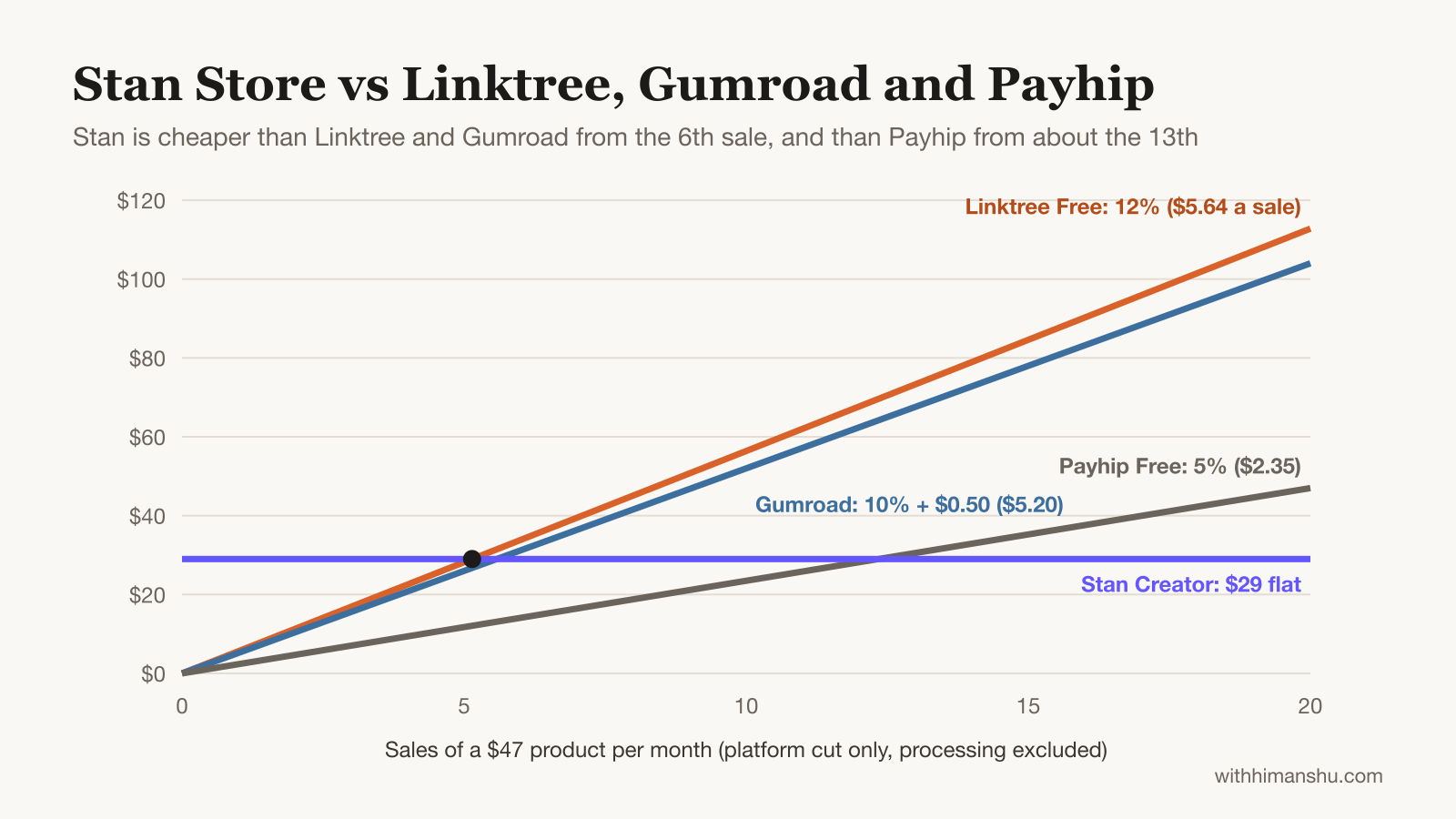
Linktree: Linktree can sell products now, but it takes 12% of each sale on the free plan and 9% on Starter and Pro. Only the $35 Premium plan drops that cut to zero. On a $47 product, Linktree’s free plan costs $5.64 a sale, so Stan’s $29 is cheaper from the sixth sale.
Gumroad: Gumroad charges per sale instead of a subscription, at 10% plus $0.50 on direct sales, with card processing on top. On a $47 product, Gumroad’s own cut is $5.20 a sale. Since both platforms pass on processing, Stan’s flat $29 becomes cheaper from about the sixth sale each month. Gumroad’s Discover section can still bring buyers Stan never would.
Payhip: Payhip’s free plan takes 5% per sale with no monthly fee, plus processing. That undercuts Stan’s $29 until sales pass roughly $580 a month, so it suits a creator testing a first product.
Whop: Whop charges per transaction and adds a marketplace that can surface products to strangers. Having sold on Whop for over two years, I’d call discovery its real edge over Stan. Whop processes payments itself, so it solves the reach problem rather than the ownership one.
Podia: Podia costs more, at $49 a month on Mover with a 5% transaction fee, or $99 on Shaker with none. That price includes a website, a blog, email marketing and a custom domain.
After eight months hosting courses on Podia, and an earlier stint on Teachable, I’d put a course business that wants its own address on Podia rather than Stan.
Shopify: Shopify suits physical products. Stan only supports them through a workaround that collects addresses at checkout, while you manage shipping and stock yourself.
Is Stan Store legit? What the complaints say
Yes, Stan Store is legit. It’s a US company with a $5 million seed round, Steven Bartlett as co-owner and an estimated $40 million in annual recurring revenue.
That revenue estimate comes from Sacra, as of April 2026. Stripe and PayPal process every payment.
On Trustpilot, recent reviews mostly praise support speed and simple setup. Stan’s own list of most-requested features includes custom domains, several price tiers under one product and a single customer portal for buyers.
Who should use Stan Store, and who should skip it
Stan Store earns a 7/10. Among the link-in-bio tools compared here, it sells from a bio link with the least friction. The ownership trade keeps it from scoring higher.
Stan is a strong pick if you:
- sell templates, guides, mini-courses or calls to an Instagram or TikTok audience
- have no website and don’t plan to build one
- want buy now, pay later or order bumps without stitching tools together
- earn most of your revenue from one-off sales rather than subscriptions
Skip it, or use it only as a front door, if you:
- earn most of your income from recurring memberships
- want your own domain building search traffic and brand value
- need to import an email list larger than 5,000 contacts
- sell physical products
- live outside the countries Stan’s Stripe Custom accounts support, which leaves PayPal as your only processor
For the first group, a two-week run on Stan Store shows quickly whether your audience buys from a one-page store.
Try Stan Store free for 14 days
Stan Store review FAQ
Is Stan Store free?
No. Stan has no free plan, only a 14-day trial of Creator or Creator Pro. Creator then costs $29 a month. Creator Pro costs $99. Affiliate-only accounts are free, but they can’t host a store.
Is Stan Store worth it?
For a creator making one-off sales from social media, yes. At $29 a month with no platform cut, it pays for itself within a handful of sales. For a business built on recurring memberships, the lock-in outweighs the convenience.
Does Stan Store take a percentage of sales?
No. Stan’s cut is 0%. Card fees still apply at 2.9% plus $0.30 for a US Stripe sale, or 3.49% plus a fixed fee through PayPal.
Can I use my own domain with Stan Store?
No. Every store stays at stan.store/yourusername on every plan. A domain you own can forward to your Stan Store, but visitors land on Stan’s address.
Can I connect my existing Stripe account to Stan?
Usually not. Stan sets up a new Stripe Custom account that you manage only inside Stan. A test lets a share of new creators who onboarded on mobile web after May 1, 2025 connect an existing account.
How long do Stan Store payouts take?
Sales take up to 7 business days to clear. After a manual cash-out, the money reaches your bank within 48 hours. Stan won’t pay out balances under $10.
What happens to my subscribers if I cancel Stan?
Their billing continues. Cancelling your Stan plan leaves every customer membership active, so you cancel each one yourself. You can still cash out a leftover balance afterwards. Past course buyers keep access as long as the course stays saved.
Can I get a refund on my Stan subscription?
Sometimes. The subscription has to be cancelled first. The charge must also fall within the last 30 days and cover one billing period. Stan doesn’t refund for non-use.
Is Stan Store better than Linktree?
For selling, yes. Linktree’s free plan takes 12% of every sale, while Stan takes nothing beyond its subscription. For a free page of links with nothing to sell, Linktree is enough.
Is Stan Store better than Gumroad?
For creators with steady sales, usually. Stan’s flat $29 beats Gumroad’s 10% plus $0.50 once a $47 product sells about six times a month. Gumroad still wins at very low volume and for marketplace discovery.
Can I sell physical products on Stan Store?
Only with a workaround. A Custom Product with address fields captures the shipping details. Shipping, tracking and restocking stay with you.
The Letter
Get the next article in your inbox.
What I am building, as it happens. The community experiments, launches and numbers behind my own work, including what did not work.
The tools, tested before I recommend them. Short notes on the platforms I try for running communities, courses and email, before they become full reviews.
The inner side of the work. Ideas on focus, meaning and energy for creators who want a business that feels as good as it performs.
Get The Letter in your inbox
One short email, usually weekly. You can unsubscribe any time.
Keep reading
More from Monetization.