How to Monetize a Discord Server in 2026 Without Losing the Members Who Built It

Discord is the best free home for a community that talks all day. By Discord’s own count, more than 90 million people open it daily. Voice and text are instant, and a server costs nothing to run however large it gets.
Gaming, trading, crypto, developer and fan communities already live there.
If you run one, you moderate, answer questions and keep the place alive every day, and the server pays you nothing for it.
But getting paid for a Discord server is harder than it should be. Discord’s own subscriptions only work if you live in the US, and even then they take about 15% of every payment.
Third-party tools each take a slice, and some of them leave you removing lapsed members by hand. Moving everyone to another platform risks losing the people who made the server worth joining in the first place.
I run a paid community on Skool and have sold Discord-gated products through Whop for over two years, so I priced every route from each platform’s own terms.
Affiliate disclosure: Some links on this page are affiliate links. If you buy through them, I may earn a commission at no extra cost to you. I will appreciate if you use them.
Four ways to monetize a Discord server
You can monetize a Discord server four ways, and you keep roughly 84% to 94% of what members pay depending on which one you pick.
Discord Server Subscriptions: fees, eligibility and payouts
Server Subscriptions are Discord’s built-in way to charge members. They cost about 15% of every payment, and only owners based in the US can switch them on.
You sell tiers from $2.99 to $199.99 a month, straight from your server’s profile. Members pay inside Discord and roles unlock on their own, with nothing else to install.
There is no member minimum and no server age requirement anywhere in Discord’s eligibility page. A “100 members and 90 days” rule gets repeated online, but it is not in Discord’s documentation.
Discord’s Creator Revenue FAQ states that Server Subscriptions are not available outside the United States. The setup asks for a US bank account and a US ID through Stripe, so owners in the UK, India, Brazil or anywhere else are shut out.
Setup lives in Server Settings. Once Community is enabled, the Monetization section walks you through Stripe onboarding, then you create tiers and attach a role to each one.
Discord’s Monetization Policy bars gambling and several other content categories, so a sports betting server should read it before relying on this route.
Of that 15%, processing takes 6% on desktop and browser checkout, then Discord takes a 10% platform fee on what remains.
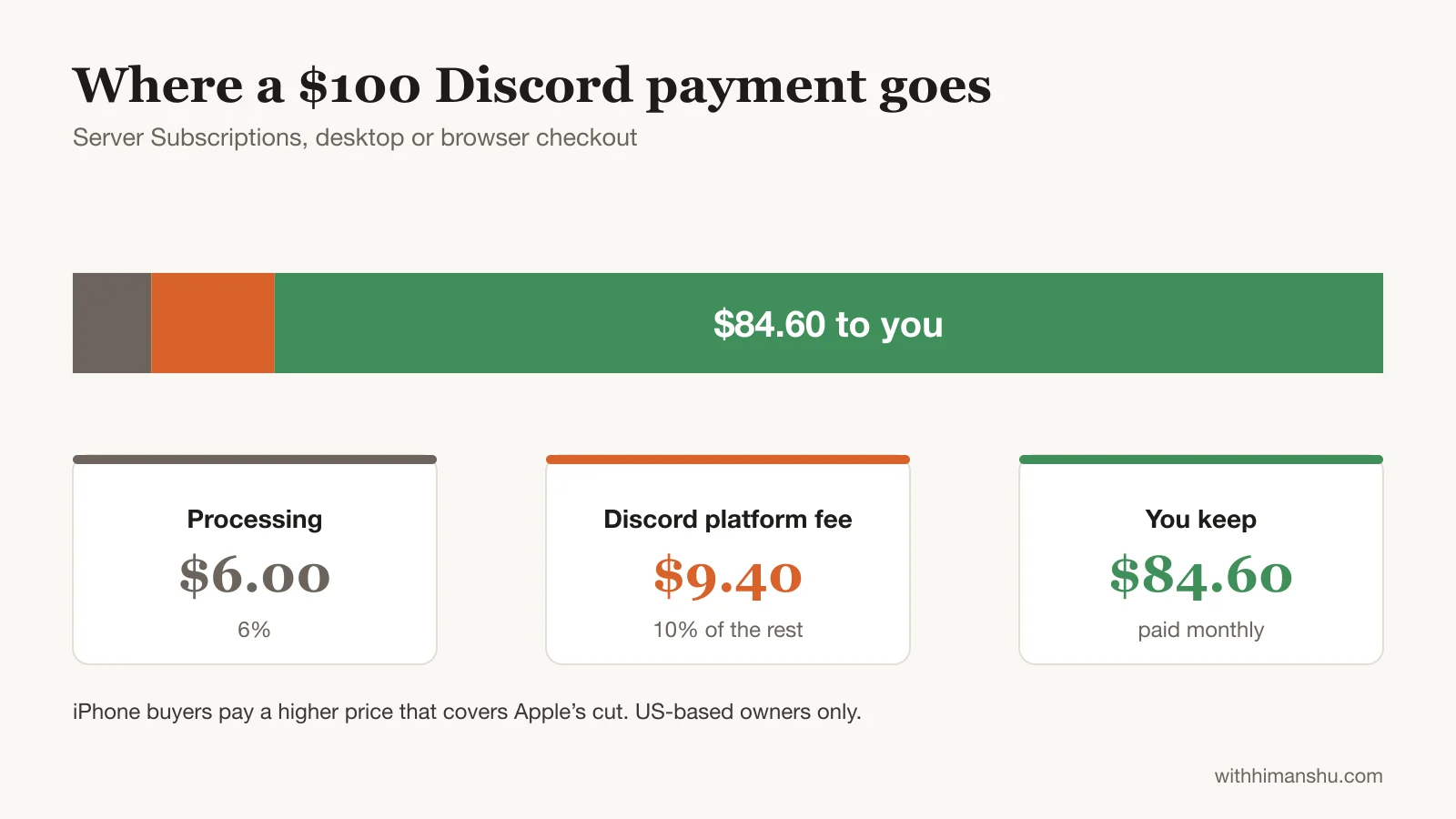
On iPhone, Discord adds Apple’s cut, 30% or 15% on retained renewals, to the price buyers see. Your margin stays the same, but the same tier costs them more than it costs desktop members. Android users cannot buy a subscription in the app at all.
Payouts arrive monthly, within 45 days after the end of the month, and only once your balance passes $100 the first time and $25 after that. A server earning $60 a month crosses $100 in its second month, and that first payout lands up to 45 days after the month ends.
Discord collects and remits transaction taxes itself, a real advantage over tools that leave sales tax to you.
For a US-based fan community that sells nothing beyond access, this is the least friction you will find.
Can you run a paid Discord server without moving anyone?
Yes, and for owners outside the US it is the default. A membership tool sits in front of the invite link, takes payment and hands out a role.
Your members stay exactly where they are. When a member stops paying, most of these tools take the role back.
LaunchPass, a paywall tool built for Discord, Telegram and Slack, is the cheapest way in. Its Basic plan is free with no transaction fee, so you pay only Stripe’s 2.9% + 30¢. The Premium plan at $29 a month adds 3.5% and more customization.
You connect your server, pick the role that paying members receive, and LaunchPass removes that role or kicks the member when a subscription lapses.
Patreon suits creators who already have patrons. Each tier maps to a Discord role, Patreon’s bot assigns it, and a declined payment removes it. Creators who launched their page after 4 August 2025 pay 10% plus card processing, the most expensive option in this group.
Memberful costs $49 a month plus 4.9% and connects to Discord on every plan. It removes lapsed members from the server automatically and supports a separate trial role. On fees alone it never beats LaunchPass, so the case for it rests on the trial role and its newsletter and website tools.
Nas.com, which used to be Nas.io, positions itself for creators who also run WhatsApp or Telegram groups. The free plan ended on 31 March 2026, so Pro now starts at $29 a month plus 2.9% on digital sales. The Discord connection grants one role to members who sign up through your Nas portal.
The paywall route also fits when your members already pay you somewhere else, or when you want to charge for one channel without changing anything about the server. It loses when you want the tool to bring you buyers, because none of these four is built for that.
Selling Discord access through Whop
Whop is a marketplace and checkout platform for digital products, and it treats your Discord server as one of them. You create a listing, attach the Discord app, map it to a role, and buyers check out on a page Whop hosts.
The Whop Bot then grants the role, watches the subscription, and revokes the role when a payment fails.
I have sold through Whop for over two years, and the role automation has never needed my attention, provided the bot’s role sits at the top of your role hierarchy. A past-due role gives members a grace period before the kick, instead of removing someone the hour their card declines.
Processing is 2.7% + 30¢ on domestic cards. Products with the Discord app attached pay an additional platform fee, 3% in my experience, though Whop’s public fees page does not list a fixed rate.
International cards add 1.5% and currency conversion 1%. Bank payouts cost $2.50, or 4% + $2.50 if you want the money instantly. Whop also offers tax calculation and remittance for an extra 2%, which matters once you sell across borders.
The Whop marketplace lists your community where buyers browse. Since May 2025, Whop takes nothing extra on sales that come through it, so the marketplace is pure upside.
The storefront sells courses, software, files and coaching too. A trading server can sell Discord access alongside an indicator and a course without a second tool.
Because of that community layer, in my experience sellers keep the real conversation in Discord and use Whop for checkout and roles.
Discord vs Skool: moving your community off Discord
Conversations in a busy server scroll away within hours. There is no course area, no progress a member can see, and no record of who has contributed. In a coaching or learning community, paying members forget why they joined.
Skool, a community platform built around a feed, a classroom and a leaderboard, fills exactly that gap. Posts stay findable, courses sit beside the conversation, and points and levels make participation visible. Levels can unlock content, so members have a reason to come back that has nothing to do with you posting.
Pricing is $9 a month plus 10% + 30¢ per payment on Hobby, with card processing included. Pro is $99 a month plus 2.9% + 30¢, and it becomes cheaper than Hobby once the community earns about $1,270 a month.
Skool also has a Discovery page where new members find communities by category, and Skool says it funds Meta ads for communities through Growth Boost. For a creator starting without an audience, that is the strongest argument to move.
Skool has no native Discord integration, and moving usually means leaving Discord behind rather than running both.
Members have to install another app, learn another interface, and give up the live chat that made them join.
Circle and Heartbeat sit in the same category with more branding control and higher prices.
Opening the Skool community for paying members first, with the free Discord as the funnel for 30 to 60 days, works better than a hard cutover. After that window you know whether the free server still earns its moderation time.
What each route leaves you from $1,000 a month
Percentages hide the fixed plan fees, so the fair comparison is in dollars. Take a server with 100 paying members and $1,000 a month in revenue, paid by card on desktop:
- LaunchPass Basic: about $941
- Whop: about $913
- Nas.com Pro: about $883
- Skool Hobby: about $861
- Discord Server Subscriptions: $846
- Memberful: about $843
- Skool Pro: about $842
- Patreon: about $841
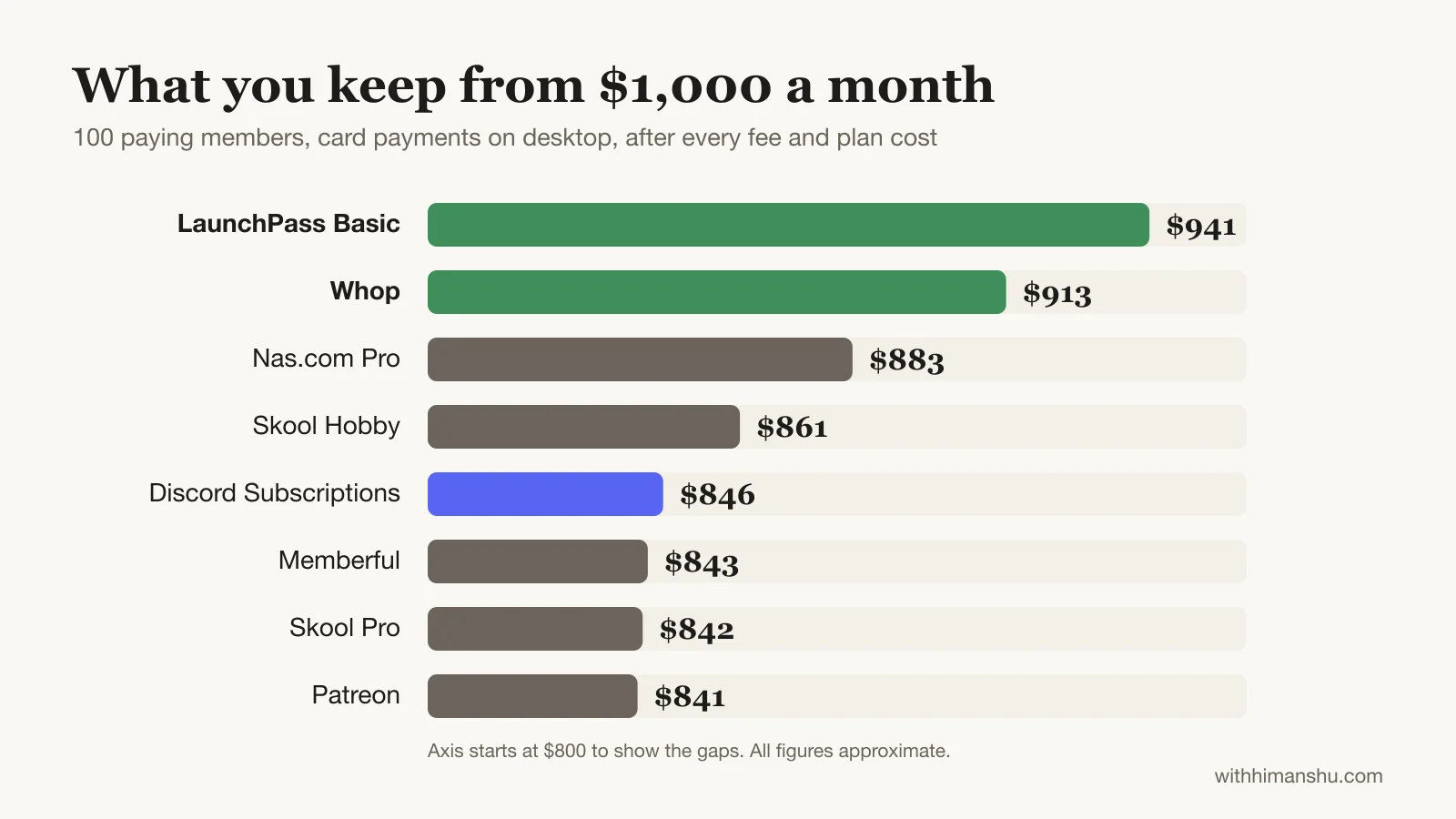
The two tools with no plan fee lead by $30 to $100 a month. That gap widens for a smaller server, where a $29 or $49 plan eats a bigger share, and narrows for a larger one.
Whop adds 1.5% on international cards and 1% on currency conversion, and Stripe-based tools typically carry a similar surcharge.
Other ways to make money on Discord
A subscription is the base, and the same members will buy more from you once they trust the paid room.
One-time products. A guide, a template pack or lifetime access to an archive sells well to members who will not commit monthly. Discord’s Server Shop handles these at the same fee split as subscriptions, and Whop sells them from the page that already holds your membership.
Sponsored announcements. Brands in your niche pay for a labelled post in your announcements channel. A one-page media kit with your member count, daily active members and niche is usually all they ask for.
Keeping sponsors out of the paid rooms protects what members pay for, and Discord’s Monetization Policy bars servers whose main purpose is third-party promotion.
Coaching and calls. A higher tier with a monthly group call, or one-off sessions sold separately, suits servers where members keep asking you the same question in DMs.
Affiliate recommendations. Members already ask which tools you use. A pinned resources channel with your affiliate links answers that once and earns on every sign-up.
Turning a free server into a paid one without emptying it
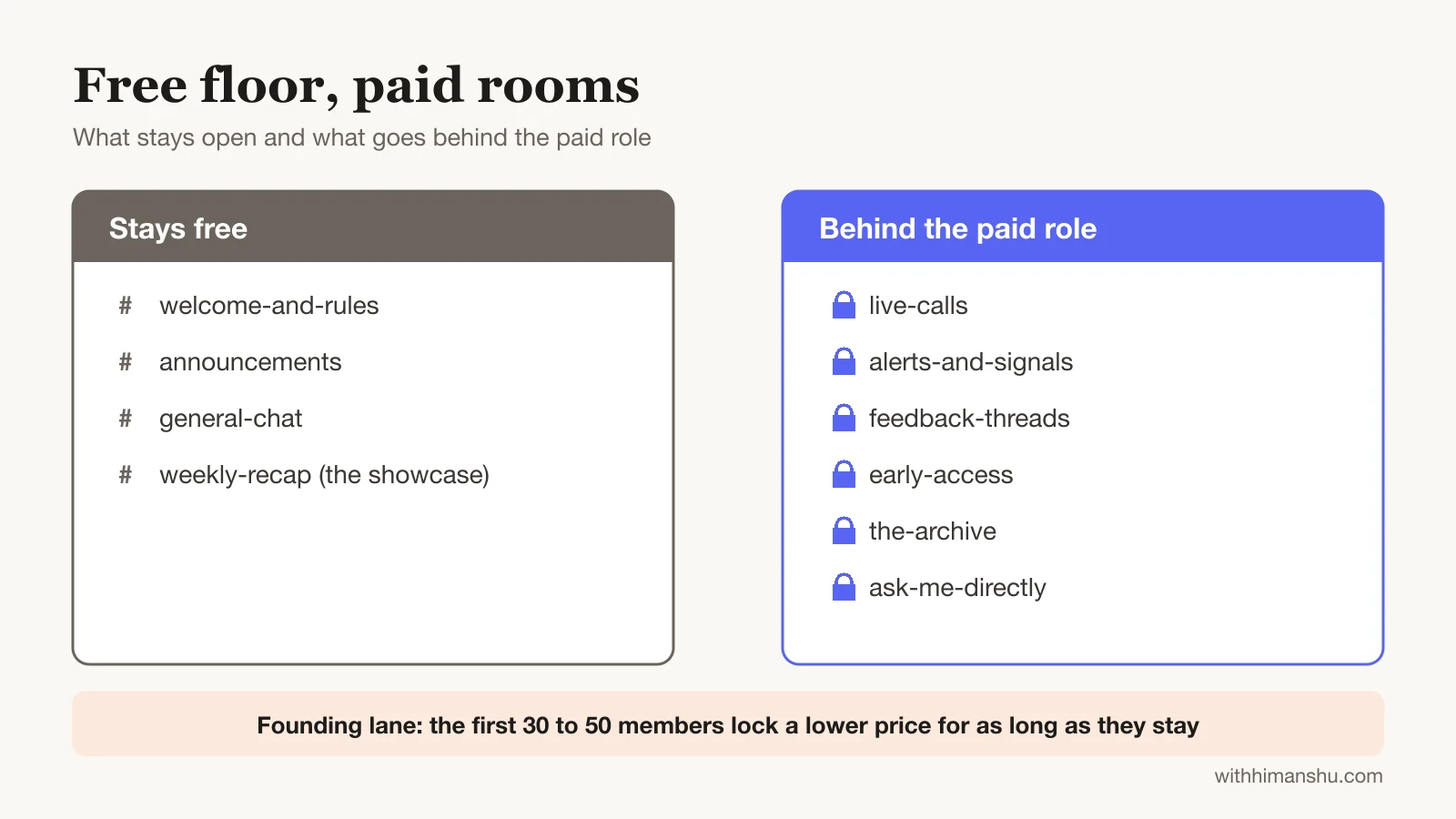
Members who have been there for a year can feel a paywall as a betrayal, and the owner feels every leave notification. The servers that survive the switch keep a free floor and sell the rooms above it.
Stays free: the welcome and rules channels, one general chat, and announcements. One more free channel shows what the paid area produces, such as a weekly recap, a pinned result or a clip.
Goes behind the role: the channels where the real value happens. Live calls, trade alerts, feedback threads, early access, the archive, and direct access to you.
Founding lane: a lower price for the first 30 to 50 members who pay, locked for as long as they stay subscribed. Existing active members get this offer first, by name, before anyone else hears about it.
On pricing, peer communities built on connection, Q&A and accountability sit in the $9 to $49 range. One tier is enough to launch. A second, higher tier makes sense only once you have something that costs you time per member, such as a monthly call or a review of their work.
Starting at the bottom of the band and raising it for new members every 50 sign-ups is easier than cutting a price later.
Launch sequence, in order
- Build the paid channels and fill them for two weeks before anyone pays, so the first members walk into a room with content in it.
- Message your 20 most active members individually with the founding offer. Their names in the paid channels sell the upgrade to everyone else.
- Announce publicly once at least ten people are inside.
- Offer a seven-day trial where the tool allows it. Discord’s own subscriptions offer one day or one week, and Memberful has a dedicated trial role. One day is too short to form a habit.
- Configure the past-due role or grace period before the first renewal date, not after the first failed payment.
A few percent of free members tend to convert in the first month, depending on how much of the value they could already see. In my experience the showcase channel on the free side does more for conversion than the launch post.
Why paying members leave a Discord, and what keeps them
In my experience, a paid Discord loses members mostly because they stop opening the app. Little in Discord reminds a quiet member what they are paying for. The channel fills up without them, the notifications get muted, and the renewal receipt becomes the moment they remember to cancel.
After three years running a paid community, the members I see stay are the ones who got something in the first week and have a reason to come back on a fixed day.
Discord makes the weekly event easy and the other two harder than Skool does, because it has no paid-member onboarding and no progress markers. If you stay on Discord, those come from your moderators and your calendar.
Which Discord monetization route fits your server
A US-based fan or hobby server that sells only access: Discord’s own subscriptions. Nothing to install, and members never leave the app.
Anywhere else in the world, with access as the only product: LaunchPass Basic. If your supporters already pay you on Patreon, connecting it beats asking them to switch.
Gaming, trading, crypto or sports, or more than one thing to sell: Whop. This is the route I would pick for most servers, because it is the only one that also brings buyers.
A coaching, fitness or business community that has outgrown chat: Skool. Members asking where the recording is, or newcomers unable to find the good threads, are the usual signs.
An audience split across WhatsApp, Telegram and Discord: Nas.com.
FAQ
Can you make money from a Discord server?
Yes. Discord’s own Server Subscriptions let US-based owners sell tiers from $2.99 to $199.99 a month, while Whop, LaunchPass and Patreon let owners in most countries sell role access. Beyond subscriptions, servers earn through courses, coaching, sponsored announcements and one-time products sold to members.
How much money can a Discord server make?
It comes down to paying members times price. A server bringing in $1,000 a month keeps roughly $840 to $940 after fees, depending on the tool. A few percent of active free members tend to convert, and Discord’s own tiers run from $2.99 to $199.99 a month.
How much does Discord take from server subscriptions?
About 15% on desktop. Processing takes 6%, then Discord takes a 10% platform fee on the rest, per its Monetization Terms. iPhone buyers see Apple’s cut added to the price, and payouts need a $100 balance the first time.
Can I monetize a Discord server outside the US?
Not with Discord’s own subscriptions. Discord’s Creator Revenue FAQ states they are not available outside the United States. Owners elsewhere use Whop, LaunchPass, Patreon, Memberful or Nas.com to sell role access, all of which pay out in most countries.
How many members do I need to monetize a Discord server?
Discord sets no member minimum. Its eligibility requirements cover age, 2FA, a Community server, good standing and a US bank account, not server size. Third-party tools have no minimum either, though a few percent of active members tend to convert, so 300 active members might yield around ten paying.
Whop vs LaunchPass vs Patreon for a paid Discord: which is cheapest?
LaunchPass Basic is cheapest, with no plan fee and no platform fee beyond Stripe’s 2.9% + 30¢, per its pricing page. Whop charges 2.7% + 30¢ plus a platform fee on Discord-gated products, about 3% in my experience, and adds a marketplace. Patreon takes 10% plus processing for creators who launched after 4 August 2025, per its fee article.
Should I move my Discord community to Skool?
The move pays off when your members need courses, visible progress and posts that stay findable, and when the community is about learning rather than live chat. It does not pay off for gaming, trading or anything that depends on real-time conversation. Skool costs $9 a month plus 10% or $99 plus 2.9%, per its pricing page, with no Discord integration.
What happens to a member who stops paying?
It depends on the tool. Whop, LaunchPass, Memberful and Patreon remove the role or kick the member automatically when a subscription lapses. Nas.com grants the role but does not remove it, so you remove lapsed members by hand, per its Discord help article.
Do I have to pay tax on Discord server income?
Income from any route is taxable where you live, and sales tax is a separate question. Discord collects and remits transaction taxes on Server Subscriptions itself, while Whop offers tax calculation and remittance as a 2% add-on, per its fees page. On LaunchPass and Skool, sales tax handling depends on your country and payment processor.
The Letter
Get the next article in your inbox.
What I am building, as it happens. The experiments, launches and numbers behind my own one-person business, including what did not work.
The tools, tested before I recommend them. Short notes on the platforms I try for selling courses, running a community and sending email, before they become full reviews.
The inner side of the work. Ideas on focus, meaning and energy for solo founders who want a business that feels as good as it performs.
Get The Letter in your inbox
One short email, usually weekly. You can unsubscribe any time.
Keep reading
More from Monetization.