Teachable Review 2026: I Tested It for a Course Business After 6 Years

Teachable is one of the oldest and largest platforms for selling online courses. More than 150,000 creators use it to sell courses, coaching and digital downloads, with checkout, student logins and sales tax handled for them.
That convenience is why so many experts start there. You upload lessons and set a price, while Teachable runs the payment page and calculates the VAT owed on each sale. But not everything is right about this platform.
If you are choosing a home for your first course, you already know what is at stake. The platform holds your students and your revenue. Moving later means rebuilding every lesson and re-inviting every student.
In 2019, Teachable lost my trust. I was hosting my marketing program on it when some of my students couldn’t log in, and support didn’t reply for six days.
I moved that program to Podia. Today my courses and community run on Skool, which is why my Skool vs Teachable comparison leans toward community-led businesses.
I tested this platform completely and for this Teachable review, I went back six years after leaving. I opened a trial school, spoke with the Teachable team and went through dozens of live Teachable schools.
Payouts, tax handling, fees and the community feature have all changed since 2019. Most of those changes help creators. One of them, a new charge for free students, can cost a lead-magnet funnel hundreds of dollars a month.
Affiliate disclosure: Some links on this page are affiliate links. If you buy through them, I may earn a commission at no extra cost to you. If you do not want, feel free to not click on them. But I will appreciate if you use them.
Is Teachable worth it? Quick verdict (7/10)
Yes, for: experts selling paid courses, coaching or downloads to a global audience who want payments and sales tax handled for them.
No, if: community is your product, you give away free courses at scale, or you need completion certificates without paying for Growth.
Real cost: Builder at $89 a month ($69 billed yearly) with a 0% Teachable fee, plus card processing. Starter costs $39, but it takes 7.5% of every sale.
What Teachable is in 2026
Teachable is built for selling knowledge as products, not for running a community. Everything happens inside a “school” where you list products and students log in to learn.
A school sells three product types: online courses, coaching offers and digital downloads. Memberships and bundles group those products into subscriptions or packages.
The company began as Fedora, founded by Ankur Nagpal. Hotmart, the Brazilian-founded creator platform, acquired it in 2020. Teachable has run inside the Hotmart Group since.
Teachable’s 2026 releases all serve paid course delivery:
- “Create with AI” on every plan, for drafting outlines and lesson content
- iOS and Android student apps on every plan
- Teachable Payments, the rebuilt payment system on Stripe, formerly called teachable:pay
An expert whose students want lessons, quizzes and a certificate will feel at home. A creator whose members pay for conversation and accountability will need something else, for reasons covered in the community section below.
Teachable pricing and fees: better, but not ideal
Teachable sells three public plans plus a custom tier. On each one, the product cap matters as much as the price:
- Starter: $39 a month, or $29 billed yearly. 5 products, 1 admin and a 7.5% transaction fee on every sale.
- Builder: $89 a month, or $69 billed yearly. 10 products, 1 admin, a 0% transaction fee, an affiliate program and live chat support.
- Growth: $189 a month, or $139 billed yearly. 50 products, 5 admins, 0% fees, completion certificates, branding removal, bulk student imports, full Zapier access, the public API, and free subtitles and translations.
- Custom: priced through sales. It adds a dedicated success manager, a sandbox school and SLA-based priority support.
Yearly billing saves 22%. Every plan starts with a 7-day free trial and a 30-day money-back guarantee. Teachable no longer offers a free plan.
Each published course, coaching offer or digital download counts as one product. Memberships, bundles and drafts don’t.
A coach selling one flagship course, a coaching package and three templates already uses all five Starter slots.
Every plan includes 1,000 GB of video storage, with extra terabytes at $15 a month each.
Transaction fees versus processing fees
Teachable charges two separate kinds of fee. Confusing them is the easiest way to misread the price.
The transaction fee is Teachable’s own cut. It is 7.5% on Starter and 0% on Builder, Growth and Custom when you sell through Teachable Payments.
The processing fee covers the card or PayPal payment itself and applies on every plan:
- US cards: 2.9% + 30¢
- International cards: 3.9% + 30¢
- US PayPal: 3.49% + 49¢
- International PayPal: 4.99% + 49¢
- Chargebacks: $15 each
- BackOffice, an optional service that handles payouts to co-authors and affiliates: 2% to 2.8%
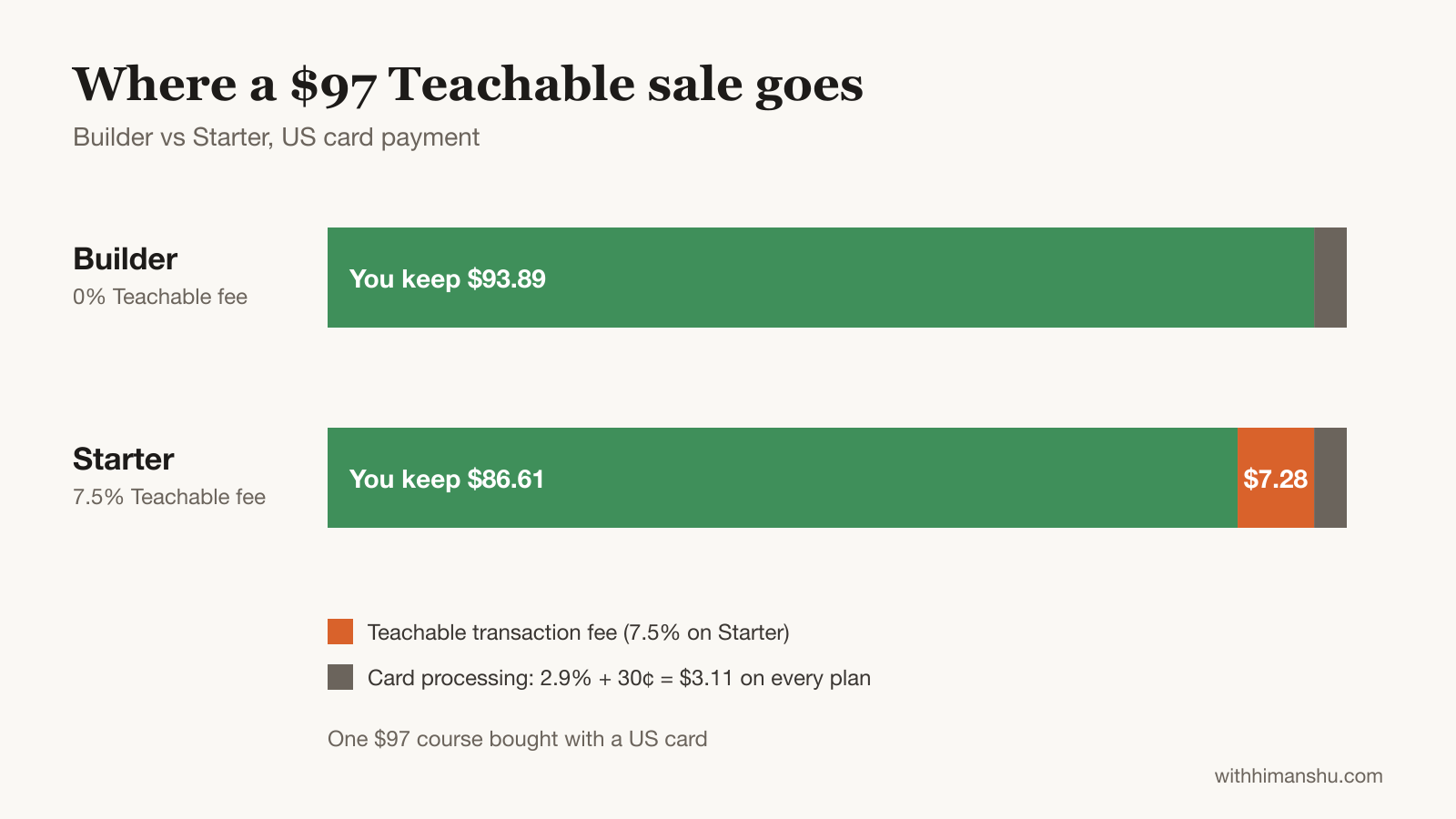
On a $97 course bought with a US card, Builder leaves you $93.89. Starter leaves you $86.61, because the 7.5% fee takes another $7.28.
US schools that connect their own Stripe account as a custom gateway pay a 2% integration fee per transaction.
What each plan really costs at two revenue levels
Starter looks cheaper until sales arrive. The monthly totals below exclude processing, which is the same on both plans:
- $500 a month in sales: Starter costs $76.50 ($39 plus $37.50 in fees). Builder costs $89.
- $2,000 a month in sales: Starter costs $189 ($39 plus $150 in fees). Builder still costs $89.
The crossover sits at about $667 a month in sales on monthly billing. On yearly billing, the gap between plans is $40, so Builder wins from about $533.
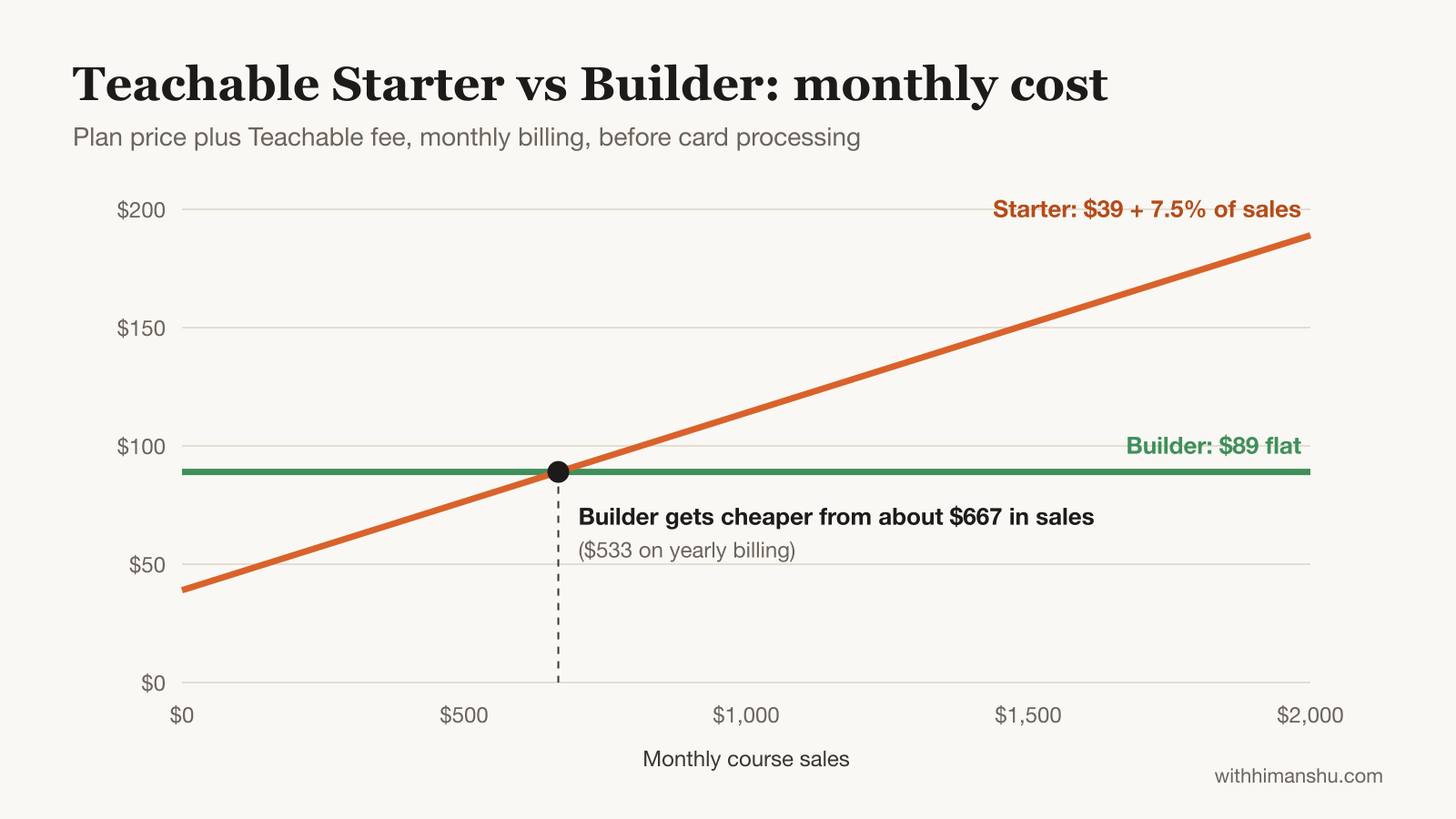
A course selling ten $97 copies a month is already past both lines. Starter suits a first product while you test demand. Teachable’s trial lets you start on either plan.
Teachable Payments, payouts and tax
Teachable rebuilt its payment system on Stripe in 2026, which removed the old 10% reserve on sales.
According to Teachable’s help center, creators on Teachable Payments now get paid in full at the time of sale. Payouts run daily. Teachable’s announcement adds instant payouts for eligible creators.
Teachable also calculates, collects and remits sales tax, VAT and GST, with coverage in more than 45 countries. Each purchase comes with a tax-compliant invoice.
For a solo expert selling into the UK, the EU and Australia, that removes a real administrative load. The catch is eligibility: Teachable Payments serves creators based in 41 countries.
Creators elsewhere use the monthly payment gateway, which pays out once a month. That slower cycle hurts a business running on thin cash flow.
The new $0.50 charge for free students
Teachable rewrote its usage fees in September 2026. The change hits one of the most common course-marketing tactics: the free mini-course used to build an email list.
Every student who pays more than $0 through Teachable’s checkout or a custom gateway is free, with no limit. Other students count toward an allowance of 100 per school.
Above that allowance, each counted student costs $0.50 a month. Counted students include:
- anyone enrolled in a free product or through a 100% coupon
- students you import or enroll manually or through the API
- buyers from another platform, including Hotmart, who get access in Teachable
- paying students who also hold one enrollment they didn’t buy
Teachable bills the peak count reached in each billing period. Removing a student’s access to every product takes them out of the count going forward.
What a free course funnel now costs
Picture a coach who adds 300 students a month through a free mini-course. By month four, the school holds 1,200 counted students. Teachable bills 1,100 of them at $0.50, which comes to $550 that month.
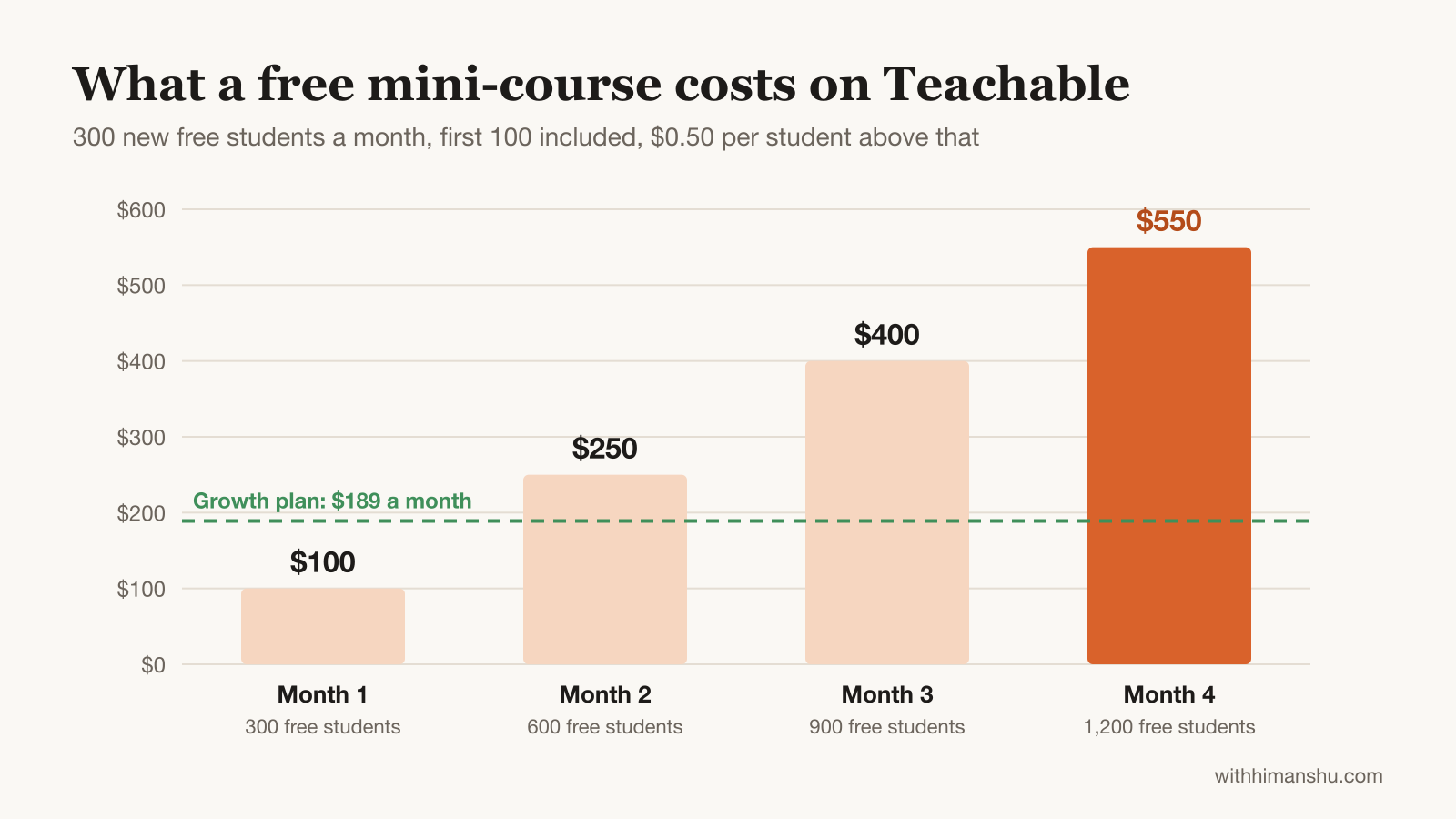
At that point the free funnel costs more than a Growth plan. The bill also rises every month the funnel keeps working.
Three adjustments keep the fee under control:
- Charge a small amount. A $1 or $7 tripwire sold through Teachable checkout turns the student into a paying student, who never counts.
- Remove access after the free window. Students without access to any product drop out of the next billing period’s count.
- Deliver the freebie by email instead. A sequence in your email tool costs nothing per subscriber on Teachable, and it builds an email list you own.
Course builder and student experience
The course builder remains Teachable’s strongest part. You build a curriculum from sections and lessons, then fill each lesson with video, text, files, quizzes or embedded content.
Expert courses get the essentials:
- drip scheduling, so lessons unlock over days or weeks
- auto-graded quizzes and short-answer assessments
- course compliance, which makes students watch videos or finish lessons in order
- lesson comments for questions under each lesson
- a sales analytics dashboard and student progress reports
Completion certificates are the notable gap on cheaper plans. They only arrive with Growth, at $139 a month billed yearly.
Professional training feels that most, because nurses, coaches and accountants often need proof of completion. Systeme.io includes certificates on its free plan, while Skool has none.
Students get Teachable’s own app on iOS and Android on every plan, so they can learn on their phones without a browser. The app carries Teachable’s branding. No public plan puts an app with your name in the app stores.
Free subtitles and translations arrive with Growth. For a creator selling into non-English markets, they open a new audience without re-recording a single lesson.
Coaching, digital downloads and memberships
Coaching and downloads let one school earn from more than a single course.
Coaching products sell one-to-one sessions or packages through the same checkout as your courses. A coach can offer a $1,500 six-session package beside a $97 course.
Digital downloads cover templates, workbooks, presets and recordings.
Memberships bundle products into a recurring subscription that sits outside the product cap. A creator on Builder can run ten products plus a membership that packages them.
Sales tools: pages, checkout and affiliates
Teachable gives you enough to sell without a separate website, though it stops short of a full funnel builder.
The site builder creates a homepage and sales pages from templates, which suits a clean, conventional layout. Teachable’s own showcase hints at how most schools present themselves. Of the 17 featured schools still hosted on the platform, 10 sell from a teachable.com address rather than their own domain.
Every plan includes the checkout tools that lift order value:
- coupons
- order bumps and upsells
- abandoned cart emails with unlimited sends
- subscriptions and memberships
Order bumps and upsells raise the average order value. Cart recovery emails bring back a share of buyers who stop at the payment step.
The affiliate program starts on Builder and tracks referrals and commissions inside your school. The tracking is the easy part. A course affiliate program works best with a short list of creators who already teach your audience.
Experts who run WordPress often keep their main site there and send buyers to Teachable only for checkout and lessons. Teachable’s official plugin adds buy buttons to a WordPress site, one of two ways to sell Teachable courses from WordPress.
Teachable community: closed to new schools
Teachable has walked away from community at the moment many course businesses lean on it for renewals.
Teachable’s help center says Community “is no longer available for new schools.” The same applies to older schools that never created one. Schools with an existing community can keep it.
That legacy version is a simple forum with categories, topics, replies, moderation and optional direct messages. It has no gamification and no events.
For a new course business, lesson comments are therefore the only built-in conversation. Creators who sell accountability or peer support need a second tool or a different platform.
I run my own community, The Creator Circle, on Skool, where the course area sits inside the community. At $5,000 a month in sales, Skool Pro costs about $274 in plan and fees.
Circle, Heartbeat and Mighty Networks are other community platforms for paid members that put a course area next to real discussion.
Teachable customer support: I tested it again after 6 years
Support is why I left Teachable in 2019, so it was the first thing I tested when I came back.
What happened in 2019
I was hosting my marketing program on Teachable when some of my students couldn’t log in to their accounts. I contacted Teachable support. No reply came for six days.
After those six days, I moved the program to Podia. Later, I moved my courses and community to Skool, where they still run.
What I found in 2026
This time I opened a trial school and spoke with the Teachable team directly. The team was responsive, which is the opposite of my 2019 experience.
The platform around support has matured too. Payouts now arrive at the time of sale with tax handled. The plan structure is also clearer than the old Basic, Pro and Business tiers.
Support depends on your plan
Live chat support begins on Builder. Starter relies on email. Custom adds SLA-based priority support and a dedicated success manager.
When students lose access to a course they paid for, every hour without a fix costs trust and refunds. Builder is the minimum I’d run a live course business on.
What other users report
Public reviews remain split. On Trustpilot, Teachable holds 3.3 out of 5 from more than 1,100 reviews.
The ratings are polarized: 38% five-star and 40% one-star. Slow replies are the most common complaint, while some reviewers praise individual agents. Teachable replies to 97% of its negative reviews.
My own result fits that pattern. Support was responsive when I tested it in 2026. A Starter creator waiting on email still lacks the live chat that Builder includes.
Integrations, data export and leaving
Teachable keeps its deepest integrations on Growth, so most smaller schools connect tools through native integrations and webhooks. Full Zapier access and the public API arrive with Growth, with 10,000 API requests a month.
Leaving is simpler than it looks, but it takes manual work. Teachable’s help center explains what you can take with you:
- student lists, exported as a CSV from the Users section
- sales and transactions, exported as a CSV
- videos, audio, PDFs and resources, downloaded one block at a time
- lesson text, copied out by hand
Teachable can’t export a whole course as one file. It also doesn’t support bulk downloads. Its support team can’t run a full export for you either. The details sit in Teachable’s export guide.
You can cancel at any time, with the cancellation taking effect at the end of the billing cycle. The 30-day money-back guarantee covers your first month only.
An email list kept in your own email tool moves with you to any platform. That single habit makes a future migration far less painful.
Teachable vs Skool, Podia, Kajabi, Thinkific and Systeme.io
Teachable is the safest pick for paid courses and the wrong pick for community.
Teachable vs Skool: Skool costs $9 a month plus 10% per sale, or $99 plus 2.9%. It puts community, levels and discovery first but has no certificates. Pick Teachable for structured courses and Skool for a community-led business.
Teachable vs Podia: Podia’s Mover plan costs $49 a month ($42 yearly) with a 5% fee. Shaker costs $99 ($84 yearly) with 0%. Podia is simpler and includes email on every plan, while Teachable has the stronger course builder.
Teachable vs Kajabi: Kajabi starts at $179 a month ($143 yearly) and adds funnels, email automation and community. It costs roughly double Builder. Kajabi suits a creator who wants one tool for marketing and delivery, though Skool and Circle cost less than Kajabi for a community-led business.
Teachable vs Thinkific: Thinkific is the closest like-for-like rival, with entry pricing around $54 a month ($40 yearly) and no platform fee. Pick Teachable over Thinkific if you sell into the EU or UK and want VAT remitted for you.
Teachable vs Systeme.io: Systeme.io starts free with no transaction fee and includes certificates, funnels and a community on every plan. Its course pages are plainer. Systeme.io’s free-plan limits arrive long before Teachable’s do.
Teachable pros and cons
Who should use Teachable, and who should skip it
Teachable fits you if:
- you sell structured courses, coaching or downloads to students worldwide
- you want sales tax and VAT handled without an accountant’s spreadsheet
- your products are paid, so the free-student fee rarely applies
- you expect monthly sales above roughly $533 to $667, which makes Builder the cheaper plan
Look elsewhere if:
- your business runs on community and member engagement
- you give away free courses to thousands of people as lead magnets
- you need certificates on a small budget
- you want funnels and email automation in the same tool
My verdict after coming back: 7/10
Teachable in 2026 is a better platform than the one I left in 2019. Payouts now arrive at the time of sale with tax handled for you. The team I spoke with was responsive.
For an expert selling paid courses and coaching, Builder at $69 a month billed yearly is a strong home. Try Teachable with the 7-day trial if that describes your business.
It loses points for closing Community to new schools, charging for free students at scale and keeping certificates on the $139 plan.
Where each plan fits:
- Testing a first paid product: Starter, while sales stay under about $667 a month ($533 on yearly billing).
- Running a real course business: Builder.
- Professional training that needs certificates or a team: Growth.
- Community-led or free-funnel businesses: a different platform.
FAQ
Is Teachable worth it in 2026?
Yes, for experts selling paid courses, coaching or downloads who want payments and sales tax handled. Builder at $89 a month ($69 billed yearly) has no transaction fee and includes live chat support. It is a weaker fit for community-led businesses, because Teachable has closed Community to new schools.
Is Teachable legit?
Yes. Teachable has operated since the early 2010s, began as Fedora, and has been part of the Hotmart Group since 2020. More than 150,000 creators use it. It processes payments on Stripe and remits sales tax for creators. Reviews on Trustpilot are mixed, mainly over support speed.
What percentage does Teachable take?
Teachable takes 7.5% of every sale on Starter and 0% on Builder, Growth and Custom with Teachable Payments. Processing fees apply on every plan: 2.9% + 30¢ for US cards and 3.9% + 30¢ for international cards. Teachable lists every fee on its pricing page.
Does Teachable have a free plan?
No. Teachable no longer offers a free plan. Every paid plan starts with a 7-day free trial and a 30-day money-back guarantee, so you can test a school before committing. The cheapest plan is Starter at $39 a month, or $29 billed yearly, with a 7.5% transaction fee.
Does Teachable charge for free students?
Yes, above a limit. Each school includes 100 free, imported or manually enrolled students. Each one beyond that costs $0.50 a month. Students who pay through Teachable checkout never count. Older schools keep previous terms until their first renewal on or after 30 April 2027, per Teachable’s usage fees policy.
Does Teachable have a community feature?
Not for new schools. Teachable’s help center says Community is no longer available to new schools or to schools that never created one. Schools with an existing community can keep it. Creators who need community usually pair Teachable with a dedicated community platform or choose a community-first tool instead.
Is Teachable customer support good?
Yes, on Builder and above. In 2019, I waited six days for a reply. In 2026, the team I spoke with was responsive. Live chat support starts on Builder, while Starter relies on email. Trustpilot reviews stay split, with slow replies the most common complaint.
Can I move my courses off Teachable?
Yes, but with manual work. You can export students and sales as CSV files and download videos, PDFs and resources one at a time. Teachable can’t export a full course as one file, nor can its support team run a full export for you. Planning that early saves weeks later.
The Letter
Get the next article in your inbox.
What I am building, as it happens. The community experiments, launches and numbers behind my own work, including what did not work.
The tools, tested before I recommend them. Short notes on the platforms I try for running communities, courses and email, before they become full reviews.
The inner side of the work. Ideas on focus, meaning and energy for creators who want a business that feels as good as it performs.
Get The Letter in your inbox
One short email, usually weekly. You can unsubscribe any time.
Keep reading
More from Online Courses.