Descript Review After 3 Years – It’s Not Perfect

There’s a moment that happens with Descript that any other software doesn’t give you.
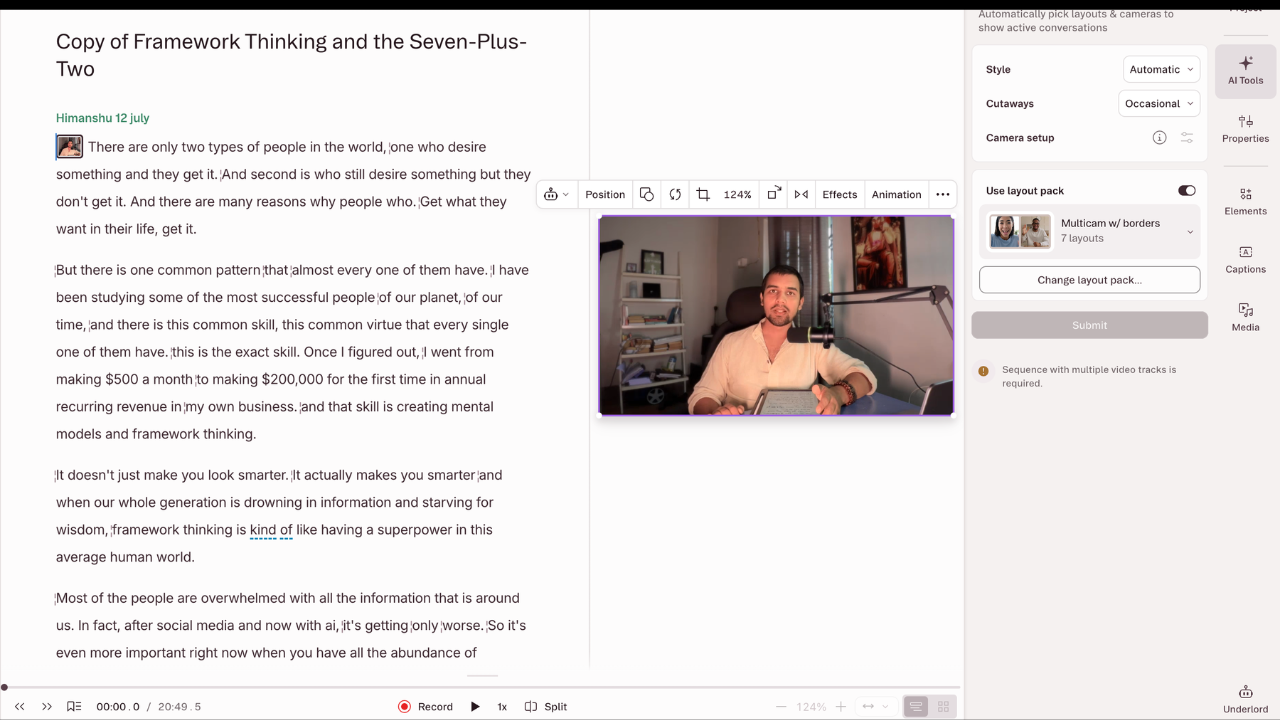
You import a video, the transcript loads, and then you just delete a few lines of text and the video trims itself to match. No dragging clips on a timeline. No hunting for the right frame. You edited like you were fixing a paragraph in a Google Doc.
I have been using Descript for 3 years and I love it… except for one thing. (Shared the live example output from features below)
That moment is real. I’ve been through it, and so has just about every creator who uses Descript seriously. The question isn’t whether that feature works. It’s whether the whole product holds up the same way once the novelty settles.
Affiliate disclosure: Some links on this page are affiliate links. If you buy through them, I may earn a commission at no extra cost to you. I will appreciate if you use them.
I like Descript But there is One Problem
I have used this AI video editing tool for 3 years at this time. Most video editors work on the typical standard logic: a timeline, clips on tracks, a preview window. You trim by pulling edges, you reorder by dragging, and you develop instincts over months of practice to do this efficiently.
That workflow made sense when editing was physical. But this looks a bit expired when there is a lot you can already do with AI tools. Software developers just kept rebuilding the same structure without asking if there was a better way for modern content.
Descript does feel different.
A 2025 paper on turning long videos into short clips automatically shows how far automated editing has come.
Descript removed the timeline from the process. When you upload your file, Descript transcribes it first. Every word shows up as text, and from that point forward, you’re editing a document. You can delete a sentence from the transcript, and the corresponding audio and video disappears from the project. You can also move a paragraph from one place to another like a google Doc file.
For anyone whose content is primarily people talking, it’s a fundamentally different way of working. That is why I rate it among the most useful personal branding tools for anyone who talks on camera. However, it might not have all the features that are needed to make a cinematic video. And this is where, to me, Descript is Not the best video editing software for everyone. It has a very specific audience. I will come to it in a bit…
Descript Feature Review before I get to the troubles
Studio Sound Feature
If Descript only had one feature worth paying for, this might be it. Studio Sound is a one-click audio cleanup tool that strips background hiss, room echo, fan noise, and the kind of muddy recording quality you get from a non-treated space. I have tried it myself and it works incredibly well. Studio Sound is limited on the Free plan and full from Hobbyist, and each use draws up to 30 AI credits.
For creators who record on the road, work from home without acoustic treatment, or use a mid-range mic in a less-than-ideal space, this tool is worth the subscription on its own. The processing is near-instant, it works across the full recording without selective adjustments, and it consistently pulls decent audio out of situations where the recording felt like a lost cause.
Here is one of my videos edited with Studio Sound as an example.
Notice that I have hosted this video on Descript as it allows you to host and share the videos directly. It’s a much less discussed feature but makes the job much easier for me as a consultant who requires to share quick info with the team.
Filler Word Removal
Descript scans your entire transcript and highlights every “uh,” “um,” “like,” and “you know.” You can wipe all of them in a single click or step through them one by one to decide which pauses are actually natural and worth keeping.
On a long interview, say, 45 minutes of unedited conversation, this process historically took two to four hours of careful work on a standard timeline editor. The same job takes roughly twelve minutes in Descript. And when you multiply that across a weekly publishing schedule, the time you recover in a month is significant enough to restructure how you plan your production.
Underlord AI Co-Editor
This is Descript’s biggest move in 2026. Underlord v2 launched in January 2026, and Descript still labels it beta.
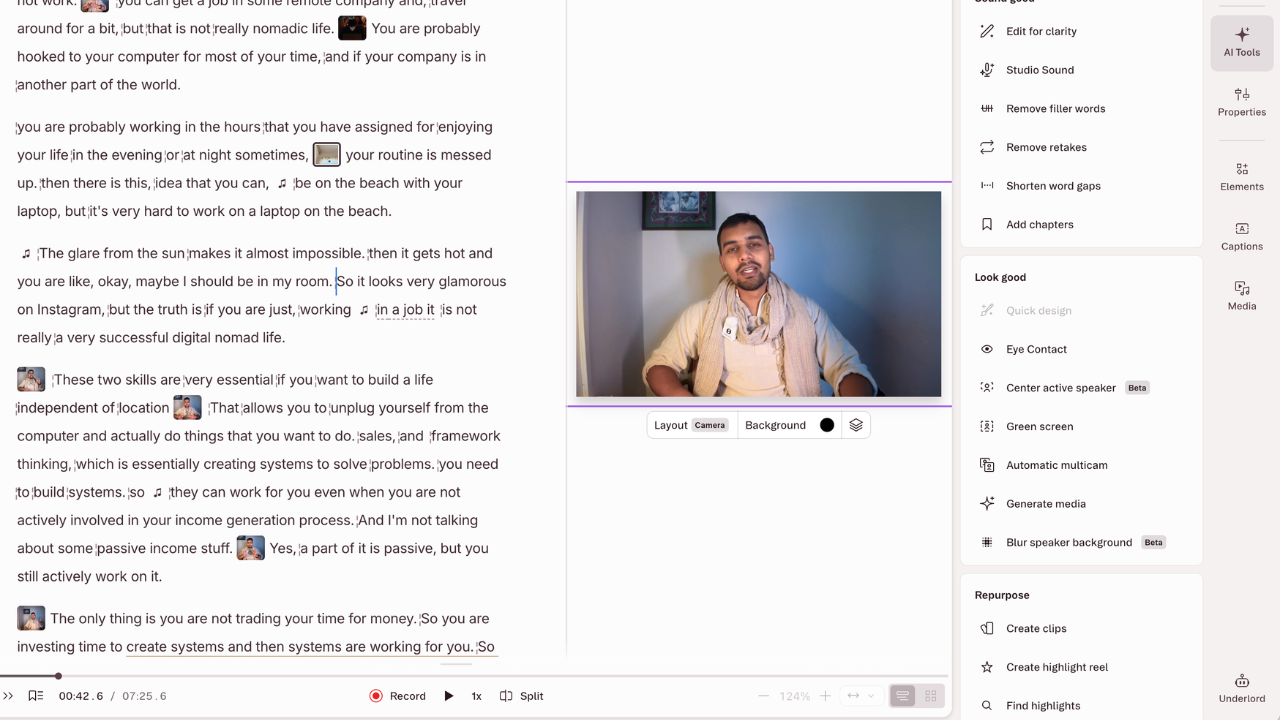
Underlord is positioned as an AI co-editor: you give it a text command, something like “polish this episode for YouTube,” and it runs a sequence of editing steps without you touching anything. Silence removal, filler word cleanup, pacing adjustments, clip suggestions all in one run. This is why I kinda call it Cursor for AI editing.
But Underlord isn’t a replacement for editorial judgment, and calling it that would be misleading. Think of it more like autocorrect for editing. It catches most of what needs fixing and makes the right call most of the time. You still review the output before anything goes live.
The feature performs best on predictable content formats: solo episodes, two-person interviews, educational walkthroughs. In my research, I found results become less consistent as you add more ingredients to the video.
The summary and social post generation inside Underlord is another story. Those outputs read too generic to publish without significant reworking, and every Underlord run bills AI credits for its reasoning and each tool it uses. I generally copy my transcription into my own writing workflow, where I keep reusable prompts for each content format. It is a far better workflow than Underlord.
Voice cloning (formerly Overdub)
You can train Descript on your voice by reading a short script of about 90 seconds, and it builds a synthetic clone. After that, if you misread a line or need to add a sentence you forgot to record, you type it out and Descript generates the audio in your voice. without a re-recording session, or matching the room tone, or scheduling time with a microphone.
For short corrections like fixing a word, smoothing over a stumble, adding a quick clarification this is genuinely impressive. The output integrates with your original audio in a way that’s hard to catch on a casual listen.
The limit shows up when you push it past short fixes. Longer passages generated through voice cloning carry a slight synthetic quality, something a careful listener will pick up on. It’s not unusable, but it’s noticeable enough that you wouldn’t want to replace a full recording session with it. As a tool for occasional small repairs, it earns its place. Descript moved voice clones to a new voice engine in October 2026.
Eye Contact Correction
Descript uses AI to adjust your gaze in the video so it appears you’re looking directly at the camera, even if you were reading notes off to the side. For talking-head videos where eye contact builds viewer trust, this removes the awkward look of constantly breaking from the lens. This one is similar to the tools like CapCut and Captions.
It works cleanly most of the time. Sometimes it produces a result that looks slightly off. In my review, I found it to generate a red tint and a bit unrealistic gaze. However, for little here and there which would be impossible to fix otherwise, it gets the job done. For most users, it will be more than required.
What I didn’t like about Descript
Over the last few months I have noticed a pattern: For projects under 120 minutes, the experience is generally smooth. Transcription is fast, the editing interface responds well, and the overall workflow feels as efficient as the pitch promises.
Somewhere after 120 minutes of content, things begin to slow.
Rendering takes longer, the timeline gets sluggish between actions, and autosave creates brief but noticeable freezes. Sometimes, a long project crashes the app and it restarts by itself. The good thing is, I haven’t had any data loss since it uploads data in real time.
There’s also no offline mode. Descript relies on an internet connection for its key features, and if your internet drops, you can’t continue working.
For anyone editing in transit, in hotels, or anywhere with unreliable connectivity, this is a real constraint and not a minor one.
Another thing which could have been better is Export quality. The platform compresses output files during export, and the settings for controlling bitrate and resolution are limited compared to traditional editing software. Creators who work at high-quality standards and need control over the final technical specs will find this frustrating. It’s fine for most web publishing, but it’s not the right tool if your output needs to match broadcast or archival standards for cinematic purposes.
So as I mentioned earlier, this is not a tool for photographers and cinematographers. It can be but right now it is not. Though, for creators, business owners and entrepreneurs this can save hours of work time and tonnes of money and frustration.
The Descript Pricing Review: I almost cancelled
In September 2025, Descript changed its pricing structure and moved from a simple “transcription hours” model to a system built on “media minutes plus AI credits,” like any other AI tool.
Plans (yearly billing, monthly in brackets):
- Free: 60 media minutes a month, 720p exports with a watermark, 100 one-time AI credits
- Hobbyist: $16/month ($24 billed monthly): 10 hours of media, 1080p, no watermark, 400 AI credits a month, Studio Sound, Eye Contact, filler word removal and voice clones
- Creator: $24/month ($35 billed monthly), the one I am using: 30 hours, 4K exports, 800 AI credits a month, full Underlord access and the unlimited stock library
- Business: $50/month ($65 billed monthly): 40 hours, 1,500 AI credits a month and team collaboration
The credit system is the part of Descript I like least, and it is why I do not use Underlord. For most individual creators producing four to eight episodes or videos per month, the Creator plan covers the workload comfortably as long as Underlord stays an occasional tool.
If you’re a high-volume producer doing daily content, you might want to go for business plan. However, the best option would be to pick the Free plan and try the tool in the first place.
Comparing Descript with Alternatives
Riverside vs Descript
Riverside is the most relevant comparison for anyone in the podcast or interview space. But Riverside and Descript aren’t competing for the same moment in the workflow.
Riverside is built for recording, and it does that better than Descript does. Local recording up to 4K, separate tracks per participant, a more stable performance record. Riverside Pro now lists text-based editing and an AI editing agent too, but Descript’s transcript editing and audio tools are still deeper.
This is why a lot of serious podcasters run both. record in Riverside, edit in Descript. That workflow isn’t a workaround; it’s just using each tool for what it actually does well.
Also Descript now has its own recording studio, called Rooms. It records up to 10 guests on separate tracks, locally and up to 4K, and you share a join link with each participant.
Opus Clip vs Descript
Opus Clip solves one specific problem faster than anything else: turning long-form content into multiple short clips for social media. It identifies high-engagement moments automatically and formats them for different platforms. But it’s not a full editor and doesn’t pretend to be. If you’re repurposing existing content at scale, Opus Clip belongs in your toolkit alongside Descript, not instead of it. The two genuinely complement each other, and the clipping platforms that pay for clips are where many of those short clips end up.
CapCut vs Descript
CapCut is excellent for short-form social content, especially on mobile. The template library is unmatched, it’s free to use at a meaningful level, and for 60-second content going to TikTok or Reels, it’s fast and purpose-built.
But its audio tools are basic, and anything longer than a few minutes starts to feel constrained. Different tool, different job. For short-form trend research, Virlo shows which clips are taking off in your niche. If your short videos go to Instagram, a keyword on screen and in the caption’s first line helps Reels get found in Instagram search.
For mobile specific editing, CapCut is better. But for serious editing, especially for long form content, Descript is better option.
Premiere Pro vs Descript
Adobe Premiere Pro doesn’t really belong in the same comparison for most creators reading this. It’s an industry-grade professional editor with a steep learning curve, at about $22.99 a month for Premiere Pro alone on an annual plan.
If you need cinematic control, color grading, complex motion graphics, multi-angle footage with precise audio mixing, Premiere is the answer.
But for a solo creator trying to get a weekly episode out efficiently, comparing Premiere to Descript is like choosing between a commercial kitchen and a home range. Both cook food. The similarity ends there.
Also, if you consider editing as a job, Adobe definitely is the better option than Descript. For me, Descript is better a creator who needs less features and more speed.
Who Gets the Most Out of Descript
The clearest sign that a tool is right for you is when the core problem it solves is the exact problem slowing you down. For Descript, that problem is editing spoken content efficiently without needing professional timeline editing skills.
If you are a podcaster like me who create interview or conversational shows you are right user for it. The filler word removal, the transcript cuts, the Studio Sound cleanup, and the ability to have a client or producer leave comments directly on the project, all of that builds a workflow that a traditional editor can’t replicate at the same speed.
YouTubers running education channels, tutorial series, or interview content get the same benefits, especially when launching a YouTube channel on a weekly schedule.
Also course creators working with screen recordings and voiceover explanations have a specific reason to appreciate voice cloning. Fixing a misread line without re-recording the session pays off repeatedly across a full course production, whether the course lives on Skool or elsewhere.
However, if visual production quality and precise export control matter to your output, or if you need mobile editing capabilities that actually work than check other alternatives we discussed above.
My Personal Opinion on Descript after 3 years of use
Descript is super useful as a creator. It’s not trying to be Premiere Pro and it’s not trying to be CapCut. It’s built for the creator who produces regular spoken-word content and wants to move from raw recording to finished edit without burning hours on a timeline.
The core product delivers. Studio Sound works better than anything at its price point. Filler word removal and transcript editing return real hours every week. However, Underlord is early but functional, and I personally do not use it because it takes unnecessary credits. However, the software offers more than enough even without it. Or probably I need to learn to better use it. Descript removes more friction from the editing process than any competing tool right now.
Start with the free plan. Take a real episode through it: something 20 to 30 minutes of unedited conversation. Remove the filler words, run Studio Sound, make a cut or two in the transcript. The time it takes compared to how you’ve been editing is the answer to whether it’s worth buying.
Descript FAQ
What is Descript and what is it used for?
Descript is a text-based audio and video editor. You edit a recording by editing its transcript, and it adds tools like Studio Sound for audio cleanup, filler word removal, voice cloning, captions and remote recording. It suits podcasters, YouTubers and course creators.
Is Descript worth it in 2026?
For spoken content like podcasts, interviews, courses and talking-head videos, yes. It saves hours on every episode. For cinematic editing, color grading or mobile-first short videos, Premiere Pro or CapCut fits better.
Is Descript free?
Descript has a free plan with 60 media minutes a month, 720p exports with a watermark and 100 one-time AI credits. Paid plans start at $16 a month billed yearly ($24 monthly).
How much does Descript cost?
Hobbyist costs $16 a month billed yearly ($24 monthly), Creator costs $24 ($35 monthly) and Business costs $50 ($65 monthly). Each plan includes media hours and a monthly allowance of AI credits.
What are Descript AI credits?
AI credits pay for Descript’s AI features. Hobbyist includes 400 a month, Creator 800 and Business 1,500. Studio Sound and Remove Filler Words use up to 30 credits each time you apply them, and Underlord bills credits for its reasoning and every tool it runs.
CapCut or Descript: which is better?
CapCut is better for short, mobile-first videos with templates and effects. Descript is better for long-form spoken content, because transcript editing, Studio Sound and filler word removal save far more time on podcasts and interviews.
Does Descript work offline?
No. Descript relies on an internet connection for its key features, so you cannot keep editing when your connection drops.
The Letter
Get the next article in your inbox.
What I am building, as it happens. The experiments, launches and numbers behind my own one-person business, including what did not work.
The tools, tested before I recommend them. Short notes on the platforms I try for selling courses, running a community and sending email, before they become full reviews.
The inner side of the work. Ideas on focus, meaning and energy for solo founders who want a business that feels as good as it performs.
Get The Letter in your inbox
One short email, usually weekly. You can unsubscribe any time.
Keep reading
More from Podcast.