Kit Review 2026: Free to 10,000 Subscribers, but Is It Worth Paying For?

Email marketing still produces the highest ROI of any marketing channel. For the last four years, I have used Kit as my go-to email marketing software.
But I don’t think it is perfect. In fact, I don’t think Kit is the right tool for everyone.
Here is my brutally honest Kit review, covering email marketing, landing pages and newsletters.
Kit, formerly called ConvertKit, keeps sign-up forms, landing pages, newsletters and automated sequences in one account. Its free plan holds up to 10,000 subscribers, which makes it an easy place to build an email list from scratch.
Kit gets expensive the moment you ask it to do real work, though. A welcome sequence, usually the first thing a creator wants to automate, sits behind a plan that starts at $39 a month.
The bill then climbs with every few thousand subscribers. Kit also raised its prices on existing customers in 2025, while cheaper email tools are easy to find.
So is Kit worth paying for in 2026, or is the free plan the only good deal it has?
Affiliate disclosure: Some links on this page are affiliate links. If you buy through them, I may earn a commission at no extra cost to you. I will appreciate if you use them.
What Kit is, and what changed when ConvertKit became Kit
Kit is email marketing software for people who earn from an audience: writers, coaches, course creators, YouTubers and podcasters. Nathan Barry founded it in 2013 as ConvertKit. The company finished renaming itself Kit in October 2024.
The name and the domain changed. The product, the team and your login carried over. A ConvertKit review written before the rename describes the same tool, usually with older prices.
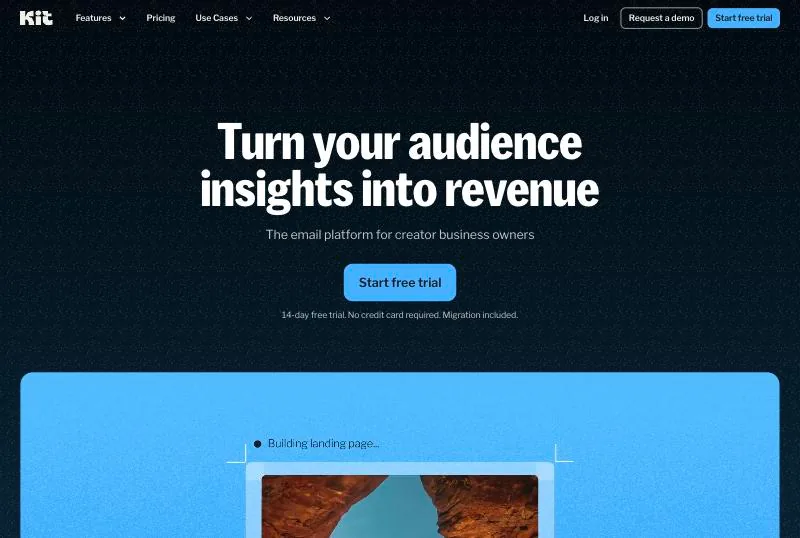
Kit runs the email side of my own business. A pop-up on this site feeds a welcome sequence. My sales funnels are WordPress pages with Kit behind them.
Mailchimp was built for small businesses in general. Kit assumes one person runs everything, so it keeps one subscriber list and few settings.
Is the Kit free plan really free?
The Kit free plan costs nothing up to 10,000 subscribers and has no time limit. What it leaves out is automation.
For a newsletter you write and send by hand, that covers the whole job.
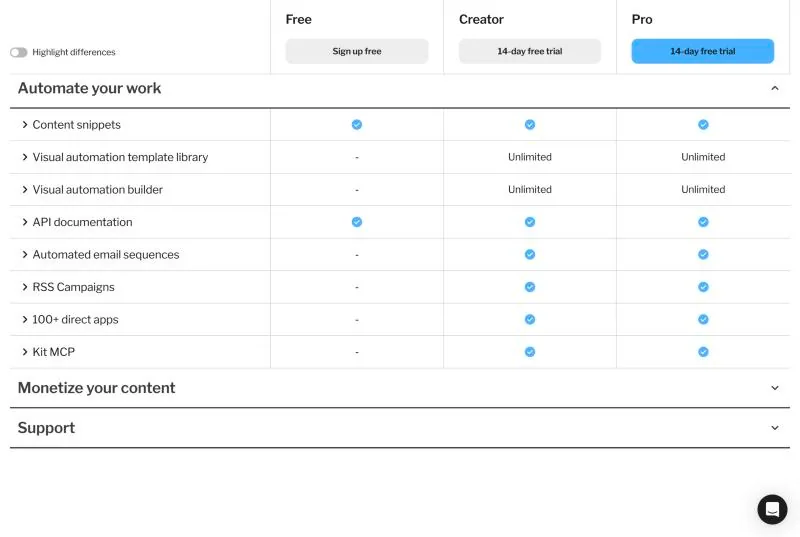
For a while, Free also included one automation and one sequence. Kit’s comparison table now shows a dash in both rows.
A new subscriber is most curious about you in the week they sign up. Without a sequence, that week passes in silence until your next broadcast goes out.
A form can still deliver a lead magnet through its incentive email, so a free download works on Free. The follow-up emails after it need a paid plan.
Support on Free comes by email, with replies inside 24 hours.
Kit also switches on Recommendations by default, which shows other creators’ newsletters to your new subscribers. You can turn that off.
A free account that passes 10,000 subscribers has to upgrade to keep sending. The next tier covers 15,000 subscribers at $169 a month, so the bill goes from zero to $169 in one step.
Free suits the stage where you are still finding out whether people want your emails. Once you have something to sell, the missing sequence can cost more than the $39 it takes to add one.
Kit pricing in 2026: what the bill looks like as your list grows
Kit charges by subscriber count. No plan has a sending limit, so a daily newsletter costs the same as a monthly one.
Monthly prices by list size, Creator first and Pro second:
- 1,000 subscribers: $39 / $79
- 3,000: $59 / $99
- 5,000: $89 / $139
- 8,000: $119 / $169
- 10,000: $139 / $189
- 15,000: $169 / $249
- 25,000: $199 / $279
- 55,000: $379 / $519
- 105,000: $679 / $879
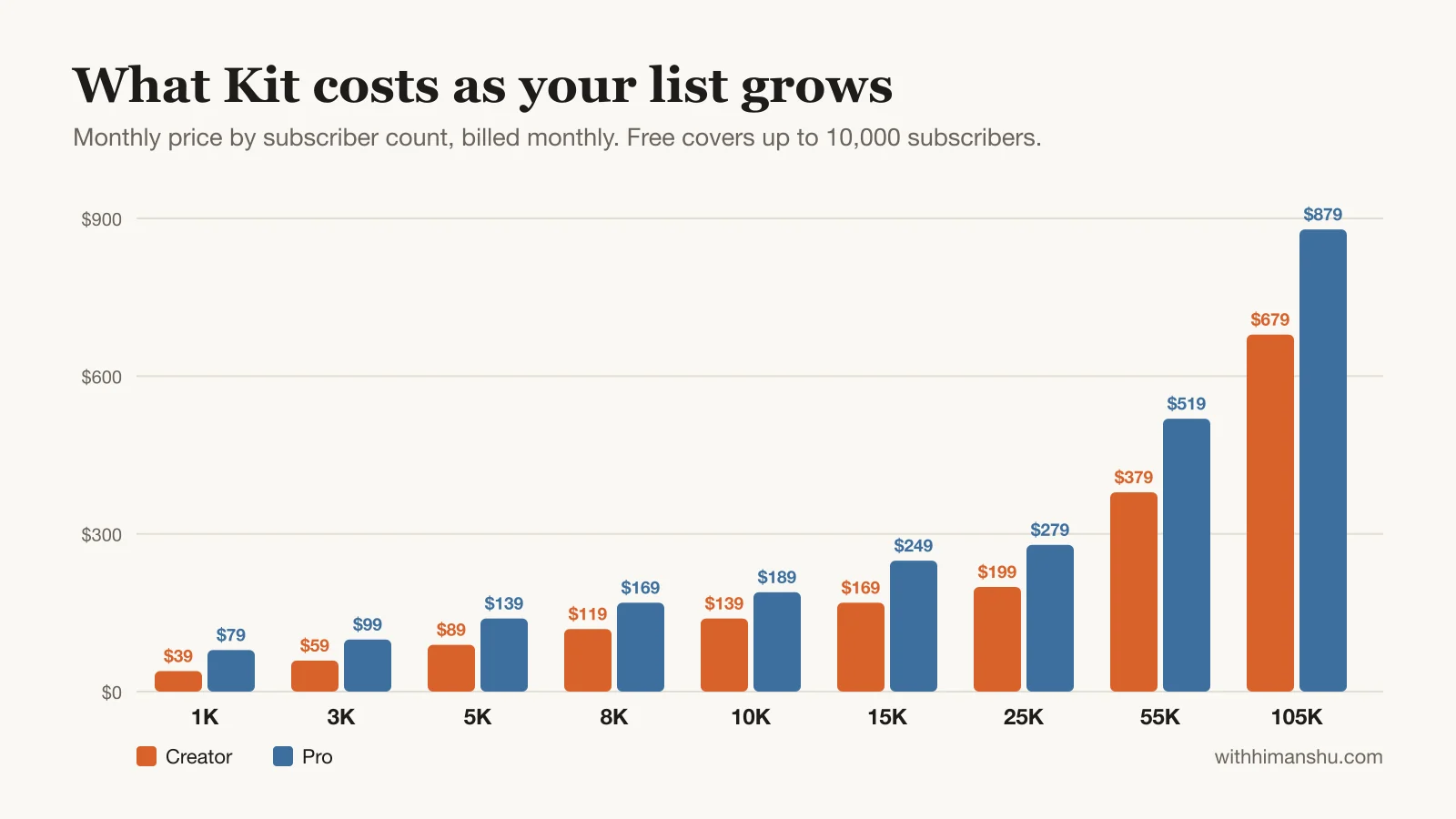
Yearly billing takes about 17% off. Creator at 1,000 subscribers comes to $390 a year, which works out to $33 a month.
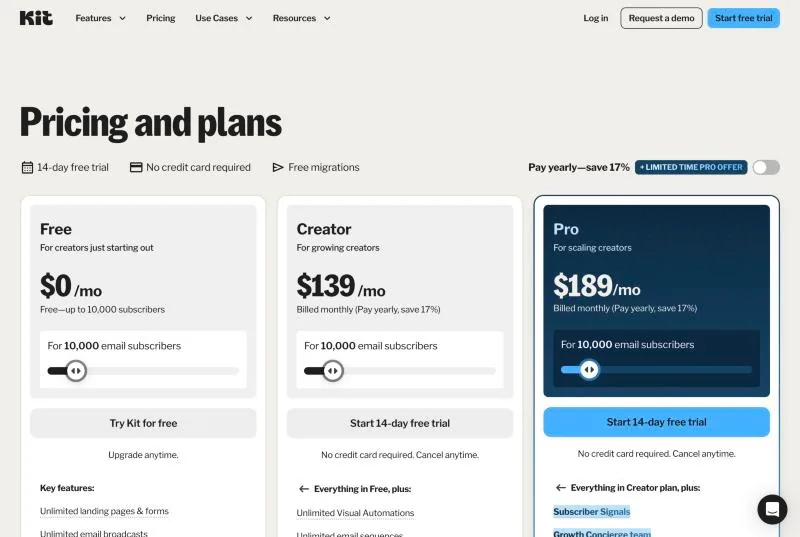
Each subscriber gets cheaper as the list grows: about 3.9 cents a month at 1,000 and 1.4 cents at 10,000. The total still rises while the features stay put. A Creator account with 10,000 subscribers has the same tools as one with 1,000.
Long-time customers raise that point often. In September 2025, Kit also raised prices for the first time in 12 years. Creator at 1,000 subscribers went from $29 to $39 a month.
Existing customers moved to the new rates at their first billing date after 15 October 2025.
How Kit decides what you owe
Kit bills on confirmed subscribers, whether or not they still open your emails. When a list passes a tier limit, Kit upgrades the account automatically.
The way back down is manual. A “Switch to a lower tier” link appears under Account & Billing once you qualify. The lower price starts at your next billing date, provided the count is still under the limit then.
Is your Kit bill reasonable?
Paying $39 a month to email a few hundred people can feel steep. Whether it is depends on what those emails earn.
You can check by dividing last month’s email revenue by the Kit bill. A 1,000-subscriber list that earns $400 a month spends about a tenth of it on Kit, which is cheap for the tool doing the selling.
At $50 a month in earnings, the same $39 eats most of the income.
What $39 a month buys: emails that send themselves
Creator mostly adds automation. Integrations and a second team login come with it, but they matter far less.
A sequence is a series of emails with a delay between each one, written on a single screen. A visual automation is a flowchart that decides who enters which sequence and when.
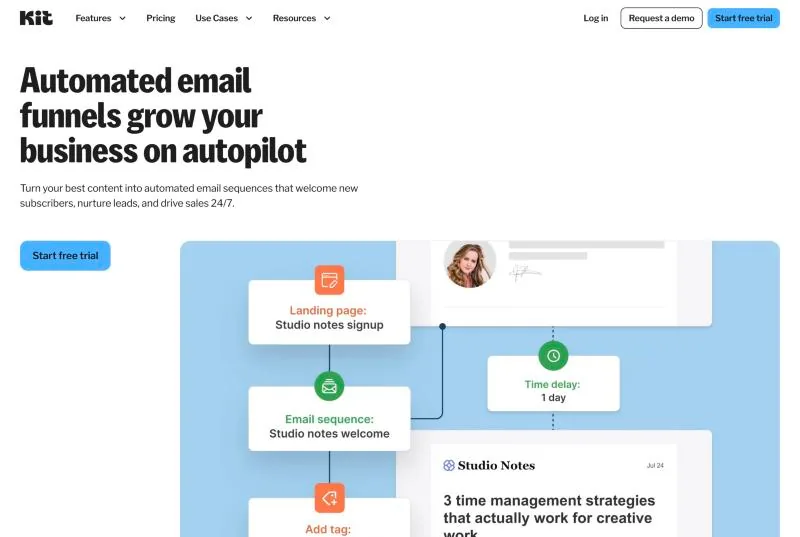
An automation starts from a trigger such as a form sign-up, a tag or a purchase. From there you add emails, delays and conditions.
A buyer can skip the sales emails. A reader who clicked the coaching link can get the coaching emails.
Kit keeps one record per person and describes them with tags, so someone who joins through three forms still counts once on your bill. List-based tools such as Mailchimp can count that same person once per list.
Kit’s builder also handles launch emails and webinar follow-ups, with different messages for people who registered, attended or clicked.
On this site, the pop-up starts a five-day welcome sequence. Each email has one job: a welcome, a quick win, common mistakes, my approach, and what comes next.
Getting started in Kit is easy. The confusing part arrives later, when tags, segments, rules, sequences and automations start to overlap.
Creator also removes Kit’s branding and adds a second login. You get RSS campaigns, polls, chat support around the clock and Kit’s direct app integrations.
Does the Creator Network actually grow a list?
It does, though every subscriber it brings counts toward your bill.
The Creator Network lets Kit users recommend each other’s newsletters. After someone joins your list, Kit shows them a few other creators they can subscribe to with one click. Other creators’ forms can show yours in return.
Every plan includes it. You can keep up to 20 active recommendations, with up to five shown to each new subscriber.
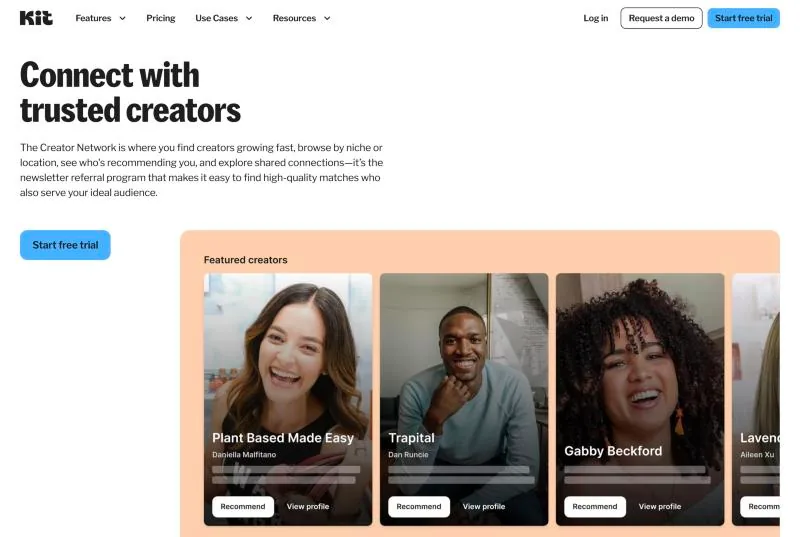
Kit says creators who recommend each other see double the list growth of those who do not. That figure counts sign-ups only.
A subscriber who ticked your name on another creator’s thank-you page knows far less about you than someone who downloaded your guide. They still count toward your tier, at the same price as your best reader.
I would treat recommended subscribers as a separate group from day one. Kit lists them on their own page, where you can tag them in bulk.
On a paid plan, an automation can send that group a short introduction before your regular emails. Kit marks a new subscriber as cold after 60 days without an open or a click. Recommended subscribers who end up there are safe to remove.
Paid Recommendations turn the same feature into income on Creator and Pro. Other newsletters pay for each subscriber you send them, usually $1 to $4. Kit keeps 23.5% of what you earn.
Kit Commerce takes 3.5% + 30c. Is that a good deal?
For digital products, it is. Every Kit plan, Free included, can sell digital products, paid newsletters and subscriptions, and can accept tips. The 3.5% + 30c fee covers card processing.
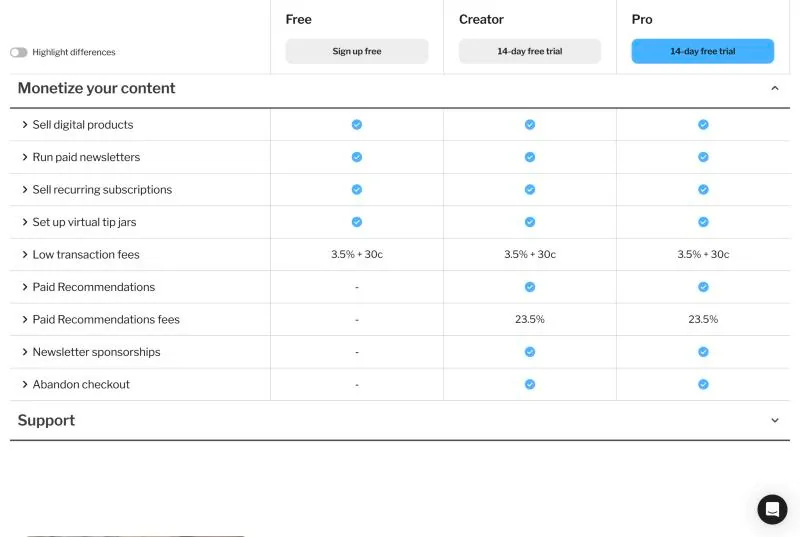
A standard US card payment through Stripe costs 2.9% + 30c before any platform adds its cut. Kit’s own share on top is about 0.6%, which is low for a checkout that needs no setup.
The fixed 30c weighs more on cheap products:
On a $5 tip, nearly a tenth goes to fees.
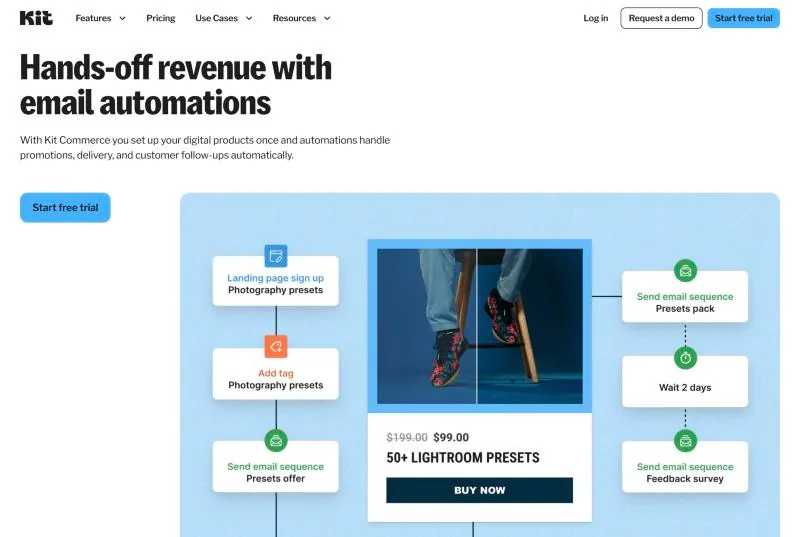
What limits Kit Commerce is its feature list. A product page, a payment and a delivery email are the whole checkout. It has no course player and no community space.
That makes it a good home for a first product such as an ebook, a template pack or a paid newsletter. Stan Store does the same job from a bio link for a flat $29 a month.
A full course fits better on Teachable or Podia. For a paid community I use Skool. Skool has no email sequences of its own, so I pair it with Kit.
Where Kit falls short
Kit was built for people who write plain emails to an audience.
Emails that look like letters
Kit advertises more than 40 templates, yet its emails still come out looking like a letter. A store that wants product grids and heavy branding will find the editor limiting.
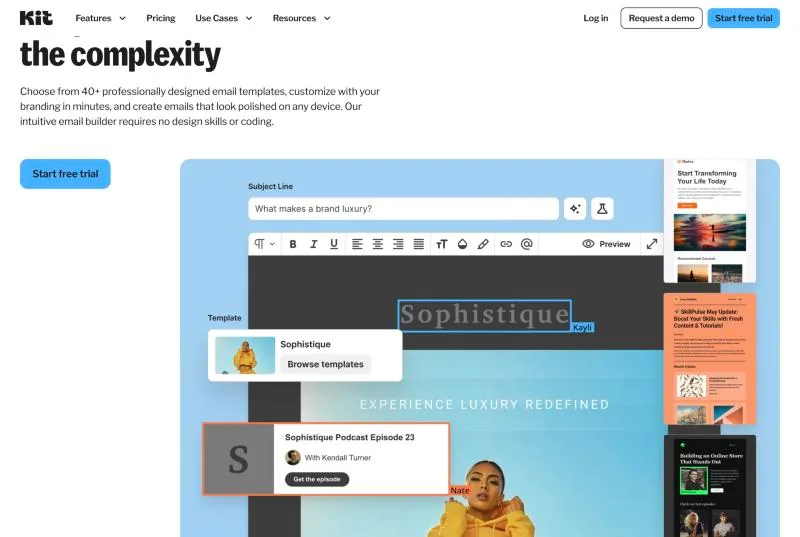
For a creator, that plainness often helps, since the email reads as a note from a person.
Kit Creator vs Pro: is the analytics upgrade worth it?
Engagement scoring, the insights dashboard, deliverability reporting and Subscriber Signals all sit on Pro. Creator accounts get basic reporting. Their A/B tests compare two subject lines where Pro compares five.
The gap between the plans is $40 a month at 1,000 subscribers, which doubles the bill. At 10,000 it is $50 on top of $139.
So Pro is hard to justify on a small list. It gets easier on a large one, where engagement scores decide who receives which email. Pro also allows unlimited team logins against two on Creator.
A 99.8% delivery rate is not an inbox rate
Kit reports a 99.8% delivery rate across more than a billion emails a month. Delivery rate counts the emails a receiving server accepted. It says nothing about whether they reached the inbox, the promotions tab or spam.
Where an email lands depends more on your own habits: a verified sending domain, a clean list and emails people reply to.
What Kit reviews on Trustpilot, G2 and Capterra say
Kit scores 4.6 on Capterra and 4.4 on G2. On Trustpilot it sits at 3.9, with roughly one review in five giving a single star.
The one-star reviews mostly describe closed accounts, unexpected charges and refund disputes. Praise across the three sites centres on ease of use and automations.
Kit alternatives: when beehiiv, MailerLite or Flodesk is the better pick
A cheaper tool only saves money if it fits the job email does in your business.
Kit fits best when email sells your other products, because tags and automations decide who hears about which offer.
When the newsletter itself is the product, beehiiv is built for it. You get a website for the newsletter and a referral program. Its paid plans add an ad network. beehiiv also takes 0% of paid subscription revenue.
Its free plan stops at 2,500 subscribers. Billed yearly, beehiiv starts at $49 a month against Kit’s $33.
MailerLite wins on price, with paid plans from $12 a month. Its free plan includes automations, so a welcome sequence costs nothing there. The catch is size: that plan was cut to 250 subscribers in 2026.
For designed emails, Flodesk is the pick. It charges a flat $46 a month for unlimited subscribers, which undercuts Kit’s $59 from the 3,000-subscriber tier up.
Mailchimp makes more sense for a shop or a local business than for a creator. Its free plan now covers 250 contacts and 500 sends a month, with no automations.
Systeme.io bundles email with funnels and course hosting on a free plan for up to 2,000 contacts. It suits a creator who wants one login instead of a stack.
Switching to Kit, and what it takes to leave
Every paid plan includes Kit’s migration service. Under 10,000 subscribers, Kit’s team moves your subscribers, tags, lists and segments in two to five business days. You rebuild forms and automations yourself.
From 10,000 up, the team also rebuilds forms, automation emails, templates and integrations.
The team cannot move a subscriber who is halfway through a sequence. If you let running sequences finish on the old tool first, nobody gets the same emails twice.
Leaving starts with a CSV export. The file holds first names, emails, tags, custom fields, status and sign-up dates. Its download link expires after five days.
The export covers subscribers only, so expect to rebuild sequences and automations by hand in the next tool.
Paid newsletter subscribers are harder still. Kit bills them through its own Stripe connection, which makes them hard to carry over to another platform.
A downgrade to Free is gentler than leaving. Automations and sequences pause, then come back when you upgrade again.
Trying Kit carries little risk. Paid plans come with a 14-day trial and no card. Kit also refunds within the first 30 days after you sign up for an account.
Those 30 days start at sign-up, so a long stay on Free can use them up.
The trial clock starts when you click, so the writing comes first.
Is Kit worth it? Who should pay, and who should not
Free fits a newsletter you write by hand, with fewer than 10,000 subscribers and nothing to sell yet. None of the alternatives above lets you email a list that size for free.
Creator earns its $39 once you have a lead magnet and an offer. The welcome sequence connects the two without you sending each email.
Pro makes sense when a team needs logins, or when the list is large enough for engagement scoring to change who gets which email. Below roughly 10,000 subscribers, Creator does the job.
Kit is the wrong tool when the newsletter is the business, when your brand depends on designed emails, or when the lowest bill wins. In that order, beehiiv, Flodesk and MailerLite serve those cases better.
Kit’s price is fair when your emails sell something. I still run my own list on Kit after four years.
Kit’s free plan costs nothing to try. The 14-day Creator trial then shows whether automation changes your numbers before you pay.
FAQ
Is Kit worth it in 2026?
Kit is worth it if email sells your products or services. The Creator plan’s automations and tagging are built for that job, from $39 a month. For a newsletter with nothing to sell, the free plan is enough up to 10,000 subscribers.
Is Kit the same as ConvertKit?
Yes. ConvertKit renamed itself Kit and completed the change in October 2024.
The product, the accounts and the company stayed the same. The site moved from convertkit.com to kit.com.
Is Kit really free?
Kit’s Free plan has no time limit and holds up to 10,000 subscribers. It includes unlimited forms, landing pages and broadcasts.
It does not include automations, email sequences, RSS campaigns or direct app integrations. Kit’s branding also stays on your forms and emails.
How much does Kit cost per month?
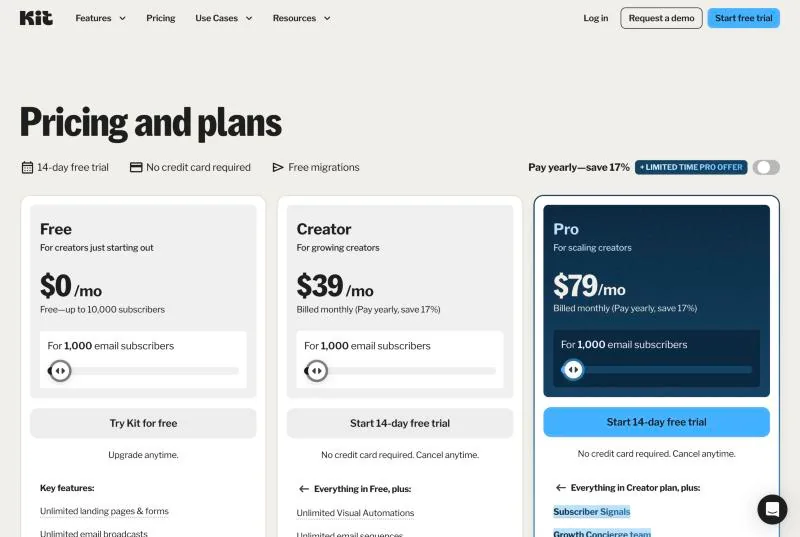
Kit’s Creator plan costs $39 a month for up to 1,000 subscribers, or $33 a month billed yearly. Pro costs $79 a month at the same size. Prices rise with the list: Creator is $89 at 5,000 subscribers, $139 at 10,000 and $199 at 25,000.
Did Kit raise its prices?
Yes. Kit announced its first price increase in 12 years in September 2025. Creator at 1,000 subscribers went from $29 to $39 a month.
Existing customers moved to the new prices at their first billing date after 15 October 2025.
What happens when a free Kit account passes 10,000 subscribers?
The account has to move to a paid plan to keep sending. The next tier covers up to 15,000 subscribers and costs $169 a month on Creator.
Does Kit charge for inactive subscribers?
Yes. Kit bills on confirmed subscribers, so a subscriber who never opens still counts. You can keep the bill down by removing cold subscribers before you pass a tier limit, because downgrades are manual.
Kit Creator vs Pro: which plan do I need?
Creator is usually enough below 10,000 subscribers. Pro adds engagement scoring, deliverability reporting, Subscriber Signals, five-way subject line tests and unlimited team logins. It costs $79 a month at 1,000 subscribers against $39 for Creator.
Kit vs Mailchimp: which is better?
For creators, Kit is the better fit. It counts each subscriber once however many forms they join. Its free plan holds 10,000 subscribers against Mailchimp’s 250 contacts.
Mailchimp suits shops and local businesses that want designed emails and ecommerce reports.
Kit vs beehiiv: which should I choose?
Kit fits when email sells your own products. beehiiv fits when the newsletter itself earns the money through ads and paid subscriptions. beehiiv takes 0% of paid subscription revenue, while Kit charges 3.5% + 30c per transaction.
Is Kit good for beginners?
Yes. A form, a landing page and a first broadcast take little setup. The free plan removes the cost.
The learning curve starts with automations and rules, which is also where the paid plans begin.
What fee does Kit take on sales?
Kit takes 3.5% + 30c per transaction on every plan, including Free. That figure already includes card processing. On a $29 product the fee is $1.32.
Can I get a refund from Kit?
Kit refunds within the first 30 days after you sign up for an account, on monthly and annual plans. Paid plans also start with a 14-day trial that needs no card.
The Letter
Get the next article in your inbox.
What I am building, as it happens. The experiments, launches and numbers behind my own one-person business, including what did not work.
The tools, tested before I recommend them. Short notes on the platforms I try for selling courses, running a community and sending email, before they become full reviews.
The inner side of the work. Ideas on focus, meaning and energy for solo founders who want a business that feels as good as it performs.
Get The Letter in your inbox
One short email, usually weekly. You can unsubscribe any time.
Keep reading
More from Marketing strategies.